The orbital velocity simulator is a free interactive lab with one slider that matters. Drag Altitude h above the surface from 100 km to 400,000 km and the orbit ring grows while the speed card falls — on Earth from 7.848 km/s to 0.9904 km/s, with the period climbing from 86.34 min to 29.84 d. A second marker on the 400 km orbit stays behind to be lapped, so the whole argument is something you watch rather than something you are told. Nothing here asks for the satellite’s own mass, because it cancels.
Orbital Velocity: Higher Means Slower
Gravity supplies the centripetal force a circular orbit needs, and setting G M m / r² = m v² / r leaves one speed for each radius: v = sqrt(G M / r). The satellite's own mass cancels. Raise the orbit and the speed falls — four times the radius is exactly half the speed — which is why the ISS at 400 km runs at 7.673 km/s while a geostationary satellite 42,164 km out needs only 3.075 km/s. Note the radius is measured from the centre: r = R + h.
Load a real orbit
Each button presses one of the lab’s four central-body buttons and then writes the altitude slider, which is exactly what your own hand would do. Between them they reach six of the twelve states the two tables below record, and they are arranged as a ladder rather than a list: the first five share a body and change nothing but the slider, so the speed column falls all the way down them.
Press the first four in order and watch one card. 7.673, then 7.597, then 3.875, then 3.075 km/s — every one of them slower than the last, and every one of them higher up. The sixth button is the odd one out: it leaves the slider alone at 400 km and changes the body instead.
Pick a published orbit above, or drag the altitude slider yourself.
What Is the Orbital Velocity Lab Simulator?
The orbital velocity lab simulator is a free interactive physics lab that runs in your browser, with nothing to install and no sign-up. A satellite runs round a chosen body on a circular orbit, and one logarithmic slider raises that orbit from 100 km to 400,000 km. The panel answers with the speed the circle needs, how long one lap takes, the radius the speed was worked out at and the gravity still acting there.
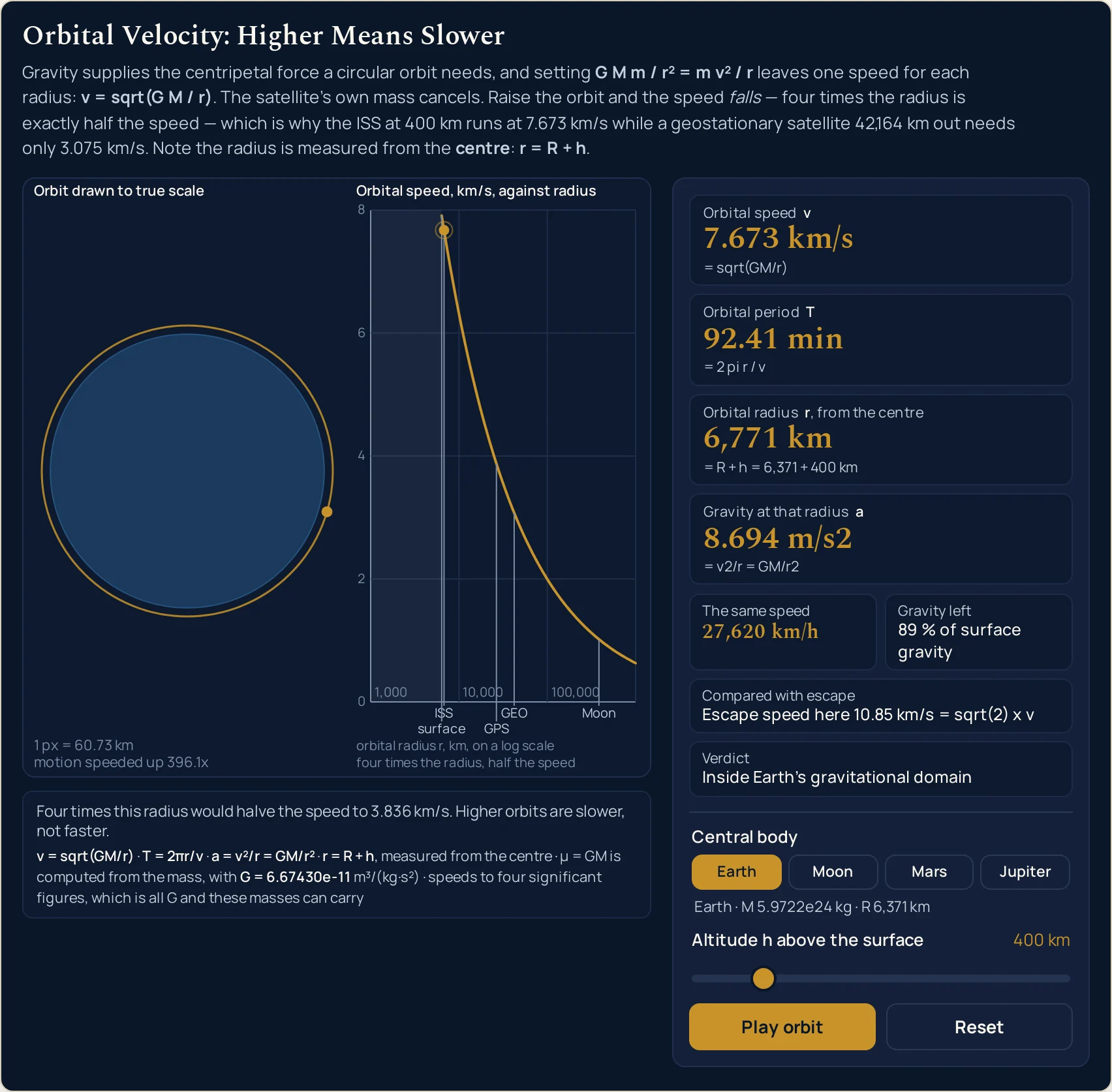
Two panes share the drawing. In the orbit pane the body and the orbit are on one true linear scale fitted to the current orbit, with the scale printed in the caption in kilometres per pixel, so at 400 km the ring genuinely hugs the disc and at the distance of the Moon the Earth shrinks to a dot. In the curve pane the speed is plotted against radius on a decade-anchored logarithmic axis, with the real orbits of the selected body ticked and the current state drawn as a filled point on the curve.
The thesis is one slider wide. At 400 km the readings are 7.673 km/s and 92.41 min; at the geostationary radius of 42,164 km they are 3.075 km/s and 23.93 h; at the distance of the Moon they are 1.018 km/s and 27.45 d. Raising the orbit makes the satellite slower, not faster, and the sentence under the canvas says so in the state you are actually in: four times any radius is exactly half the speed.
A second marker makes the comparison impossible to miss. Whenever the current orbit sits above the 400 km reference orbit, a cream marker runs round that lower ring beside the gold one, and both share a single time compression that the caption prints, for example motion speeded up 6,155x. Because the compression is shared, the inner marker genuinely laps the outer one at the true ratio of their angular rates, which at the geostationary state is more than fifteen laps to one.
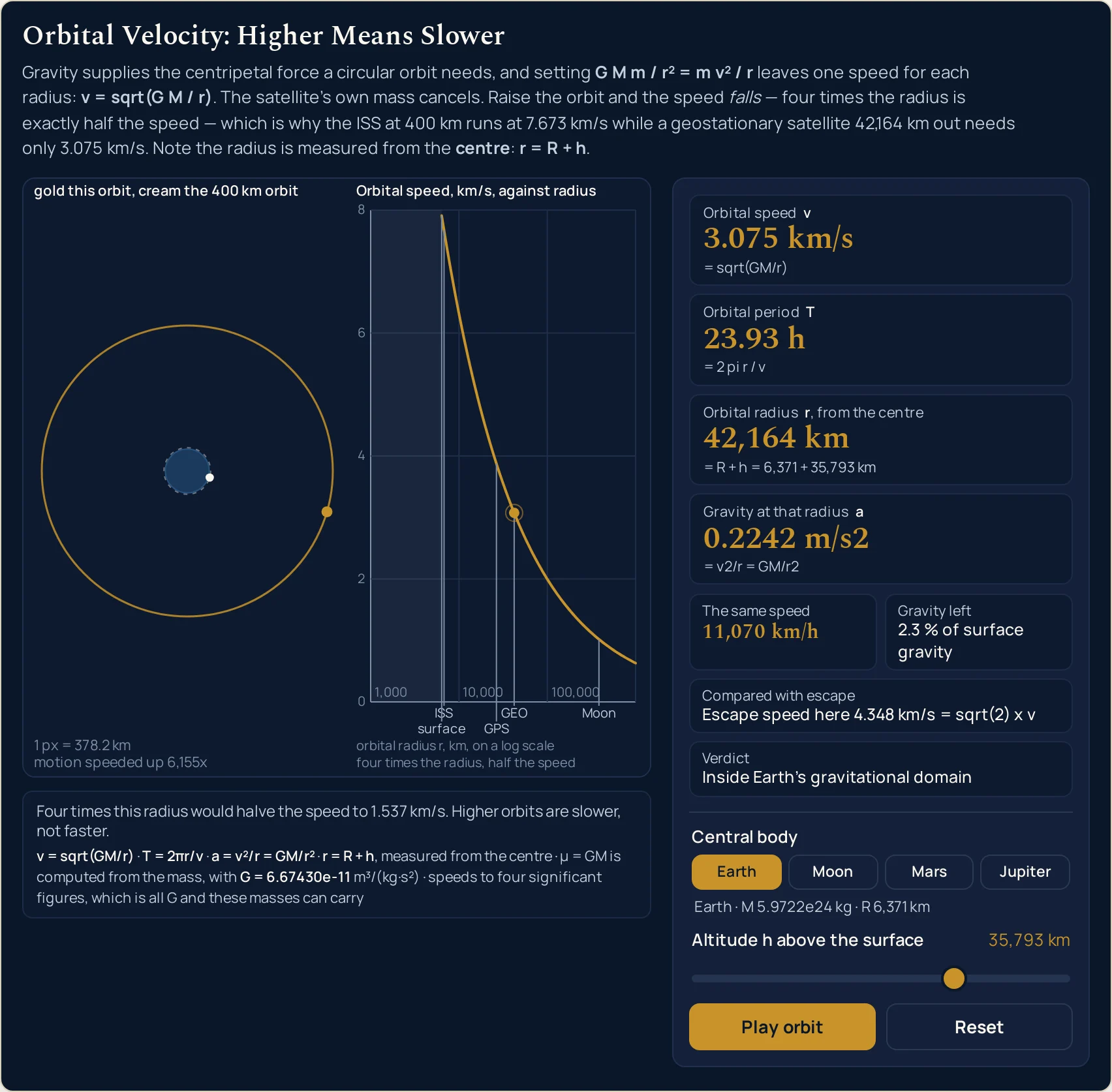
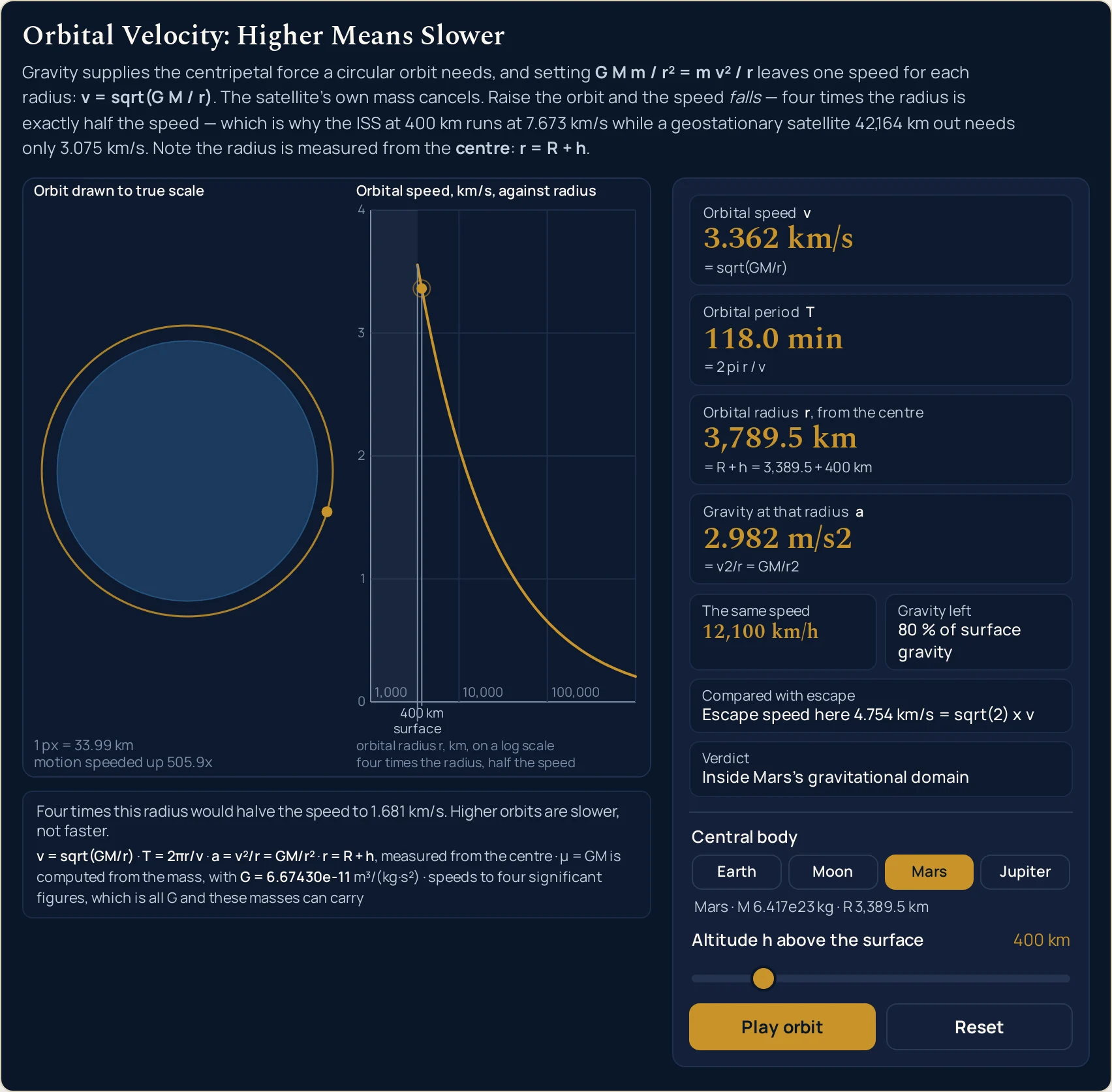
The radius card is the one that catches the commonest mistake on this formula. It prints the addition rather than the answer alone: = R + h = 6,371 + 400 km on Earth, and = R + h = 3,389.5 + 400 km on Mars at the very same altitude. Switch body at a fixed altitude and the speed moves from 7.673 km/s to 3.362 km/s because both the mass and that radius have changed, and the card shows which.
Three further readings sit in the compact row. The same speed appears as 27,620 km/h for anyone who thinks in car speeds; the gravity cell reads 89 % of surface gravity, restating the 8.694 m/s2 on the fourth card, which is the whole answer to the idea that there is no gravity in space; and one cell compares with the neighbouring quantity, Escape speed here 10.85 km/s = sqrt(2) x v, and leaves it at that.
A fourth cell is a verdict rather than a number, and it exists because the formula keeps returning an answer long after the physics has stopped applying. It reads Inside Earth's gravitational domain where the orbit is real, Low orbit - a real satellite here decays in weeks at 200 km, Hypothetical - this orbit is inside the atmosphere at 100 km, and Beyond this body's gravitational domain - a real orbit here would be perturbed away at the top of the slider on the Moon, whose pull only dominates out to about 60,000 km.
Every speed is given to four significant figures with the trailing zeros kept, because G and these masses cannot carry a fifth. The altitude is the one figure printed in full rather than rounded, so that the addition beside it stays true: at the Moon preset the cards read 378,029 km and = R + h = 6,371 + 378,029 km against a radius of 384,400 km. Pause freezes both markers and changes no reading, and Reset returns Earth, 400 km and a running orbit.
| Control | Range | Step, default and what it does |
|---|---|---|
| Central body | Earth, Moon, Mars, Jupiter | four buttons; opens on Earth, which prints as M 5.9722e24 kg and R 6,371 km, and each body brings its own mass and its own radius into the addition |
| Altitude h above the surface | 100 km to 400,000 km | logarithmic, so the slider value is log10 of the altitude in kilometres over 2 to 5.60206 in steps of 0.000001; opens at 400 km and moves every reading on the panel |
| Orbit animation | Pause orbit / Play orbit | one button; it cancels the frame loop outright rather than hiding it, freezes both markers where they are, and changes no reading at all |
| Reset | back to Earth at 400 km | one button; it reselects Earth, returns the slider to 400 km, puts both markers at the top of their circles and leaves the orbit running |
How to use the orbital velocity simulator
- Read the four cards before you touch anything. They are already answering for a satellite 400 km above the Earth: Orbital speed 7.673 km/s, Orbital period 92.41 min, Orbital radius 6,771 km and Gravity at that radius 8.694 m/s2. That last figure is the most useful number on the panel, and we will come back to it.
- Look at the third card’s subline, not just its answer. It reads
= R + h = 6,371 + 400 km, and it prints that addition on purpose: the radius this formula wants is measured from the centre of the body, and feeding it an altitude is the single commonest way to get a wrong answer. The card never lets the addition out of sight. - Now drag Altitude h above the surface, slowly, and watch the first card fall. At
535 kmit reads 7.597 km/s; at20,180 km, 3.875 km/s; at42,164 kmof radius, 3.075 km/s. One slider, and the counter-intuitive half of the subject: going higher makes you slower. The orbital velocity guide is where that result is derived properly. - Watch the orbit pane while you drag, and notice what it refuses to do. The orbit is on one true linear scale fitted to the current ring, and the bottom-left caption prints that scale in kilometres per pixel. The figure follows the width of the pane as well as the orbit, so the stable thing about it is the ratio: between the opening state and the geostationary preset it grows by the same factor of a little over six that the radius did. At 400 km the ring genuinely hugs the disc, because 6,771 km really is only six per cent more than 6,371 km.
- Keep dragging until a second, cream marker appears. It rides the 400 km orbit of whichever body is selected, and both markers are driven by one shared time compression that the caption prints beneath the scale, such as
motion speeded up 6,155x. Because the compression is shared, the lapping you see is the true ratio of the two rates rather than a visual effect. - Read the compact row of four cells under the cards. The same speed restates the first card in car units — 27,620 km/h at the opening state — and Gravity left puts the fourth card as a percentage, 89 % of surface gravity. Compared with escape is the one glance this lab takes at its neighbour, reading
Escape speed here 10.85 km/s = sqrt(2) x v, and the escape velocity calculator is where that quantity belongs. - Read the fourth cell, the one that is a sentence rather than a number. Verdict exists because the formula keeps returning an answer long after the physics has stopped applying. At
200 kmit says Low orbit - a real satellite here decays in weeks; at100 km, Hypothetical - this orbit is inside the atmosphere. The speed card carries on regardless, which is exactly why the sentence is there. - Change the body without touching the slider. Press Mars and leave the altitude at 400 km: the speed drops to 3.362 km/s, the period stretches to 118.0 min, and the radius subline rewrites itself as
= R + h = 3,389.5 + 400 km. Both the mass and the radius changed, and the card shows you which. - Read the sentence strip under the canvas. It restates the thesis in the state you are actually in — at the opening state, Four times this radius would halve the speed to 3.836 km/s — and it grows a second clause wherever the verdict has a caveat to add. It is the only place on the panel that does arithmetic you did not ask for.
- Use the curve pane to see where you are on the whole curve. It plots speed against radius with the radius axis logarithmic and anchored on the decades, ticks the real orbits of the selected body — on Earth at a desktop width,
surface,ISS,GPS,GEOandMoon— and draws your current state as a filled point on it. The ladder stops rather than skips when the next label will not fit, so a narrow pane shows fewer of them and never an arbitrary selection. Thesurfacetick is a limit of the formula, not a place the slider can reach. - Press Pause orbit when you want to look rather than watch. It cancels the animation frame outright and leaves a clean static frame, which is the right state for reading the captions and comparing the two ring radii. The button then reads Play orbit, and no reading on the panel changes either way. Reset puts you back on Earth at 400 km with the orbit running.
Dragging is the right way to see which reading answers to the slider, and a poor way to hit an exact figure. When you already have a mass and a radius and want the third quantity typed out, the orbital velocity calculator solves the same relation in all three directions with unit menus on every box. It takes a radius from the centre rather than an altitude, so the addition this panel prints for you is one you do yourself there.
Worked example: change one thing at a time
Nothing in the tables below was worked out here. Each row is a state the lab was put into on this page and then read back from, cell by cell, so every string in them is the panel’s own. The first table moves the slider and nothing else; the second changes the body button and, in two rows, the slider as well.
| Altitude on the slider | Orbital radius from the centre | Orbital speed | Orbital period | Gravity at that radius | Verdict cell |
|---|---|---|---|---|---|
| 100 km | 6,471 km | 7.848 km/s | 86.34 min | 9.519 m/s2 | Hypothetical - this orbit is inside the atmosphere |
| 200 km | 6,571 km | 7.789 km/s | 88.35 min | 9.232 m/s2 | Low orbit - a real satellite here decays in weeks |
| 400 km | 6,771 km | 7.673 km/s | 92.41 min | 8.694 m/s2 | Inside Earth's gravitational domain |
| 535 km | 6,906 km | 7.597 km/s | 95.19 min | 8.358 m/s2 | Inside Earth's gravitational domain |
| 20,180 km | 26,551 km | 3.875 km/s | 11.96 h | 0.5654 m/s2 | Inside Earth's gravitational domain |
| 35,793 km | 42,164 km | 3.075 km/s | 23.93 h | 0.2242 m/s2 | Inside Earth's gravitational domain |
| 378,029 km | 384,400 km | 1.018 km/s | 27.45 d | 0.002698 m/s2 | Inside Earth's gravitational domain |
| 400,000 km | 406,371 km | 0.9904 km/s | 29.84 d | 0.002414 m/s2 | Inside Earth's gravitational domain |
Read the speed column downwards and the whole page is in it. Every row is higher than the one above it and every row is slower, without a single exception, from 7.848 km/s at the bottom of the slider to 0.9904 km/s at the top. The period column runs the other way, from 86.34 min to 29.84 d.
Rows one and four are the pair that settles the arithmetic. The radius goes from 6,471 km to 6,906 km, seven per cent, and the speed moves by a little over three per cent — roughly half, which is what a square root does. Four times the radius would be exactly half the speed, and the sentence under the canvas prints that figure for whatever row you are standing on.
The geostationary row is the one that has to agree with another page on this site, and it does. A radius of 42,164 km gives 3.075 km/s and 23.93 h, and the geostationary orbit guide reaches the same radius and the same period from a starting point that never uses this formula, with a speed agreeing to all four figures. The altitude reads 35,793 km here because this lab subtracts Earth’s mean radius of 6,371 km, which is the radius its own addition prints.
Rows one and two carry a caveat the speed card does not. At 100 km and 200 km the arithmetic is perfectly good and the orbit is not: the verdict column says so in both rows, in two different sentences. Every other row on Earth sits inside the plain string, because nothing there is trying to fly through air.
The same four cards, four different bodies
The first two rows below share an altitude of 400 km and differ only in which body button is pressed. That is the pair worth pressing yourself, because it is the one that shows the radius card rewriting its own addition.
| Body line the panel prints | Altitude on the slider | The radius card subline | Orbital speed | Orbital period | Verdict cell |
|---|---|---|---|---|---|
| Earth · M 5.9722e24 kg · R 6,371 km | 400 km | = R + h = 6,371 + 400 km | 7.673 km/s | 92.41 min | Inside Earth's gravitational domain |
| Mars · M 6.417e23 kg · R 3,389.5 km | 400 km | = R + h = 3,389.5 + 400 km | 3.362 km/s | 118.0 min | Inside Mars's gravitational domain |
| Moon · M 7.346e22 kg · R 1,737.4 km | 100 km | = R + h = 1,737.4 + 100 km | 1.634 km/s | 117.8 min | Inside the Moon's gravitational domain |
| Moon · M 7.346e22 kg · R 1,737.4 km | 400,000 km | = R + h = 1,737.4 + 400,000 km | 0.1105 km/s | 264.5 d | Beyond this body's gravitational domain - a real orbit here would be perturbed away |
| Jupiter · M 1.89813e27 kg · R 69,911 km (1-bar level, not a surface) | 1,000 km | = R + h = 69,911 + 1,000 km | 42.27 km/s | 2.928 h | Inside Jupiter's gravitational domain |
The third column is the point of the table. At the same 400 km the left-hand term changes from 6,371 to 3,389.5, and the speed changes with it — not because the altitude moved, which it did not, but because both the mass and the radius under it did. An altitude on its own is not an orbit.
The two Moon rows are the other pair, and they share a body. One slider move takes the speed from 1.634 km/s to 0.1105 km/s and the period from 117.8 min to 264.5 d, and the verdict stops saying the orbit is inside anything. The Moon’s pull only dominates out to about 60,000 km, which the top of its slider is well past.
There is a coincidence in the fourth column worth noticing. Mars at 400 km reads 118.0 min and the Moon at 100 km reads 117.8 min, from two bodies whose masses differ by nearly a factor of ten. The period depends on the radius and the mass together, never on either alone, and those two states happen to land in the same place.
Formula and symbol reference
The lab prints its four relations on itself, in the fixed line under the canvas. Written out in the plain-digit form the panel uses:
v = sqrt(GM/r), then T = 2 pi r / v, then a = v2/r = GM/r2, and the one that is easiest to forget, r = R + h measured from the centre. The sublines on the four cards carry the first three of those, each over the reading it produced.
The quantity that never appears is the satellite’s own mass. The panel has no box for it, no slider for it and no card reporting it, and that is a statement rather than an omission: it cancels out of the balance between gravity and the circle, which is why a loose bolt and a space station on the same ring travel at exactly the same speed. The law of gravitation guide is where the inverse-square pull that one half of that balance comes from is set out.
Nine rows follow and only one of them is something you drag. The rest are cards, cells, buttons or quantities the panel uses without showing. For the slider the right-hand column gives the end stops, the step and the published positions; for everything else it gives the strings the lab prints and the span it prints them over.
| Symbol | Meaning | SI unit | In this lab |
|---|---|---|---|
| v | Orbital speed — the one speed a circular orbit of that radius allows. The first card, and the reading the whole panel is built around | metre per second; the card prints kilometres per second | four significant figures with the trailing zeros kept, always: 7.673 km/s at the opening state, 3.075 km/s at the geostationary preset, 1.018 km/s at the Moon preset. From the slider ends rather than from a card: on Earth it spans 7.848 km/s down to 0.9904 km/s, and across all four bodies the fastest reachable state is Jupiter at the floor, 42.54 km/s, and the slowest is the Moon at the ceiling, 0.1105 km/s. |
| T | Orbital period — the time for one full circuit at that speed. The second card, and the reading that climbs fastest as you drag | second; the card switches unit with the size of the answer | four significant figures in whichever unit suits: 92.41 min at the opening state, 11.96 h at GPS, 27.45 d at the Moon preset. The unit changes at two hours and again at two days, which is why a low orbit reads in minutes and a geostationary one in hours. From the slider ends: 86.34 min at the Earth floor to 264.5 d at the Moon ceiling. |
| r | Orbital radius, measured from the centre of the body and never from its surface. The third card, and the one whose subline shows its own arithmetic | metre; the card prints kilometres | 6,771 km at the opening state, 42,164 km at the geostationary preset, 384,400 km at the Moon preset. Its subline prints the addition rather than the answer: = R + h = 6,371 + 400 km. On Earth the card spans 6,471 km to 406,371 km, and on the Moon it starts as low as 1,837.4 km. |
| R | Radius of the central body — fixed by which of the four buttons is pressed, and the left-hand term of that addition | metre; the body line prints kilometres | not a slider: 6,371 km for Earth, 3,389.5 km for Mars, 1,737.4 km for the Moon, and 69,911 km for Jupiter, where the body line adds (1-bar level, not a surface) because Jupiter has no surface to measure from. |
| h | Altitude above that surface — the single thing you drag, and the right-hand term of the addition | metre; the slider label prints kilometres | 100 km to 400,000 km, logarithmic: the slider value is log10 of the altitude in kilometres, from 2 to 5.60206 in steps of 0.000001. It opens at 400 km, and the altitude is printed in full rather than rounded, so the addition beside it stays true. It moves every reading on the panel. |
| a | Gravity at that radius, which is also the centripetal acceleration holding the circle. The fourth card | metre per second squared | four significant figures: 8.694 m/s2 at the opening state, 0.2242 m/s2 at the geostationary preset. Below a thousandth it switches to exponential form, as at the Moon ceiling, 3.038e-5 m/s2. From the slider ends: 25.85 m/s2 at the Jupiter floor down to that same 3.038e-5 m/s2. |
| M | Mass of the central body. Like R it is fixed by the button rather than typed, and the body line prints it | kilogram | four buttons and four masses: 5.9722e24 kg, 6.417e23 kg, 7.346e22 kg and 1.89813e27 kg. Nothing on the panel takes the mass of the orbiting satellite, because it cancels out of the balance entirely and the lab has no box for it. |
| GM | The product of the gravitational constant and that mass, which is the only thing about the central body the orbit can feel | metre cubed per second squared | computed by the lab from the mass above and never quoted as a published figure, so that every page here multiplies the same two numbers in the same order. The fixed line under the canvas names the constant it uses, G = 6.67430e-11, and says that four significant figures is all that product can carry. |
| The verdict cell | A sentence rather than a number, chosen from four fixed strings, reporting whether a real orbit at the current radius would survive at all | a sentence | all four are reachable from the slider. Hypothetical - this orbit is inside the atmosphere at 100 km on Earth, Low orbit - a real satellite here decays in weeks at 200 km, Inside Earth's gravitational domain above that, and Beyond this body's gravitational domain - a real orbit here would be perturbed away at the top of the slider on the Moon. |
If you read one row twice, make it h. It is the only entry you can move, its DOM value is a logarithm rather than a distance, and it is the only quantity on the panel that is not part of the physics at all — the formula never sees it, because the radius card adds it to the body radius first.
The physics: why gravity sets one speed per radius
A circular orbit is gravity supplying exactly the force the circle needs, no more and no less. Pick a radius and that condition has one solution, so there is nothing to choose: at 6,771 km round the Earth the answer is 7.673 km/s, and going at anything else means the path is not that circle. The panel has one slider for that reason.
Because the pull falls off with the square of the radius while the circle’s demand falls off with the radius itself, the surviving speed goes as one over the square root of the radius. That is why the first card drops rather than climbs, and why the lab can promise the same thing at every setting: four times the radius, half the speed, exactly. The circular motion guide is where the demand side of that balance is set out on its own terms.
The fourth card is the one that answers the commonest misconception. At the opening state gravity at that radius is 8.694 m/s2, which the compact row restates as 89 % of surface gravity. There is no shortage of gravity 400 km up; an astronaut floats because the whole station is falling, and the orbit is simply a fall that keeps missing.
The two markers are the most valuable thing the drawing does. One shared time compression drives both, so the inner one laps the outer one at the true ratio of their angular rates rather than at a convenient one. Measured off the running lab rather than read off a card: that ratio is 15.54 to one at the geostationary preset, so the cream marker goes round fifteen and a half times for every single circuit of the gold one.
Where the orbital velocity formula breaks down
Every slider position this lab can reach is answered, and answered to the full precision of a double. The arithmetic is not where the panel can let you down; the model behind it is. Six limits sit under every reading on the page, and the verdict cell compresses four of them into one sentence because they belong here, at length.
- Below roughly 150 km there is still air, and the orbit does not last
- The bottom of the slider,
100 km, returns 7.848 km/s and 86.34 min, and those figures are arithmetically right. They are also useless: the verdict cell reads Hypothetical - this orbit is inside the atmosphere, and the sentence strip adds that at that height the air is thick enough to pull a satellite down in hours to days. The threshold behind that sentence is an approximate figure rather than a published one. - A little higher it lasts, but not without an engine
- At
200 kmthe verdict changes to Low orbit - a real satellite here decays in weeks, which is a different claim from the one below it and deliberately so. Nothing in the four cards notices the difference — 7.789 km/s and 88.35 min are perfectly ordinary readings. Only the sentence knows, and it is approximate too. - Far enough out, the body you chose stops being the only thing pulling
- Take the Moon to the top of its slider and the verdict reads Beyond this body’s gravitational domain - a real orbit here would be perturbed away, with 0.1105 km/s still printed beside it. The Moon holds sway out to about 60,000 km and the slider reaches 400,000 km, so the formula is answering a question that has stopped being about the Moon. That figure is an order of magnitude, not a measurement.
- Every orbit on this panel is a circle, and most real ones are not
- There is one ring in the drawing and there will not be an ellipse. On a real elliptical orbit the speed changes continuously — fastest at the closest approach, slowest at the furthest — so no single figure describes it and this panel would have nothing to print. That case belongs to the guide to Kepler’s laws, and the Kepler’s laws simulator is where it is actually drawn.
- Four significant figures is the ceiling, and a fifth digit would be noise
- The gravitational constant is known to about five significant figures and the four masses behind the body buttons to four or five, so the product that drives every reading cannot support more. Trailing zeros are kept rather than dropped for the same reason: the surface limit of the curve is 7.910 km/s, and writing it as 7.91 would publish a four-figure result as three. Only the altitude escapes the ceiling, because the radius card prints it inside an addition.
- Jupiter has no surface, so its altitudes are measured from a pressure level
- Press Jupiter and the body line adds the qualification itself:
R 69,911 km (1-bar level, not a surface). Everything the panel prints for that body is correct about the radius; it is the word altitude that is doing something unusual, because there is nothing underneath to stand on. The radius card still prints the addition,= R + h = 69,911 + 1,000 km, and the speed there, 42.27 km/s, is the fastest reading in either table above.
Where orbital velocity is actually used
- Knowing how long a low-orbit pass lasts
- The ISS preset is the state the lab opens in, and the period card is the reason the station comes back over the same part of the sky so often: 92.41 min a lap, at 7.673 km/s, or 27,620 km/h if that helps. Drag up to Hubble at 535 km and the lap stretches to 95.19 min — three minutes bought with 135 km of altitude.
- Why a navigation constellation sits where it does
- Press the GPS preset and the period reads 11.96 h, which is close to half a sidereal day, so the same satellites come round to the same place about twice a day. The altitude on that button, 20,180 km, is the nominal figure the constellation is described by rather than an exact one, and the panel is honest about the speed it gives: 3.875 km/s, a little over half the ISS’s.
- Why a television dish can be bolted down and left
- At a radius of 42,164 km the period card reads 23.93 h and the speed card 3.075 km/s, which is the combination a satellite needs if it is to stay over one spot. The geostationary orbit guide is where that match is argued out; this panel only shows you that the radius and the speed fall out of the same slider as every other row. The geostationary orbit simulator draws the station-keeping itself.
- Planning an orbit round something that is not the Earth
- The body buttons are there because the formula does not care which body it is given. A 400 km parking orbit round Mars needs 3.362 km/s rather than 7.673 km/s, and a 100 km lunar orbit needs 1.634 km/s, which is why a lander leaving the Moon has so much less to undo. The guide to weight on other planets is the same mass-and-radius pair asked a different question.
- Reading a radius back out of a measured speed
- Track something, get a speed, and the curve pane turns it into a radius: drag until the first card matches what you measured and read the third. It works because the curve is one-to-one — one speed, one radius, no ambiguity — which is the practical payoff of there being a single solution at each radius. The Kepler’s third law calculator is the route for anyone holding a period instead.
- Settling an argument about gravity in space
- The fourth card and the gravity cell are the quickest answer there is. At the ISS state they read 8.694 m/s2 and 89 % of surface gravity; even at the geostationary radius there is still 0.2242 m/s2, which is 2.3 % of surface gravity rather than none. The guide to free fall is what being in orbit actually is.
= R + h = 3,389.5 + 400 km, with a different number on the left of the plus sign.Where to go next
A panel can show you which reading the slider is allowed to move, and that is the end of what a panel is for. Orbital Velocity: Formula and Worked Examples is where the subject itself is written out: the balance set up and solved, the symbol table, the worked problems and the misconceptions. The calculator that takes these figures typed heads the list of related tools below.
Two neighbouring speeds have pages of their own and are not argued here. The escape velocity guide is the speed that leaves rather than circles, which the compact row compares with in a single cell. The law of gravitation guide is where the pull itself comes from, and it is the page this one is built on top of.
Further out, the guide to Kepler’s laws is the elliptical case this lab cannot draw, the centripetal force guide is the demand side of the balance in newtons, and the gravitational potential energy guide is what climbing to a higher orbit actually costs — which is the question this panel does not answer.
Nearer home, the universal gravitation lab is the inverse-square pull before any orbit is asked of it, the circular motion lab is a circle held by a string rather than by gravity, and the escape velocity lab is the neighbouring speed drawn as a launch. Beyond that there is the simulation library to work through, an index of calculators for when typing beats dragging, and the blog for everything written out at length.
Frequently asked questions
Why does the orbit barely clear the body at the altitude the lab opens in?
Because the orbit pane is drawn to one true linear scale and refuses to cheat. At 400 km the radius card reads 6,771 km against a body of 6,371 km, which is six per cent larger, so a ring that hugs the disc is the honest picture. The caption prints the scale it used in kilometres per pixel, and the drawn circle is then measured against that printed figure in testing rather than judged by eye.
Why does a second cream marker appear only at some altitudes?
It rides the 400 km orbit of whichever body is selected, and it is drawn only while the current orbit is higher than that. At 400 km on Earth the two rings coincide, so one marker would sit on top of the other and the lab draws just the gold one. Raise the slider and the cream marker separates out, giving you something to be lapped by.
How much faster is the inner marker really going round?
Exactly as much faster as the physics says, because both markers share one time compression and the caption prints it. At the geostationary preset that caption reads motion speeded up 6,155x, and the two angular rates measured off the running lab stand at 15.54 to one. Nothing is scaled separately to make the comparison look better than it is.
Why is the altitude printed in full when every speed is cut to four figures?
Because the radius card prints the addition out loud and a rounded altitude would make it false. At the Moon preset the panel reads 378,029 km and the subline reads = R + h = 6,371 + 378,029 km against a radius of 384,400 km. Round that altitude to four figures and the sum on screen would be wrong by 29 km. Speeds have no such constraint, so they stop at four.
Why does this lab put the geostationary altitude at 35,793 km?
Because it subtracts Earth’s mean radius of 6,371 km from the geostationary radius of 42,164 km, and it prints that subtraction as an addition on the radius card. The familiar 35,786 km subtracts the equatorial radius of 6,378 km from the same radius instead. The radius, the speed of 3.075 km/s and the period of 23.93 h are identical either way; only the altitude label moves.
Why will the slider not go down to the surface?
Because it is logarithmic, and a logarithmic scale cannot reach zero. Its floor is 100 km, which the panel already marks as hypothetical, and its DOM value is log10 of the altitude in kilometres over a range of 2 to 5.60206. The surface limit still appears, as a tick labelled surface on the speed-radius curve, where it can be shown without being offered as somewhere to put a satellite.
Does pausing the orbit change any of the readings?
No. Pause orbit cancels the animation frame outright rather than hiding it, freezes both markers where they are and leaves every card, every compact cell and the sentence strip exactly as they were. The button then reads Play orbit. Pausing is the right state for reading the captions and comparing the two ring radii, because nothing in the drawing is moving while you look at it.
Why does the gravity card sometimes print something like 3.038e-5?
Because below a thousandth of a metre per second squared the decimal form stops fitting the card. Written out, that reading would run to eight characters after the point and would be cut short inside a narrow panel, so the lab switches to exponential form instead. The switch is decided on the rounded figure rather than the raw one, so the card and the number it is reporting can never disagree.
Why is the radius axis on the curve pane logarithmic when the orbit pane is not?
Because the two panes are answering different questions. The orbit pane has to show you one orbit truthfully, so it keeps a single linear scale. The curve has to hold the whole slider at once, from 1,837.4 km at the Moon’s floor to over 400,000 km, and a linear axis would crush every low orbit into the left-hand edge. Its decades are anchored, and the axis label says it is logarithmic.
References & formula source
- Every figure on this panel comes out of one slider position, one body button and four closed forms, and nothing is fitted or measured. The lab prints the relations on itself, in the fixed line under the canvas: the speed is the square root of G M divided by the radius, the period is two pi times the radius over that speed, the field strength is the speed squared over the radius, and the radius itself is the body radius plus the altitude.
- G M is computed from the mass the lab carries for each body and is never quoted as a published standard gravitational parameter, even though published values are the better physics. The reason is consistency rather than precision: the orbital velocity calculator takes a central mass in kilograms, because that is what a reader has, so if the lab quoted a published product while the calculator multiplied its own, the two would part company in the sixth significant figure and every cross-check between them would look like an unexplained near-miss.
- Four significant figures is the ceiling on every speed here, and it is a property of the inputs rather than a house style. The gravitational constant is itself known to about five significant figures and the masses below are quoted to four or five, so a fifth digit on a speed would be noise dressed as precision. Trailing zeros are kept for the same reason: a surface-skimming orbit is 7.910 km/s, and printing it as 7.91 would quietly publish a four-figure result as three.
- The masses and radii behind the four body buttons are standard textbook values that were not fetched from a primary source for this build, and no agency is cited for them anywhere on this page. What was checked is that they are mutually consistent: the independent working written alongside this lab asserts that G times each mass agrees with the published parameter for that body to within five parts in ten thousand, which is comfortably inside the four significant figures anything here is printed to. Verify before use.
- Two of the thresholds behind the verdict cell have a mechanism and only an order of magnitude. How low an orbit can sit before the remaining air brings it down, and how far out a body goes on dominating the pull on a satellite, are both written as approximate figures rather than published ones, and every sentence on this page that reaches one of them says about. They decide which of four sentences is printed and they touch no number on the panel.
- The two markers turn at the exactly true ratio of their angular rates because one time compression is applied to both of them, and the caption prints the compression the drawing actually used. That ratio was measured from two real Chrome frames rather than asserted: at the geostationary preset the inner marker goes round 15.54 times for each turn of the outer one. Past a cap on the inner marker the current orbit simply crawls, which is itself the point the lab is making.
- The orbit pane carries one linear scale and the lab refuses to compress it radially, which is why the ring sits so close to the disc at low altitudes. The caption prints the scale as kilometres per pixel, the drawing then uses that rounded figure rather than the raw one, and the circle radius is checked against it in testing rather than judged by eye. The marker dots are the one thing in that pane not drawn to scale, and the pane title says so wherever the pane is wide enough for the longer wording.
- Two engines were compared readout by readout rather than assumed to agree: the browser check run for this lab put five slider positions side by side in Chrome and in Firefox at four widths, 119 readout values per width, and every one matched, with 19 assertions passed and 0 failed. There is a hole in that, and it is Safari - the WebKit build on this machine will not start without system access it has not been given, so Safari was never exercised here and nothing on this page is evidence about it.
- Every readout figure quoted on this page is a string this simulation printed for the button or the slider position named beside it, read back out of the running lab in a browser rather than worked out by hand. Each is computed from the exact value and rounded once, so re-deriving one printed figure from another will not always reproduce the fourth digit; the few figures here that came from sweeping the slider rather than from a card say so in their own sentences. Where a figure here and the lab part company, believe the lab, and verify anything you rely on before using it.
- Further reading: Orbital speed — Wikipedia