The escape velocity simulator is a free interactive lab built around v_esc = sqrt(2·G·M / r) and around what happens to a launch that falls short of it. Launch straight up from the Moon, Mars, Earth or Jupiter at any fraction of that world’s escape speed, and the drawing puts the apogee on one shared scale of distance from the centre in body radii, from the surface to eight radii up. One slider carries the launch speed as a percentage, four buttons carry the worlds, and ten readouts answer — headed by the Outcome card, which reads Falls back, Just escapes or Escapes and changes at exactly 100 %.
Escape Velocity
Launch straight up from the surface and see where the projectile stops. The gold column is the apogee, on a single scale of distance from the centre in radii of the body. Escape velocity is a threshold: half of it buys a third of a radius, 70.7 % of it (the speed of a circular orbit skimming the surface) buys exactly one radius, and at 100 % the apogee runs away to infinity. v_esc = sqrt(2·G·M / r) — the mass of the thing you launch never appears.
Load a real world onto the slider
Each button presses one of the lab’s own four body buttons and then writes the launch-speed slider, which is the whole of the state: nothing is inherited from the last load. Work down the list in order. The first three take Earth from the boot state to the threshold, and the last three change the world under the same slider.
Pick a case above, or drag the slider and press the four world buttons yourself.
What Is the Escape Velocity Simulator?
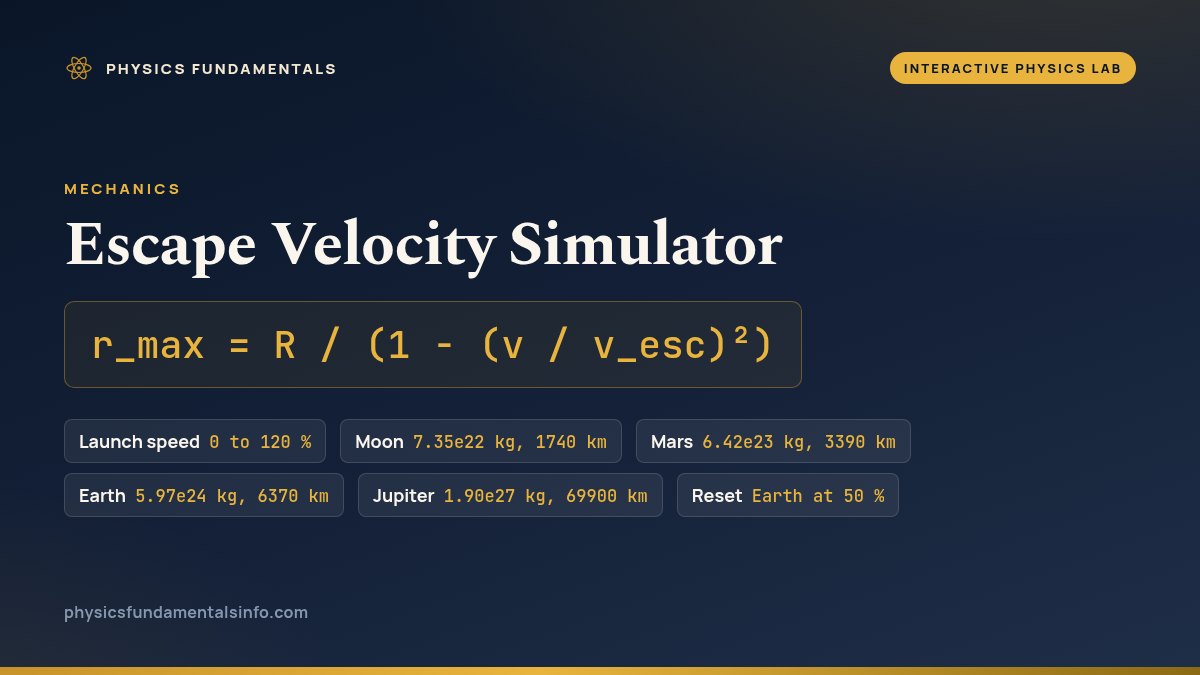
The escape velocity simulator is a free interactive physics lab that runs in your browser, with nothing to install and no sign-up. It launches a projectile straight up from the surface of the Moon, Mars, Earth or Jupiter at a chosen fraction of that world’s escape speed, and draws where it stops. Escape velocity is a threshold rather than a large number, and the drawing is built to make that visible.
One shared vertical scale carries the whole picture: distance from the centre of the chosen world, measured in radii of that world, from one radius at the surface to eight radii at the top. The world is a filled arc across the bottom, a gold column rises to the apogee with the height written beside it in radii and in kilometres, and a gauge underneath marks the speed of a surface circular orbit and escape velocity itself as two fixed ticks with a moving pointer between them.
The controls are deliberately few. One slider sets the launch speed from 0 to 120 % of escape velocity in steps of 0.01 %, four buttons set the world, and Reset returns Earth at 50 %. The slider is a percentage rather than a speed because the four worlds’ escape speeds span a factor of more than twenty-five, and a percentage puts the threshold at one fixed place on the control for all of them.
Ten readouts answer. Four cards give the escape velocity of the chosen world, the launch speed in kilometres per second, the outcome as one of three words, and the apogee height above the surface; six compact cells add the fraction of escape speed, the speed of a circular orbit skimming that surface, the world’s name, its mass, its radius, and the apogee measured from the centre in body radii.
At and above 100 % both apogee readouts print an em dash rather than a very large number, because there is no highest point to report. The apogee comes from rmax = R / (1 − (v / vesc)2), an exact consequence of the inverse-square law rather than a fit, and the escape case is decided before that bracket is ever divided by.
| Control | What it sets | Step or default |
|---|---|---|
| Launch speed | 0 to 120 % | steps of 0.01 % |
| Moon | 7.35e22 kg, 1740 km | one button |
| Mars | 6.42e23 kg, 3390 km | one button |
| Earth | 5.97e24 kg, 6370 km | the default |
| Jupiter | 1.90e27 kg, 69900 km | one button |
| Reset | Earth at 50 % | one button |
How to use the escape velocity simulator
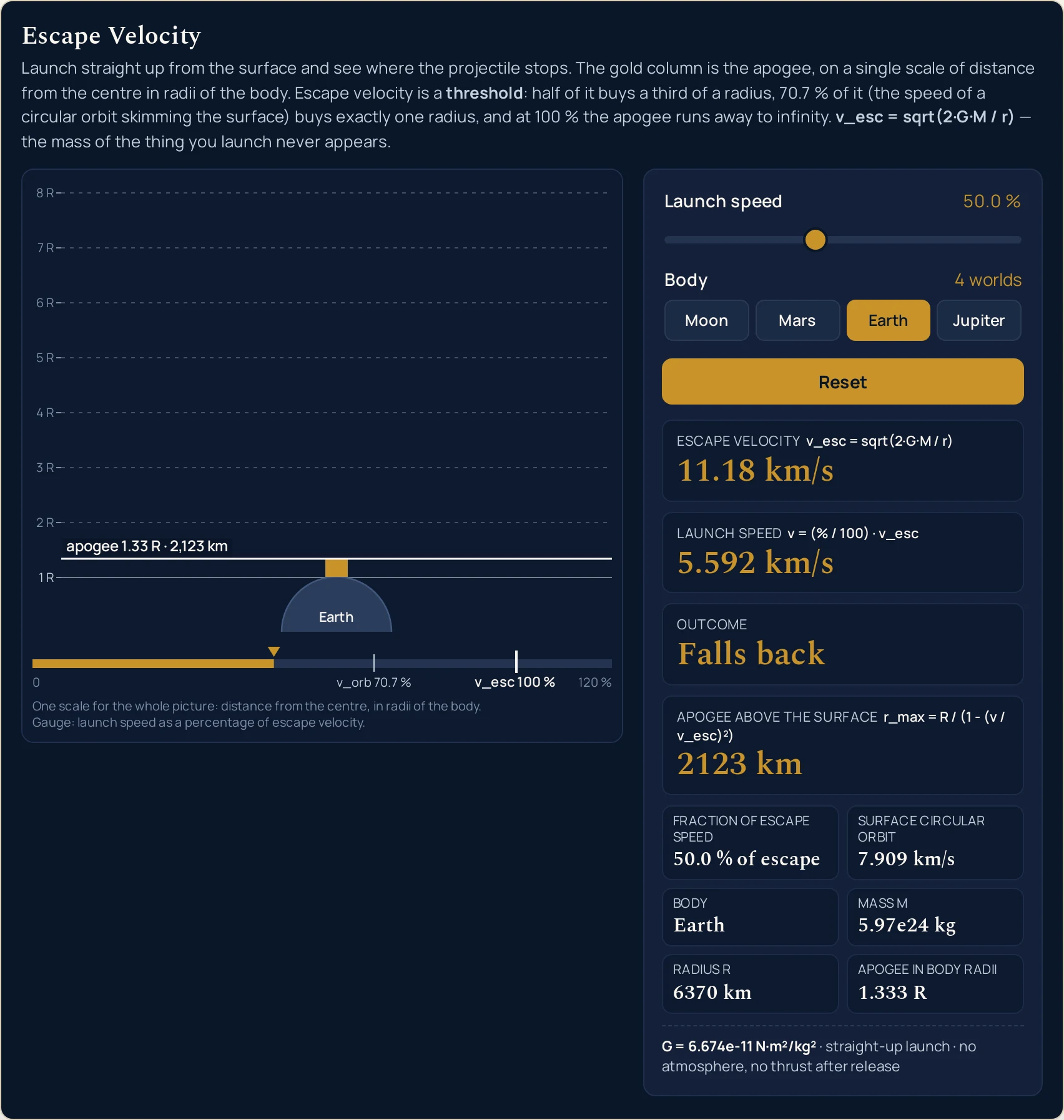
- Read the panel before you touch it. The lab boots at rest, so every reading is already on screen: Launch speed 50.0 %, Escape velocity 11.18 km/s, Launch speed 5.592 km/s, Outcome Falls back and Apogee above the surface 2123 km. The Body row reads the fixed text 4 worlds, and the world’s own name sits in the grid below as Earth.
- Find that state in the drawing. Earth is the filled arc across the bottom and its surface is the 1 R tick. The gold column rises a third of the way to the 2 R tick and carries the label apogee 1.33 R · 2,123 km. Below the scene the gauge pointer sits half way along, between the mark reading v_orb 70.7 % and the 0 at the left end.
- Drag Launch speed upwards and watch the two apogee readouts separately. The slider runs 0 to 120 in steps of 0.01. Apogee above the surface climbs in kilometres while Apogee in body radii climbs in radii from the centre, and the second one is the honest measure of how far you have got: at 50.0 % it reads 1.333 R, which is a third of a radius up.
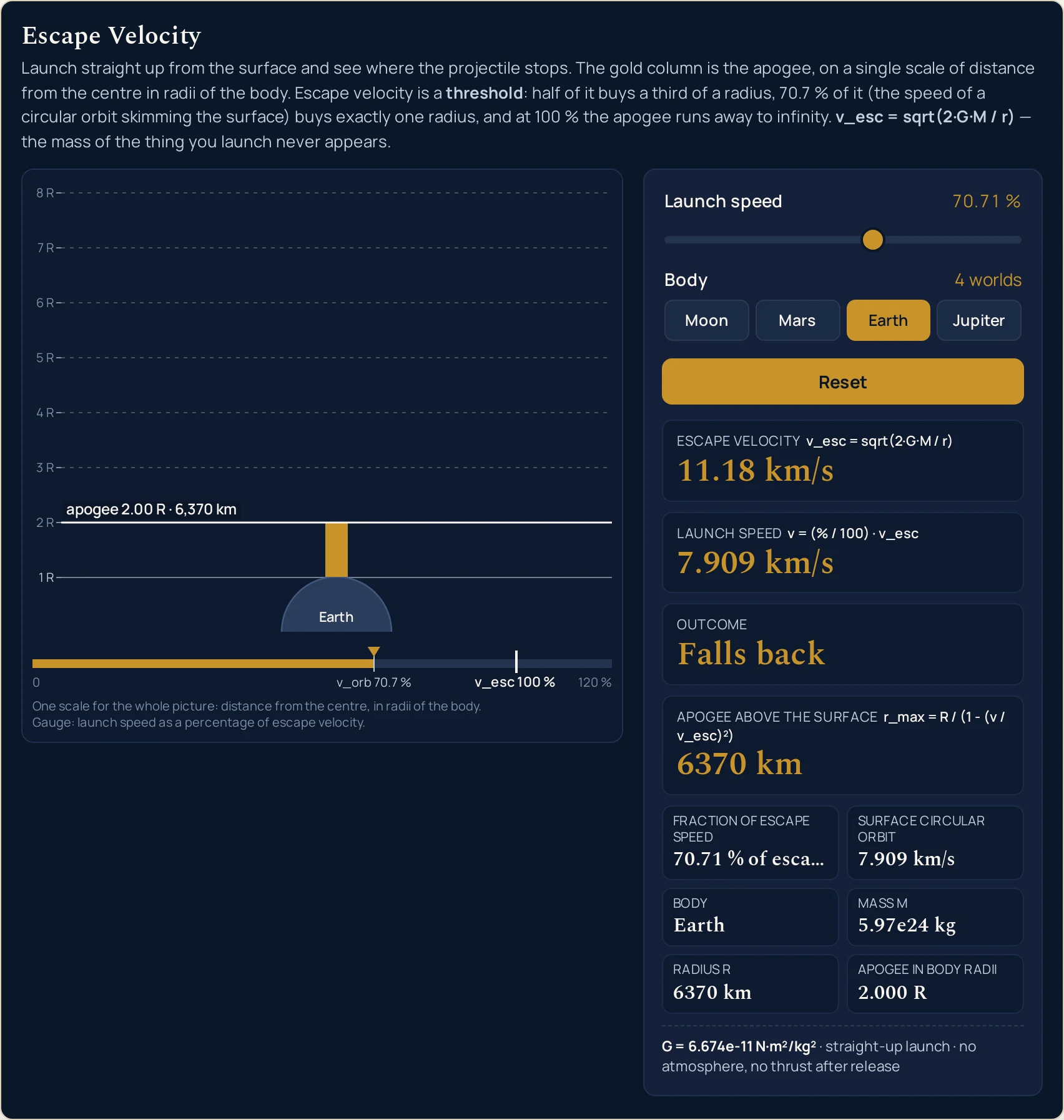
- Stop at 70.71 %. That is the nearest stop to one over sqrt(2), and three things line up there. The pointer lands on the drawing’s fixed v_orb 70.7 % mark; the Launch speed card and the Surface circular orbit cell both read 7.909 km/s; and the apogee card reads 6370 km, the same string as the Radius R cell. You are exactly one radius up.
- Keep going and watch the drawing give up before the panel does. At 90.0 % the column is at 5.263 R and still inside the frame. Past the 93.54 % stop it runs off the top, turns into an arrow, and the label stops drawing a height: at 95.0 % it reads apogee 10.3 R — above the frame while the card still reports 58960 km.
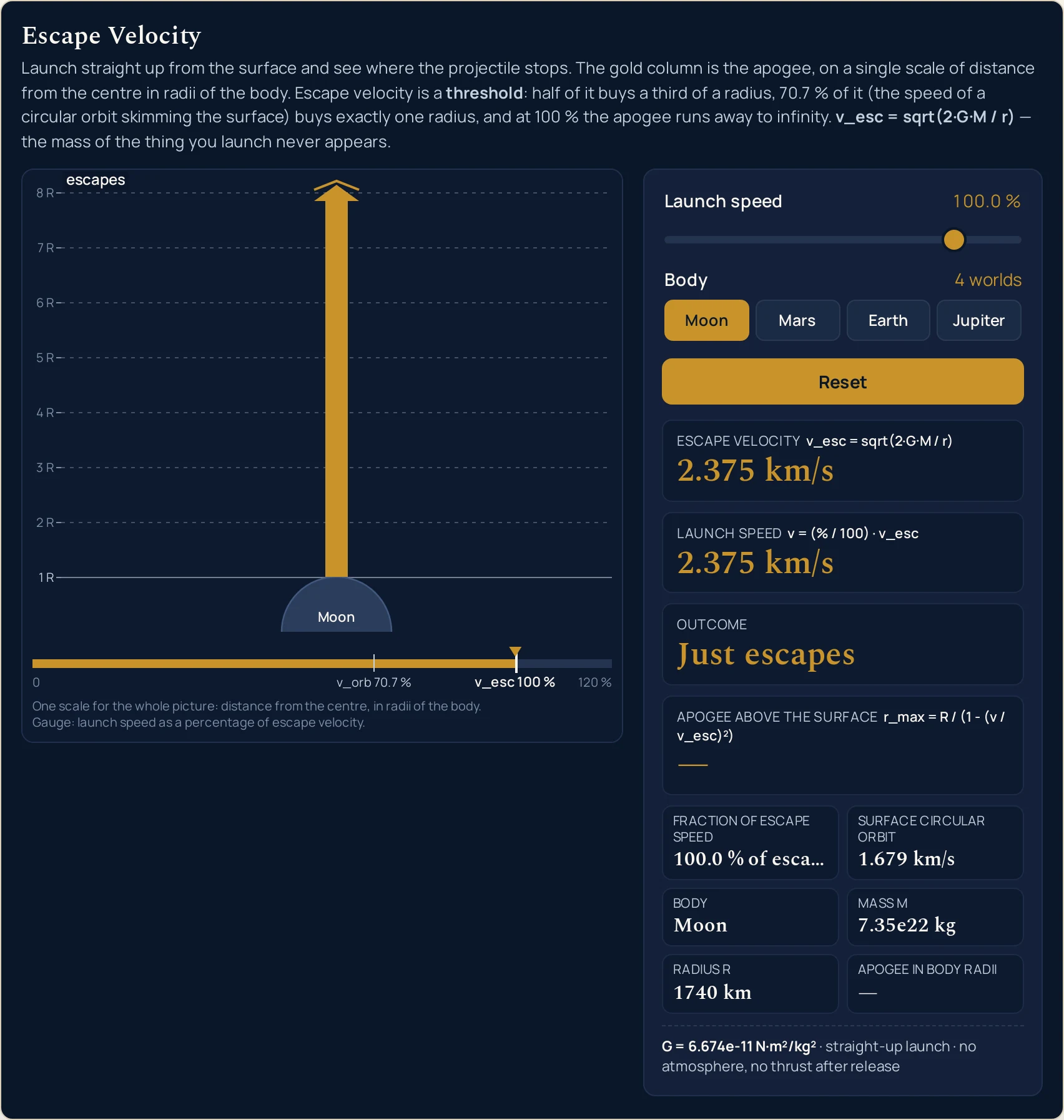
- Reach exactly 100.0 %. Outcome turns to Just escapes, both apogee readouts become —, and the drawn label becomes the single word escapes with no number attached. That dash is the point of the lab. There is no apogee to print, because the projectile never turns round.
- Go past it to the top stop, 120.0 %. Outcome changes again, to Escapes, and the Launch speed card reads 13.42 km/s on Earth. The two words are not the same claim: Just escapes is the marginal case at exactly the threshold, and Escapes is everything above it, with speed left over at infinity.
- Now change world and leave the slider alone. Press Moon, Mars or Jupiter with the slider still on 50.0 % and seven readings move: the escape velocity, the launch speed, the surface circular orbit, the body name, the mass, the radius, and the apogee in kilometres. Two refuse to. Fraction of escape speed holds at 50.0 % of escape and Apogee in body radii holds at 1.333 R on all four worlds.
- Press Reset when you have lost track. It puts Earth back under the slider, returns the slider to 50.0 % and replays the settle from the surface, so the column grows out of the ground again rather than jumping. Exactly one body button carries the pressed state at any moment, and after a reset it is Earth’s.
- Read the fixed line last of all. It says G = 6.674e-11 N·m²/kg² · straight-up launch · no atmosphere, no thrust after release, and those last two clauses are the whole list of what the panel is not modelling. Copy that line with any figure you quote from here, because it carries the conditions along with the answer.
The step worth repeating is the eighth one. Load Earth, half escape speed and then The Moon at half escape speed one after the other and look only at the bottom right cell. The apogee in kilometres falls from 2123 to 580.0, a factor of about 3.7, while the radii cell does not move off 1.333 R. The panel is saying that the two launches are the same launch, on worlds of different size.
If you would rather type the figures than drag them — or run the relation the other way, so that a required escape speed gives back the mass or the radius that would produce it — that is the job of the escape velocity calculator, which also carries a Sun preset this lab has no button for. For the definition, the two-line derivation and seven worked problems, read the full guide to escape velocity.
Worked example: change one thing at a time
Every row below is one body button and one slider position, and every cell is a string the running lab printed there. The ten settings are the ones this cluster publishes, so they are also the ones the lab’s own tests pin. Where a cell and the lab ever part company, believe the lab.
| Setting | Fraction | Escape velocity | Launch speed | Outcome | Apogee above the surface | From the centre |
|---|---|---|---|---|---|---|
| Earth, at rest on the surface | 0.0 % | 11.18 km/s | 0 km/s | Falls back | 0 km | 1.000 R |
| Earth, half escape speed | 50.0 % | 11.18 km/s | 5.592 km/s | Falls back | 2123 km | 1.333 R |
| Earth at orbital speed | 70.71 % | 11.18 km/s | 7.909 km/s | Falls back | 6370 km | 2.000 R |
| Earth, nearly there | 90.0 % | 11.18 km/s | 10.07 km/s | Falls back | 27160 km | 5.263 R |
| Earth, just escaping | 100.0 % | 11.18 km/s | 11.18 km/s | Just escapes | — | — |
| Earth, over the threshold | 110.0 % | 11.18 km/s | 12.30 km/s | Escapes | — | — |
| The Moon, half escape speed | 50.0 % | 2.375 km/s | 1.187 km/s | Falls back | 580.0 km | 1.333 R |
| The Moon, just escaping | 100.0 % | 2.375 km/s | 2.375 km/s | Just escapes | — | — |
| Mars, half escape speed | 50.0 % | 5.028 km/s | 2.514 km/s | Falls back | 1130 km | 1.333 R |
| Jupiter, just escaping | 100.0 % | 60.23 km/s | 60.23 km/s | Just escapes | — | — |
Rows 1 to 6 are one world and one slider. Nothing in them changes but how hard the projectile is thrown, so the escape velocity card sits on 11.18 km/s down all six. What moves is the apogee, and it does not move evenly: the first fifty points on the slider buy a third of a radius, the next forty buy very nearly four more, and the last ten take the apogee off the scale altogether.
Rows 2, 7 and 9 are the row this lab exists to show. Three different worlds, three wildly different apogees in kilometres — 2123, 580.0 and 1130 — and one identical reading in the last column. Half of escape speed always stops at 1.333 R from the centre, which is a height of a third of a radius, whatever the radius happens to be. Take each of those apogee cards and the Radius R cell beside it, and the card is the cell divided by three, to the four figures both of them print.
Rows 5, 8 and 10 are the three worlds at exactly 100.0 %, and they are the only rows with no number in the last two columns. The energy that would have been left at the top has all been spent on getting there, which is what the guide to gravitational potential energy works through in full. The panel does not attempt a very large number; it prints a dash.
Earth, walked from one end of the slider to the other
Leave Earth pressed and take the launch-speed slider from its bottom stop to its top one. This is the runaway in a column, and the last column is the label the drawing writes beside the marker line at this page’s own canvas width.
| Launch speed | In kilometres per second | Outcome | Apogee above the surface | From the centre | Label in the drawing |
|---|---|---|---|---|---|
| 0.0 % | 0 km/s | Falls back | 0 km | 1.000 R | apogee 1.00 R · 0 km |
| 25.0 % | 2.796 km/s | Falls back | 424.7 km | 1.067 R | apogee 1.07 R · 424.7 km |
| 50.0 % | 5.592 km/s | Falls back | 2123 km | 1.333 R | apogee 1.33 R · 2,123 km |
| 70.71 % | 7.909 km/s | Falls back | 6370 km | 2.000 R | apogee 2.00 R · 6,370 km |
| 80.0 % | 8.948 km/s | Falls back | 11320 km | 2.778 R | apogee 2.78 R · 11,320 km |
| 90.0 % | 10.07 km/s | Falls back | 27160 km | 5.263 R | apogee 5.26 R · 27,160 km |
| 93.54 % | 10.46 km/s | Falls back | 44580 km | 7.998 R | apogee 8.00 R · 44,580 km |
| 93.55 % | 10.46 km/s | Falls back | 44660 km | 8.010 R | apogee 8.01 R — above the frame |
| 95.0 % | 10.63 km/s | Falls back | 58960 km | 10.26 R | apogee 10.3 R — above the frame |
| 99.0 % | 11.07 km/s | Falls back | 313700 km | 50.25 R | apogee 50.3 R — above the frame |
| 99.99 % | 11.18 km/s | Falls back | 31850000 km | 5000 R | apogee 5000 R — above the frame |
| 100.0 % | 11.18 km/s | Just escapes | — | — | escapes |
| 120.0 % | 13.42 km/s | Escapes | — | — | escapes |
The first row is the surface itself. At the bottom stop the launch speed card reads 0 km/s, the apogee card reads 0 km and the radii cell reads 1.000 R, because one radius from the centre is the ground. The drawing still writes a label there, apogee 1.00 R · 0 km, sitting on the surface line.
Two adjacent stops in the middle of the table change the drawing, not the physics. At 93.54 % the column is still inside the eight-radius frame; one step of the slider later, at 93.55 %, it is not, and the label switches from a height to the words above the frame. Nothing has broken. The picture has simply run out of room, and it says so rather than drawing a column it would have to squash.
Watch the two rounding conventions part company on that same pair of rows. The label prints radii to three significant figures and reads 8.00 R at 93.54 %, while the cell prints four significant figures and reads 7.998 R — and it is the cell that decides which side of the frame the column is drawn on. A rounded figure is never the thing a drawing is built from.
The last three data rows are the point of the whole page. At 99.0 % the apogee is 313700 km, or 50.25 R from the centre; at 99.99 % it is 31850000 km and 5000 R; and the Outcome card reads Falls back at both. One more hundredth of a per cent and there is no number at all. That is what a threshold looks like from below.
The same two stops on all four worlds
Press each body button in turn with the slider parked first on 50.0 % and then on 70.71 %. The two left-hand columns are what the buttons set; the two right-hand columns are the ones that refuse to move.
| Body | Mass | Radius | Escape velocity | Apogee at half speed | Apogee at orbital speed | From the centre at half | From the centre at orbital |
|---|---|---|---|---|---|---|---|
| Moon | 7.35e22 kg | 1740 km | 2.375 km/s | 580.0 km | 1740 km | 1.333 R | 2.000 R |
| Mars | 6.42e23 kg | 3390 km | 5.028 km/s | 1130 km | 3390 km | 1.333 R | 2.000 R |
| Earth | 5.97e24 kg | 6370 km | 11.18 km/s | 2123 km | 6370 km | 1.333 R | 2.000 R |
| Jupiter | 1.90e27 kg | 69900 km | 60.23 km/s | 23300 km | 69900 km | 1.333 R | 2.000 R |
Compare the Radius column with the Apogee at orbital speed column: they are the same four strings. At that stop the projectile stops exactly one radius above the ground on every world, so the apogee card and the Radius R cell print the same characters. They are not identical underneath — the 0.01 grid cannot land on one over sqrt(2) — but they agree to every figure the panel shows.
Mass alone does not rank these worlds, and the first and third columns say so. Jupiter carries about 318 times Earth’s mass on this panel, and its escape velocity card is about 5.4 times Earth’s, because the radius cell has moved as well — from 6370 km to 69900 km. Surface gravity would rank the same four worlds on a third scale again, and nothing on this panel reports it.
Formula and symbol reference
Two of the three relations behind this panel are printed on the panel itself, inside the labels of the cards they feed. v_esc = sqrt(2·G·M / r) sits above the escape velocity card and r_max = R / (1 − (v / v_esc)2) sits above the apogee card, so the drawing never asks you to take a number on trust.
The third is v_orb = sqrt(G·M / r), which feeds the Surface circular orbit cell and is the reason the gauge has two marks on it rather than one. Dividing one of those relations by the other leaves v_esc = sqrt(2) × v_orb with everything else cancelled, on every world and at every radius. That single factor is the whole of what the 70.71 % mark means.
None of the three is a fit. Each is an exact consequence of the inverse-square law that the guide to Newton’s law of universal gravitation sets out, so a reading here is as good as the mass and radius that went into it and no worse. What the lab does add is a rounding rule, and the table below is where to look it up.
| Symbol | Meaning | SI unit | In this lab |
|---|---|---|---|
| v_esc | Escape velocity of the chosen world, printed by the Escape velocity card. It is the speed an unpowered projectile needs from that surface, and it is the 100 % mark on the gauge | metre per second (the card is in km/s) | four significant figures: “2.375 km/s” for the Moon, “5.028 km/s” for Mars, “11.18 km/s” for Earth and “60.23 km/s” for Jupiter. It never changes with the slider. |
| v | Launch speed, printed by the Launch speed card and set indirectly: the slider carries the percentage and the card converts it | metre per second (the card is in km/s) | four significant figures: “0 km/s” at the bottom stop, “5.592 km/s” on the shipped default and “13.42 km/s” at the top stop on Earth. |
| per cent of v_esc | The one thing you actually drag, shown twice: beside the slider as Launch speed and in the grid as Fraction of escape speed | dimensionless, shown as a percentage | 0 to 120 in steps of 0.01, printed to one decimal and to two when the hundredths digit is not zero: “50.0 %”, “70.71 %”, “100.0 %”, “120.0 %”. |
| v_orb | Speed of a circular orbit skimming that same surface, printed by the Surface circular orbit cell. It is on the panel for one reason: to show what the sqrt(2) between the two speeds is worth on each world | metre per second (the cell is in km/s) | four significant figures: “1.679 km/s”, “3.555 km/s”, “7.909 km/s” and “42.59 km/s” for the four buttons. Like the escape velocity, it ignores the slider. |
| M | Mass of the world, set by the body buttons and printed by the Mass M cell. The mass of the object being launched appears nowhere on the panel | kilogram, kg | three significant figures in exponent form: “7.35e22 kg”, “6.42e23 kg”, “5.97e24 kg” and “1.90e27 kg”. These are the four values the escape velocity calculator already publishes. |
| R | Radius of the world, set by the same buttons and printed by the Radius R cell. It is the launch radius, so it is also the one-radius tick at the foot of the drawing | metre, m (the cell is in km) | four significant figures: “1740 km”, “3390 km”, “6370 km” and “69900 km”. Jupiter’s is a volumetric mean, which is why its escape-velocity card is not the figure usually published. |
| r_max | Radius the projectile reaches, printed two ways: the Apogee above the surface card gives the height, the Apogee in body radii cell gives the radius from the centre | metre, m (the card is in km) | four significant figures, or the em dash when it escapes: the card runs “0 km” to “31850000 km” before the dash, and the cell runs “1.000 R” to “5000 R”. |
| G | The gravitational constant, the only constant typed into this lab. The line under the controls prints it rather than hiding it | newton square metre per square kilogram | a constant: 6.674e-11, which is the value the escape velocity calculator on this site already uses. CODATA 2018 gives 6.67430e-11, and the difference sits in the fourth significant figure — which is the last figure these cards print. |
The percentage row is the one to read twice. A step of 0.01 is what makes 70.71 % reachable at all, and it is why two readouts on this panel carry a second decimal when the hundredths digit is not zero: the slider can sit where 70.71 % is the honest reading and 70.7 % would not be, because the apogee beside it was computed at the longer figure.
The physics: why the apogee runs away
Everything on the drawing comes out of one bracket. The apogee relation above the card divides the launch radius by 1 − (v / v_esc)2, and every quantity in it except the launch speed is fixed by the button you pressed. Drag the slider and you are shrinking that bracket; the apogee is what a fixed radius becomes when you divide it by something on its way to zero.
That is why the column climbs so unevenly. At half speed the bracket is three quarters, so the radius grows by a third; at nine tenths it is about a fifth, and the column is already past five radii. The last stop before 100 % divides by a bracket of about two parts in ten thousand, which is how a 6370 km radius becomes an apogee of 31850000 km. Past that there is nothing left to divide by.
The escape branch is taken before the division, not repaired after it. At exactly 100 % the bracket is zero, and a panel that divided first would have to print an infinity, a browser’s idea of one, or a silent blank. This one asks whether the projectile escapes, answers in the Outcome card, and only then does arithmetic. The dash in the two apogee readouts is a deliberate answer rather than a missing one.
The gauge under the scene is the same story told sideways. It runs from nothing to 120 % with two fixed marks, and the one labelled v_esc 100 % is the emphasis of the whole picture. Narrow the browser and the drawing proves it: at a 380 px window it drops the 120 % at the right end, and at 320 px it drops v_orb 70.7 % as well, leaving v_esc 100 % and the 0 standing.
That is the only place orbital speed appears in the drawing at all, and it is the first thing sacrificed for room. The tick labels go the same way, capping at 1 R to 4 R at a 380 px window and narrower, and the apogee label shortens in two stages, from apogee 1.33 R · 2,123 km to 1.33 R · 2,123 km and then to 1.33 R.
One shared scale carries the entire left-hand column, and that is a choice worth noticing. Distance from the centre in radii of the body means the world is always drawn the same size, so switching from the Moon to Jupiter changes the numbers and not the picture — which is exactly the claim the lab is making. The gravitation simulator draws the inverse-square pull that every figure here comes out of.
Where the escape velocity simulator breaks down
The lab solves its own model exactly, so nothing on the screen ever fails. Everything below is a limit of that model, of the slider grid, or of what a rounded display and an eight-radius frame can carry, and each item says what this lab does about it.
- Straight up, unpowered, and through nothing at all
- The fixed line says it in six words: straight-up launch, no atmosphere, no thrust after release. A real launch vehicle does none of those things. It turns over within a minute, it climbs through air that takes a large bite out of the early speed, and it is still burning long after release — so it can leave at whatever speed its engines will sustain. Escape velocity is the threshold for something thrown and then left alone, which is the only case this panel draws.
- A point mass that does not spin
- The four buttons set a mass and a radius and nothing else. There is no oblateness, no mass concentration, no third body and no rotation, and the last of those is the one you would notice first: a launch from Earth’s equator starts with roughly 0.46 km/s of eastward motion already paid for, which is this cluster’s contract figure and not a reading from the panel. No combined figure is printed here, because a rotation speed and an escape speed do not simply add.
- Jupiter has three radii and this lab uses one of them
- The Radius R cell reads 69900 km for Jupiter, which is the preset value 6.99e7 m: the volumetric mean radius, rounded to three significant figures. The contract records two others from the same source: an equatorial radius of 71,492 km and a polar radius of 66,854 km. A planet that oblate does not have one escape velocity, so the 60.23 km/s on this card and the figure usually published are answers to two different questions, and neither is wrong. Ask which radius before you quote either.
- G is the weakest link in every figure here
- The line under the controls prints 6.674e-11, the value the escape velocity calculator on this site already uses, so the two tools can never disagree about the same world. CODATA 2018 gives 6.67430e-11 instead. The gravitational constant is measured far less precisely than the other quantities on this panel, and the disagreement lands in its fourth significant figure — which is the last figure the speed cards show, so a card is where you would first see it.
- The frame stops at eight radii, and then the drawing stops being to scale
- Eight radii is as far up as the scale goes, and the apogee passes it at the 93.55 % stop. Above that the column becomes an arrow at the top edge and the label reads above the frame with the figure still in it, for example apogee 50.3 R — above the frame at 99.0 %. The cards carry on being exact. Only the picture has a ceiling, and it tells you when it has hit it rather than compressing the scale.
- The apogee says where, never when
- There is no clock anywhere on this panel. Apogee above the surface is a height and Apogee in body radii is a radius; neither is a flight time, and the settle animation that plays after a control change is a piece of drawing rather than a simulated trajectory. The time to reach 2123 km and the time to reach 313700 km are very different, and this lab declines to say what either of them is.
- Do not re-derive one readout from another
- Every figure is computed from the exact value and rounded once, so a chain of rounded figures need not close. The clearest case is the pair that looks identical at 70.71 %: the Launch speed card and the Surface circular orbit cell both print 7.909 km/s on Earth, and the exact speeds behind them differ, because the slider stop is a shade under one over sqrt(2). The strings agree; the numbers underneath do not have to.
- The threshold is exact, and the panel will not round towards it
- There is no band near the top of the slider where the lab hedges. At 99.99 % the Outcome card reads Falls back beside an apogee of 31850000 km, and only the exact 100.0 % stop reads Just escapes. That is faithful to the model and slightly unfaithful to reality, where no projectile is ever released at a speed known to that many figures.
- Four worlds, and the slider will not take a fifth
- There are exactly four body buttons, and their mass and radius are fixed: this is not a lab where you can type a world. The Sun, the one preset the sibling calculator has and this lab does not, is the obvious omission. What the four do cover is a range of escape speeds from 2.375 km/s to 60.23 km/s, which is wide enough for the percentage axis to earn its place.
- The slider cleans up after you, quietly
- Typing into the control rather than dragging it goes through the browser’s own sanitising, and the results are worth knowing. Written values are snapped onto the 0.01 grid, so 70.715 becomes 70.72; out-of-range values are clamped, so 999 becomes 120 and -3 becomes 0; trailing zeros are dropped, so 50.00 becomes 50; and text that is not a number at all becomes 60, the middle of the range. Nothing ever reaches a readout as a blank or a nonsense.
- Nothing here has been measured
- One button press and one slider position go in, and one idealised projectile comes out. No reading on this page describes a real launch, vehicle or mission, and a preset name is only a label for the two values it writes. The four worlds’ masses and radii come from the presets the escape velocity calculator already publishes, and how much you weigh on each of them is a different question, answered in the guide to weight on other planets.
Where escape velocity is actually used
- Working out whether a world can keep its air, which is what the panel is shaped for
- Press Moon and then Earth at any fraction and read only the escape velocity card: 2.375 km/s against 11.18 km/s. Whether a world holds on to a gas turns on how that card compares with the speeds the gas molecules themselves reach, and the margin has to be generous rather than marginal, since some molecules in any sample always move far faster than the average. The card is one side of that comparison. This panel deliberately does not supply the other, and no reading here is about a gas.
- Sizing a straight-up hop rather than an escape
- Most of what gets launched is not trying to leave, and the apogee card is the readout for that job. Set the fraction you can afford and read the height: 50.0 % of Earth’s escape speed reaches 2123 km, and a quarter of it reaches 424.7 km. Notice which way that runs. Halving the speed costs you four fifths of the height, not half of it.
- Knowing what the sqrt(2) is worth before you quote either speed
- Escape speed and the speed of a surface-skimming circular orbit differ by one fixed factor on every world, and the panel shows what that factor costs in kilometres per second rather than in algebra. On Earth the two cells read 11.18 km/s and 7.909 km/s; on Jupiter 60.23 km/s and 42.59 km/s. The gap is the part people leave out when they quote one figure for both.
- Choosing which radius a quoted escape velocity belongs to
- The panel never shows you an escape velocity without the radius it belongs to: the two cells sit four rows apart and both change together whenever a button is pressed. Jupiter is the case that makes it unavoidable: the same mass with the equatorial radius instead of the volumetric mean is a different question with a different answer. If a figure arrives without a radius attached, it is incomplete, and the fix is to ask rather than to convert.
- Comparing worlds without being fooled by their mass
- Press the four buttons in turn and read the mass cell against the escape velocity card. Jupiter’s 1.90e27 kg is about 318 times Earth’s 5.97e24 kg, and its escape velocity card is about 5.4 times Earth’s, because 69900 km of radius is working against the mass. Anyone ranking worlds by mass alone will get the order right here and the sizes badly wrong.
- Reading the same mass and radius through a different question
- The two values the body buttons write are the two that fix an orbital period as well, which is why the guide to Kepler’s laws keeps running into the same product of mass and radius. One pair of numbers, several very different-looking answers. This panel is the one that turns them into a threshold rather than into a time.
- Teaching the threshold rather than asserting it
- The single most useful thing to do with this lab in front of a class is to drag the slider slowly from 90 % and watch two readouts at once. The apogee card runs away through 27160 km, 58960 km and 313700 km while the launch speed card crawls from 10.07 km/s to 11.07 km/s. A whole kilometre per second of speed buys more than eleven times the height, and then one more hundredth of a per cent buys all of it.
Where to go next
The topic itself — what the threshold is, where the two-line argument for it comes from, five worlds against NASA’s own published figures, and seven problems worked end to end — is in Escape Velocity Explained. If typing suits you better than dragging, the escape velocity calculator heads the list below, and it solves for the mass or the radius as well as for the speed.
The neighbouring questions have tools of their own. The guide to Newton’s law of universal gravitation and the gravitation lab cover the inverse-square pull underneath every figure here; the guide to gravitational potential energy with its calculator covers the energy the threshold is really about; and the guide to weight on other planets covers what the same four worlds do to a bathroom scale.
Further out, the guide to Kepler’s laws takes the same mass and radius to an orbital period, the guide to kinetic energy covers the half-em-vee-squared on one side of the balance, and the mechanics formula sheet has this relation in a table with everything it sits beside. The rest is in the library of physics simulations and on the blog.
Frequently asked questions
Why is the launch-speed slider in per cent instead of kilometres per second?
Because one absolute speed scale cannot serve four worlds. The escape speeds on these four buttons run from 2.375 km/s to 60.23 km/s, so a slider in kilometres per second would leave the Moon a handful of usable positions at the bottom of its travel. A percentage is the same axis on every world and puts the 100 % threshold at one fixed place on the control. The Launch speed card prints the kilometres per second beside it anyway.
The Apogee in body radii cell reads 1.333 R for the Moon and for Jupiter. Is that a fault?
No, and it is the cleanest single result in the lab. That cell measures the apogee from the centre in radii of the body, and it depends on the fraction of escape speed alone. Ask for 50 % and all four worlds read 1.333 R, while the Apogee above the surface card reads 580.0 km for the Moon and 23300 km for Jupiter. The kilometres change with the world; the shape of the answer does not.
Why does the apogee card show a dash instead of a very large number at 100 %?
Because the apogee is not large there, it is absent. The projectile never turns round, so there is no highest point to report, and the dash sits where a number would be. Both apogee readouts switch to it together at and above 100 %, while the Outcome card reads Just escapes at exactly 100.0 % and Escapes at anything higher.
At 99.99 % the Outcome card still reads Falls back. Should it not have escaped by then?
No, and the panel is being deliberate. Escape velocity is a threshold rather than a region, so nothing here rounds towards it. Park the slider on 99.99 % and the apogee card reads 31850000 km, the radii cell reads 5000 R and the Outcome card still reads Falls back. Both of those distances are enormous and both are finite. Only the exact 100.0 % stop changes the verdict.
The apogee card reads 2123 km and the label inside the drawing says 2,123 km. Which should I quote?
Either, because they are one number written two ways. The card gives four significant figures with no thousands separator; the label in the drawing groups the thousands and gives the radii to three significant figures instead of four. That second difference shows near the top of the frame: at 93.54 % the drawn label reads 8.00 R while the cell still reads 7.998 R, and the column is still inside the frame.
Why do the Launch speed card and the Surface circular orbit cell read the same thing at 70.71 %?
Because escape velocity is sqrt(2) times the speed of a circular orbit skimming the same surface, and 70.71 % is one over sqrt(2) as closely as a 0.01 step reaches. At that stop both read 7.909 km/s on Earth, both read 1.679 km/s on the Moon. They are not exactly equal: the stop sits a hair below one over sqrt(2), so the two agree to the four figures the panel prints rather than digit for digit.
Where do I set the mass of the object being launched?
Nowhere, and the panel has no field for it. The only masses it accepts are the four body buttons, each of which sets the mass and the radius of the world you are leaving. A launch speed is the whole of what the projectile contributes, which is why a single figure serves a pebble and a loaded freighter from the same place. The escape velocity calculator on this site has no field for it either.
Why is there no Sun button when the calculator offers a Sun preset?
The lab ships four body buttons and the Sun is not one of them. Nothing in the drawing would break if it were, because the vertical scale is measured in radii of whichever world is selected, so every body is drawn the same size and only the kilometres move. Use the escape velocity calculator for that case: it carries a Sun preset, and this cluster’s contract figure for the solar surface escape speed is 617.8 km/s.
References & formula source
- Three relations drive this panel and none of them is a fit. v_esc = sqrt(2·G·M / r) is the escape velocity at radius r; v_orb = sqrt(G·M / r) is the speed of a circular orbit at the same radius, so v_esc = sqrt(2) × v_orb on every body; and r_max = R / (1 − (v / v_esc)²) is the apogee of a straight-up launch, from the same energy balance stopped at the highest point instead of at infinity. The escape branch is taken before the division, so the bracket is never divided when it is zero.
- One constant is typed into this simulation: G = 6.674e-11 N·m²/kg², which the line under the controls prints. It is the value the escape velocity calculator on this site already uses, so the lab and that calculator can never disagree about the same world. CODATA 2018 gives 6.67430e-11 instead; the two differ in the fourth significant figure, and four significant figures is exactly what these cards show.
- The four body buttons carry the mass and radius the escape velocity calculator already publishes as its presets: the Moon at 7.35e22 kg and 1740 km, Mars at 6.42e23 kg and 3390 km, Earth at 5.97e24 kg and 6370 km, Jupiter at 1.90e27 kg and 69900 km. The Sun is a preset on that calculator and is not a button here.
- Jupiter’s radius is a question rather than a number. This cluster’s contract records three of them from NASA’s Jupiter Fact Sheet: 69,911 km as the volumetric mean, 71,492 km measured at the equator and 66,854 km measured pole to pole. The Radius R cell carries the first of those three, which the preset rounds to 6.99e7 m and the cell prints as 69900 km — and that is why the escape-velocity card here is not the single figure usually published for Jupiter.
- Earth’s rotation is not modelled. The body is treated as a non-rotating point mass, while a real launch from the equator starts with roughly 0.46 km/s of eastward motion already paid for — this cluster’s contract figure. No combined number is printed anywhere on this page, because adding a rotation speed to an escape speed is not how the two go together.
- Every readout figure quoted on this page is a string this simulation printed for the body button and the slider position named beside it, read back out of the running lab rather than worked out by hand. Each one is computed from the exact value and rounded once, so re-deriving one printed figure from another will not always reproduce it. Where a figure here and the lab ever part company, believe the lab, and verify anything you intend to rely on against your own data before you quote it.
- Further reading: Escape velocity — Wikipedia