The relative velocity simulator is a free interactive lab built round one formula, v_AB = v_A - v_B, and one question: what does body B see body A doing? Five sliders set each body’s speed and bearing and how far apart they start; three buttons redraw the same motion from the ground, from A or from B. All four reading cards stay exactly where they are when you change frame — and that refusal to move is the whole of relative motion in one gesture.
Relative Velocity: One Motion, Three Frames
Set each body's speed and bearing, then change the frame you watch from. v_AB = v_A - v_B is the velocity of A as measured by B. All four readouts stay put when the frame changes, because a frame change subtracts one common velocity from both bodies — and that is the whole of relative motion. Bearings run clockwise from north; computed figures are given to four significant figures.
Load a real pair of motions
Each button writes the five sliders and presses one frame button, which is exactly what your own hand would do. They are arranged as a chain rather than a list: each one differs from the one above it in as few controls as possible, so the column of readings that changes tells you what that control is responsible for.
Press the first two in order and watch the first card. 5.560, then 50.00 m/s — a ninefold jump, from turning one slider through 180° and touching nothing else. Then press the third and fourth, which differ only in the frame button, and watch all four cards refuse to budge.
Pick one of the six settings above, or drag the five sliders yourself.
What Is the Relative Velocity Simulator?
The relative velocity simulator is a free interactive physics lab that runs in your browser, with nothing to install and no sign-up. Two bodies, A and B, travel at constant velocity across a top-down map, and five sliders set how fast each one goes, which way it points and how far apart the two begin. The panel answers with how fast B sees A move, which way that apparent motion points, how quickly the gap between them is changing, and how large that gap is now.
The quantity it reports is written v_AB, and here that means the velocity of A as measured by B. Textbooks genuinely disagree about which subscript comes first, so the reading is printed in the intro, in the fixed line under the canvas and in a compact cell that gives the reciprocal view at the same time: at the opening setting the card reads 5.560 m/s on bearing 90.00° and the cell reads 5.560 m/s, bearing 270.0°, equal and opposite.
Three buttons are the point of the lab. They redraw the same physical motion from the ground, from A or from B, and all four reading cards are byte for byte identical in every one of the three. Only the frame cell, the sentence under the canvas and the arrows on the map change, because a frame change subtracts one common velocity from both bodies and so cannot touch the difference between them. In the frame of A, A has no arrow at all and is labelled at rest; in the frame of B it is B that stands still.
The cell that catches the commonest mistake on this subject is Difference of speeds, and it is printed beside the answer that contradicts it. Set both bodies due east at 27.78 and 22.22 m/s and the relative speed is 5.560 m/s, which the panel also gives as 20.02 km/h, and the difference of the two speeds is the same figure. Now turn one bearing slider through 180 degrees and the relative speed becomes 50.00 m/s while the difference of speeds still reads 5.560 m/s. The two agree only when both motions lie along one line in the same sense.
A second distinction gets a card of its own. Closing speed is the projection of the relative velocity on the line joining the two bodies, so it depends on where they are as well as on how they move, and it is never larger than the relative speed. Two aircraft flying due north at 200 and 150 m/s a kilometre apart have a relative speed of 50.00 m/s and a closing speed of 0.000 m/s at the same time: the gap is not changing at that instant, because just then none of the relative velocity points along it; a moment later the line of sight has swung and the separation starts to grow.
Two readings are refused rather than computed, and a refusal is printed as a dash. Give both bodies the same speed and the same bearing and the relative speed is a perfectly valid 0.000 m/s, but the direction card shows a dash, because a vector of zero length has no direction and a naive arctangent would publish a confident bearing of due north. Drag the separation slider to zero and the closing speed is refused instead, because a line of sight from a point to itself has nothing to project onto.
The map is a drawing rather than a plot, and it has no axes. Each body carries an arrow for the displacement it makes over the run the caption names, ticked at four places, so an arrow length is that body speed in the frame now selected. A fainter pair of dots shows the same two bodies partway through the run, joined by its own faint line, so the gap can be watched to shrink, grow or hold. All three frames share one metres-per-pixel scale, printed in the caption, which is what keeps the A to B gap the same number of pixels in each.
Two sentences under the canvas do the work a card cannot. The first restates what each body is doing in the frame you have chosen and then gives the frame-independent answer; the second names which of four closing-speed cases the current setting is in, and says whether the difference of speeds happens to be the relative speed here. Bearings run clockwise from north throughout, 0 north and 90 east, and every computed figure is given to four significant figures with the trailing zeros kept. Pause motion freezes the drawing and changes no reading, and Reset returns the opening setting in the ground frame.
| Control | Range | Step, default and what it moves |
|---|---|---|
| Speed of A | 0 to 250 m/s | step 0.01 m/s; opens at 27.78 m/s. A is the body being watched, so this is the first term of the subtraction, and the step is what fixes the first preset at 5.560 m/s |
| Bearing of A | 0 to 360 degrees | step 1 degree; opens at 90, due east. Clockwise from north, so 0 is north, 90 east, 180 south and 270 west |
| Speed of B | 0 to 250 m/s | step 0.01 m/s; opens at 22.22 m/s. B is the body doing the measuring, so this is the term subtracted; at 0 m/s the card simply reprints the speed of A |
| Bearing of B | 0 to 360 degrees | step 1 degree; opens at 90. Moving this one slider from 90 to 270 takes the relative speed from 5.560 m/s to 50.00 m/s without touching either speed |
| Separation, B east of A | 0 to 2,000 m | step 1 m; opens at 1,000 m. The only control the relative speed ignores and the only one the closing speed cannot do without; at 0 m the closing speed is refused |
| Frame | the ground, A or B | three buttons, exactly one pressed at a time; opens on the ground frame. It redraws the map from the ground, from the frame of A or from the frame of B, and changes no reading on any of the four cards |
| Motion | Pause motion / Play motion | one button; it stops the single animation frame and freezes the faint mid-run pair where it had got to, and changes no reading at all |
| Reset | back to the opening setting | one button; it restores all five sliders, selects the ground frame and leaves the motion running |
How to use the relative velocity simulator
- Read the four cards before you touch anything. They are already answering for two vehicles heading the same way: Relative speed v_AB 5.560 m/s, Relative direction bearing 90.00°, Closing speed on the line of sight +5.560 m/s and Separation A to B 1,000 m. The first card’s sub-line spells out what it is reporting:
the magnitude of v_AB. - Note which letter is being watched and which is watching. The lab reads
v_AB = v_A - v_Bas the velocity of A as measured by B, and it says so in the paragraph above the canvas, in the fixed line below it and in the reciprocal cell. Swapping the two letters flips every component’s sign, so this is not a detail. The relative velocity guide is where the convention is argued out rather than merely declared. - Now move one slider, and only one: Bearing of B, from 90° to 270°. Neither speed has changed. The first card goes from 5.560 m/s to 50.00 m/s and the The same in km/h cell from 20.02 km/h to 180.0 km/h, while Difference of speeds sits there reading 5.560 m/s in both states. That cell is the whole misconception, printed beside the answer that contradicts it.
- Read the two signed cells, v_AB east and v_AB north. They are the subtraction done one component at a time, which is the only operation that respects a direction. Press Rain and cyclist and they read -6.000 m/s and -8.000 m/s, giving a magnitude of 10.00 m/s from a three-four-five triangle. The guide to scalar and vector quantities is where that insistence on components comes from.
- Drag Separation, B east of A and watch which cards care. The first two do not move at all; the fourth follows the slider exactly, from
0 mto2,000 m; and the third changes because the gap it is measuring has a different direction. Take it all the way to0 mand the Closing speed card prints an em dash instead of a figure, because two bodies at one point have no line of sight between them. - Press the three frame buttons in turn and watch nothing happen. Ground frame, A’s frame, B’s frame: all four cards, both component cells, the difference of speeds, the kilometres per hour and the reciprocal view are identical in every one. Only the Frame cell, the first sentence under the canvas and the arrows in the drawing change. That is the single most instructive thing on the page, and it is easiest to see on the Parallel tracks preset.
- Read the first sentence cell under the canvas, not just the cards. It restates what each body is doing in the frame you have chosen and then gives the frame-independent answer: in B’s frame on Parallel tracks it reads In this frame A runs at 50.00 m/s, bearing 0.000° and B is at rest. v_AB is 50.00 m/s, bearing 0.000°, the same in all three frames. It is the only place the panel spells out the difference between what you see and what is true of the pair.
- Read the second sentence cell, which tells you which case you are in. There are four of them and the slider positions decide. On Parallel tracks it opens The relative speed is 50.00 m/s, yet the separation changes at 0.000 m/s: v_AB is perpendicular to the line of sight, so none of it closes the gap. On the opening state it instead reports that the two coincide, and adds why they get muddled.
- Watch the map rather than the panel for one run. Both bodies carry an arrow for the displacement they make over the run named in the caption, with four ticks along it, so an arrow’s length is that body’s speed in the frame now selected. A fainter pair of dots shows the same two bodies partway through, joined by their own faint line, so the gap can be watched to shrink, grow or hold rather than only read off the third card.
- Press Pause motion when you want to look rather than watch. It stops the single animation frame and freezes the faint pair where it had got to, and no reading on the panel changes either way. The button then reads Play motion. Reset puts you back on the opening setting, in the ground frame, with the motion running.
Dragging is the right way to find out which reading a control is allowed to move, and a poor way to hit an exact figure — the speed sliders step in hundredths of a metre per second and the bearings in whole degrees. When you already have two velocities and want the answer typed out, the relative velocity calculator takes the same two speeds and bearings with kilometre-per-hour and mile-per-hour menus on both speed boxes. It has no separation and no closing speed, which are the two readings this panel adds.

Worked example: change one thing at a time
Nothing in the tables below was worked out here. Each row is a setting the lab was put into and then read back from, cell by cell, so every string in them is the panel’s own. The first table moves as few sliders as possible between consecutive rows; the second holds every slider still and presses the frame buttons instead.
| Body A, speed and bearing | Body B, speed and bearing | Separation | Relative speed | Relative direction | Closing speed | Difference of speeds | The same relative speed in kilometres per hour |
|---|---|---|---|---|---|---|---|
| 27.78 m/s · 90° | 22.22 m/s · 90° | 1,000 m | 5.560 m/s | 90.00° | +5.560 m/s | 5.560 m/s | 20.02 km/h |
| 27.78 m/s · 90° | 22.22 m/s · 270° | 1,000 m | 50.00 m/s | 90.00° | +50.00 m/s | 5.560 m/s | 180.0 km/h |
| 27.78 m/s · 90° | 22.22 m/s · 90° | 0 m | 5.560 m/s | 90.00° | — | 5.560 m/s | 20.02 km/h |
| 33.33 m/s · 90° | 25 m/s · 90° | 400 m | 8.330 m/s | 90.00° | +8.330 m/s | 8.330 m/s | 29.99 km/h |
| 200 m/s · 0° | 150 m/s · 0° | 1,000 m | 50.00 m/s | 0.000° | 0.000 m/s | 50.00 m/s | 180.0 km/h |
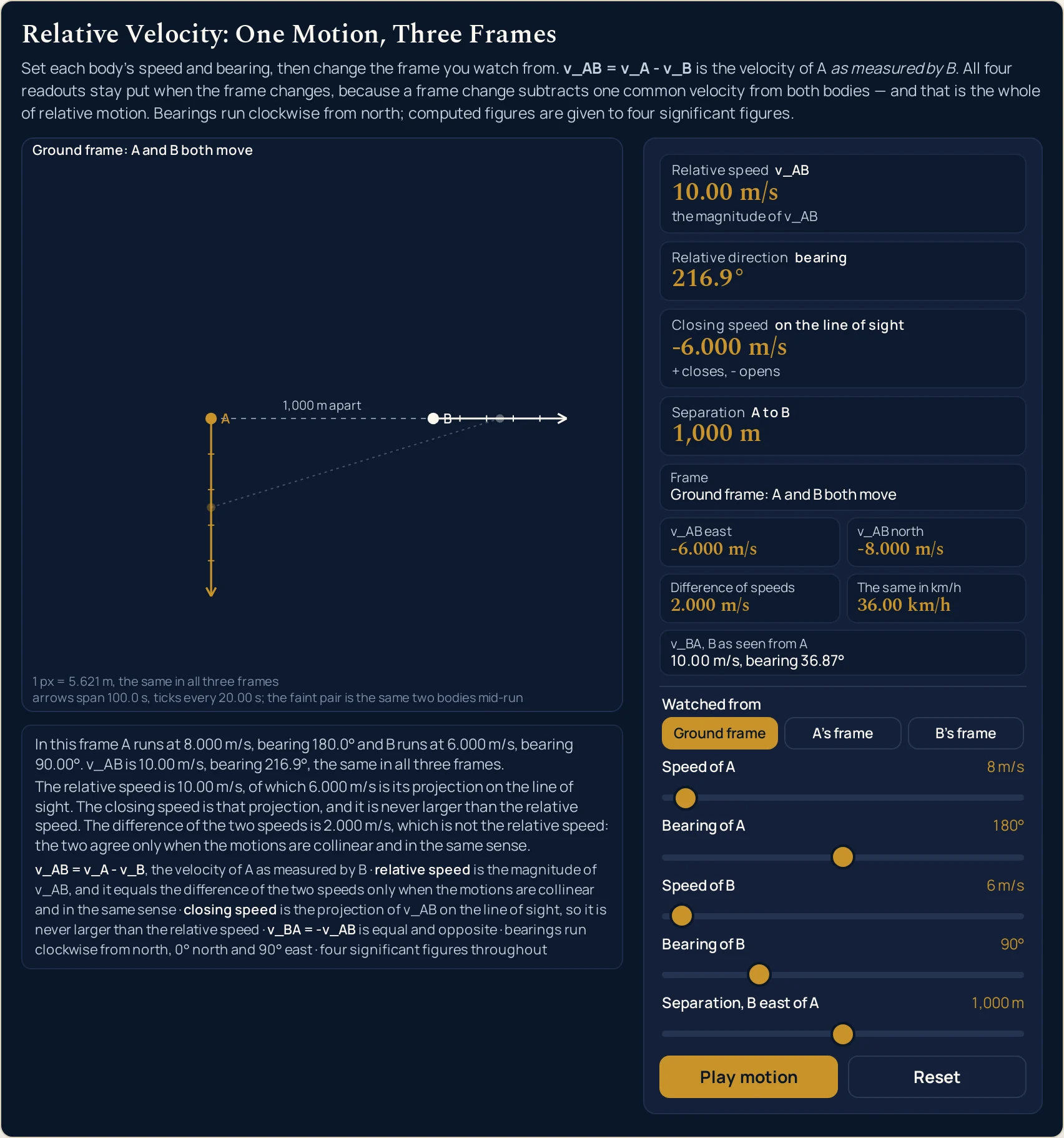
| 8 m/s · 180° | 6 m/s · 90° | 1,000 m | 10.00 m/s | 216.9° | -6.000 m/s | 2.000 m/s | 36.00 km/h |
| 10 m/s · 0° | 10 m/s · 90° | 1,000 m | 14.14 m/s | 315.0° | -10.00 m/s | 0.000 m/s | 50.91 km/h |
| 15 m/s · 45° | 15 m/s · 45° | 1,000 m | 0.000 m/s | — | 0.000 m/s | 0.000 m/s | 0.000 km/h |
| 27.78 m/s · 45° | 0 m/s · 0° | 1,000 m | 27.78 m/s | 45.00° | +19.64 m/s | 27.78 m/s | 100.0 km/h |
| 250 m/s · 90° | 250 m/s · 270° | 2,000 m | 500.0 m/s | 90.00° | +500.0 m/s | 0.000 m/s | 1800 km/h |
| 250 m/s · 270° | 250 m/s · 90° | 2,000 m | 500.0 m/s | 270.0° | -500.0 m/s | 0.000 m/s | 1800 km/h |
| 0.01 m/s · 90° | 0 m/s · 0° | 1 m | 0.01000 m/s | 90.00° | +0.01000 m/s | 0.01000 m/s | 0.03600 km/h |
Rows one and two are the pair the whole page turns on. One slider moved, through 180°, and the relative speed goes from 5.560 m/s to 50.00 m/s. The difference of the two speeds is 5.560 m/s in both rows, because a difference of speeds cannot tell a head-on pass from an overtake. Read those two columns against each other and the headline misconception is dead on the page.
Row seven is the same trap from the other side. Two bodies at 10 m/s each, one due north and one due east: the difference of their speeds is 0.000 m/s and their relative speed is 14.14 m/s. Equal speeds do not mean no relative motion; equal velocities do, which is row eight.
Row three and row eight both read zero in a column, and they mean different things. Row three has the separation slider at 0 m, so the Closing speed card is suppressed to an em dash: the quantity is undefined, not small. Row eight has the two bodies travelling together, so the Relative direction card is suppressed instead, while the closing speed is a genuine 0.000 m/s. A dash and a zero are not the same claim.
Row five is where the page earns its keep. Two aircraft on parallel tracks a kilometre apart have a relative speed of 50.00 m/s and a closing speed of 0.000 m/s, at the same time, in the same row. The rate at which that gap changes is zero, because none of the relative velocity points along the line joining them — the v_AB north cell carries all +50.00 m/s of it and the east cell reads 0.000 m/s. It is an instantaneous rate, not a promise about the next minute: let the run play out and the line of sight swings round, so the gap does creep open.
Rows ten and eleven are the same two settings with the bearings exchanged, and they separate the sign from the magnitude. Both read 500.0 m/s on the first card, which is the fastest the sliders go, and 1800 km/h on the conversion cell. The closing speeds are +500.0 and -500.0 m/s: one pair is converging on that gap and the other is tearing away from it, and only the third card knows which.
The same motion, three frames, nothing moved
Every slider below is held at the Parallel tracks setting and only the frame button is pressed. The top two rows change and the eight below them do not, which is the entire argument of this lab in one table.
| What the panel reports | Ground frame | The frame of A | The frame of B |
|---|---|---|---|
| The Frame cell | Ground frame: A and B both move | A’s frame: A is at rest, B moves at v_BA | B’s frame: B is at rest, A moves at v_AB |
| The first sentence cell | In this frame A runs at 200.0 m/s, bearing 0.000° and B runs at 150.0 m/s, bearing 0.000°. v_AB is 50.00 m/s, bearing 0.000°, the same in all three frames. | In this frame A is at rest and B runs at 50.00 m/s, bearing 180.0°. v_AB is 50.00 m/s, bearing 0.000°, the same in all three frames. | In this frame A runs at 50.00 m/s, bearing 0.000° and B is at rest. v_AB is 50.00 m/s, bearing 0.000°, the same in all three frames. |
| Relative speed | 50.00 m/s | 50.00 m/s | 50.00 m/s |
| Relative direction | 0.000° | 0.000° | 0.000° |
| Closing speed | 0.000 m/s | 0.000 m/s | 0.000 m/s |
| Separation | 1,000 m | 1,000 m | 1,000 m |
| East component | 0.000 m/s | 0.000 m/s | 0.000 m/s |
| North component | +50.00 m/s | +50.00 m/s | +50.00 m/s |
| Difference of speeds | 50.00 m/s | 50.00 m/s | 50.00 m/s |
| The reciprocal view | 50.00 m/s, bearing 180.0° | 50.00 m/s, bearing 180.0° | 50.00 m/s, bearing 180.0° |
Look at what the second row does to the first four speeds it names. In the ground frame A runs at 200.0 m/s and B at 150.0 m/s; in A’s frame A is simply at rest and B runs at 50.00 m/s on bearing 180.0°. Three different descriptions of how fast things are going, and one unchanged answer to how fast each sees the other.
The drawing changes more than the panel does. In A’s frame A has no arrow at all and is labelled A at rest; in B’s frame it is B that stands still and A that slides. The dashed line between them is the same length in all three, because the lab fits one metres-per-pixel scale to the pair and refuses to rescale when the frame changes.
Formula and symbol reference
The lab prints its relations on itself, in the fixed line under the canvas. Written out in the plain-digit form the panel uses, with every subscript as an underscore:
v_AB = v_A - v_B, component by component, read as the velocity of A as measured by B. Then the relative speed is the magnitude of v_AB; the relative direction is its compass bearing; the closing speed is its projection on the line of sight; and v_BA = -v_AB is equal and opposite. No modulus bars appear anywhere on this page, because a bar either side of a symbol draws as a capital letter I in the site’s fonts.
The quantity that never appears is an acceleration. There is no slider for it, no card reporting it and no curve: both bodies travel at constant velocity for the whole run, which is what lets a single arrow stand for a whole displacement. The guide to acceleration is where that restriction is lifted, and the vector addition calculator is the place to combine two velocities rather than subtract them — though it measures its angles anticlockwise from the x-axis, which exchanges the sine for the cosine.
Twelve rows follow and only five of them are something you drag. The rest are cards, cells or quantities the panel names without giving you a control for. For the sliders the right-hand column gives the end stops and the step; for everything else it gives the strings the lab prints and the span it prints them over.
| Symbol or card | Meaning | SI unit | In this lab |
|---|---|---|---|
| v_A | Speed of A, the body being watched. The first slider, and the first term of the subtraction | metre per second | 0 to 250 m/s in steps of 0.01, opening at 27.78 m/s. Written in full by the row above the slider, so 250 m/s rather than a rounded 250.0, and the step is what settles the 5.560 m/s of the first preset: 27.78 less 22.22 is 5.560 exactly, and the six figures an exact 100 km/h would need are off the grid. |
| dir A | Bearing of A, clockwise from north. The second slider, and the thing worth moving on its own | degree | 0 to 360 in steps of 1, opening at 90°, due east. The relative direction readouts reach 0.000°, 45.00°, 90.00°, 216.9°, 270.0° and 315.0° among the settings in the tables above — north, east and west landed on exactly, and three of the four compass quadrants entered. The slider itself covers the whole turn, so the remaining quadrant, between east and south, is one drag away, and nothing about the bearing is clamped. |
| v_B | Speed of B, the body doing the measuring. The third slider, and the term that is subtracted | metre per second | the same 0 to 250 m/s in steps of 0.01, opening at 22.22 m/s. Taking it to 0 m/s is the instructive end: the card then simply reprints the speed of A, 27.78 m/s, because a body at rest is already the ground frame. |
| dir B | Bearing of B, clockwise from north. The fourth slider, and the one that produces the headline jump | degree | the same 0 to 360 in steps of 1, opening at 90°. Moving it alone from 90° to 270° takes the relative speed from 5.560 m/s to 50.00 m/s without touching either speed slider. |
| d | Separation, B east of A. The fifth slider, which places the two bodies rather than moving them | metre | 0 to 2,000 m in steps of 1, opening at 1,000 m. It is the only control the Relative speed card ignores completely, and the only one the Closing speed card cannot do without: at 0 m the separation card reads 0 m and the closing speed is suppressed to a dash. |
| v_AB | The relative velocity itself, read as the velocity of A as measured by B. Not a card but the quantity all four of them describe | metre per second, with a direction | the panel reports it three ways at once: as a magnitude on the first card, as a bearing on the second, and as the two signed cells east and north. At the Rain and cyclist setting those read -6.000 m/s and -8.000 m/s, which is the subtraction done one component at a time. |
| Relative speed | The magnitude of v_AB — how fast B sees A move, whatever either of them is doing over the ground. The first card | metre per second | four significant figures with the trailing zeros kept: 5.560 m/s, 50.00 m/s, 10.00 m/s. From the slider ends rather than from a preset: the largest reading the grid allows is 500.0 m/s, from both speeds at 250 m/s in line and opposed, and the smallest non-zero one is 0.01000 m/s. It is never negative, because it is a magnitude. |
| Relative direction | The compass bearing of v_AB, clockwise from north. The second card, and the one that is allowed to refuse | degree | 0.000° to 315.0° over the settings above, and the em dash — whenever the relative speed is exactly zero. A zero bearing is not the same thing as a refused one: Parallel tracks reads 0.000° because the relative velocity points due north, while Travelling together reads the dash because there is no relative velocity to point anywhere. |
| Closing speed | The projection of v_AB on the line of sight — the rate the gap between the two bodies is changing. The third card | metre per second, signed | from +500.0 m/s to -500.0 m/s across the slider ends, with the sub-line + closes, - opens giving the sign its meaning. It is never larger than the relative speed, which is a property of a projection rather than a coincidence. A reading that rounds to zero prints 0.000 m/s with no sign at all, and a suppressed one prints the dash. |
| Separation | The current distance from A to B. The fourth card, and the only reading that is a position rather than a motion | metre | 0 m to 2,000 m, straight off the fifth slider, written in full rather than at four figures: 1 m, 400 m, 1,000 m, 2,000 m. No choice of frame can move it, which is why it sits beside three velocities without ever changing with them. |
| v_BA | The reciprocal view, B as seen from A. Equal and opposite to v_AB, and printed as a compact cell rather than a card | metre per second, with a direction | the same magnitude on the opposite bearing: 5.560 m/s, bearing 270.0° against a card reading 90.00°. When the relative velocity is exactly zero the cell gives up in words instead of numbers, printing exactly zero, so it has no bearing. |
| Difference of speeds | The plain arithmetic difference of the two speed sliders. A cell rather than a card, and the one that is there to be caught out | metre per second | it equals the relative speed only when the two motions are collinear and in the same sense, which the second sentence cell states in whichever of the four cases the setting is in. Both legs of the trap are in the table above: a difference of 5.560 m/s beside a relative speed of 50.00 m/s, and a difference of 0.000 m/s beside 14.14 m/s. |
If you read one row twice, make it Difference of speeds. It is the only cell on the panel that is there to be wrong in most states, and the second sentence under the canvas says in words whether the current setting is one of the few where it is right.
The physics: why changing frames changes nothing physical
Changing frame means subtracting one and the same velocity from both bodies. Whatever that velocity is, it cancels out of the difference between them, so v_AB survives the operation untouched. The three frame buttons are therefore not three answers but one answer drawn three ways, and the four cards are the part of the picture that cannot tell which button you pressed.
That is why the panel can promise an invariance rather than merely exhibit one. Pick any of the twelve settings in the table above, press all three buttons, and the relative speed, the bearing, the closing speed and the separation come back byte for byte the same. The guide to velocity and speed is where the distinction the first two cards rest on is set out: a speed has survived the subtraction as a magnitude, and a velocity has carried its direction through it.
The frame of A is the most useful of the three and the least often drawn. In it A does not move at all, and B sweeps past at the reciprocal relative velocity — on Parallel tracks, 50.00 m/s on bearing 180.0°, due south, which is the answer to “what does the pilot of A actually see out of the window?”. Both bodies are flying north over the ground, and from A the other aircraft appears to be going backwards.
The closing speed is the one reading that needs the positions as well as the velocities. It is the component of v_AB along the line joining the two bodies, so the same pair of velocities gives a different closing speed depending on where they happen to be. That is why it is the only card the separation slider can move, and why it can read 0.000 m/s while the relative speed reads 50.00 m/s.
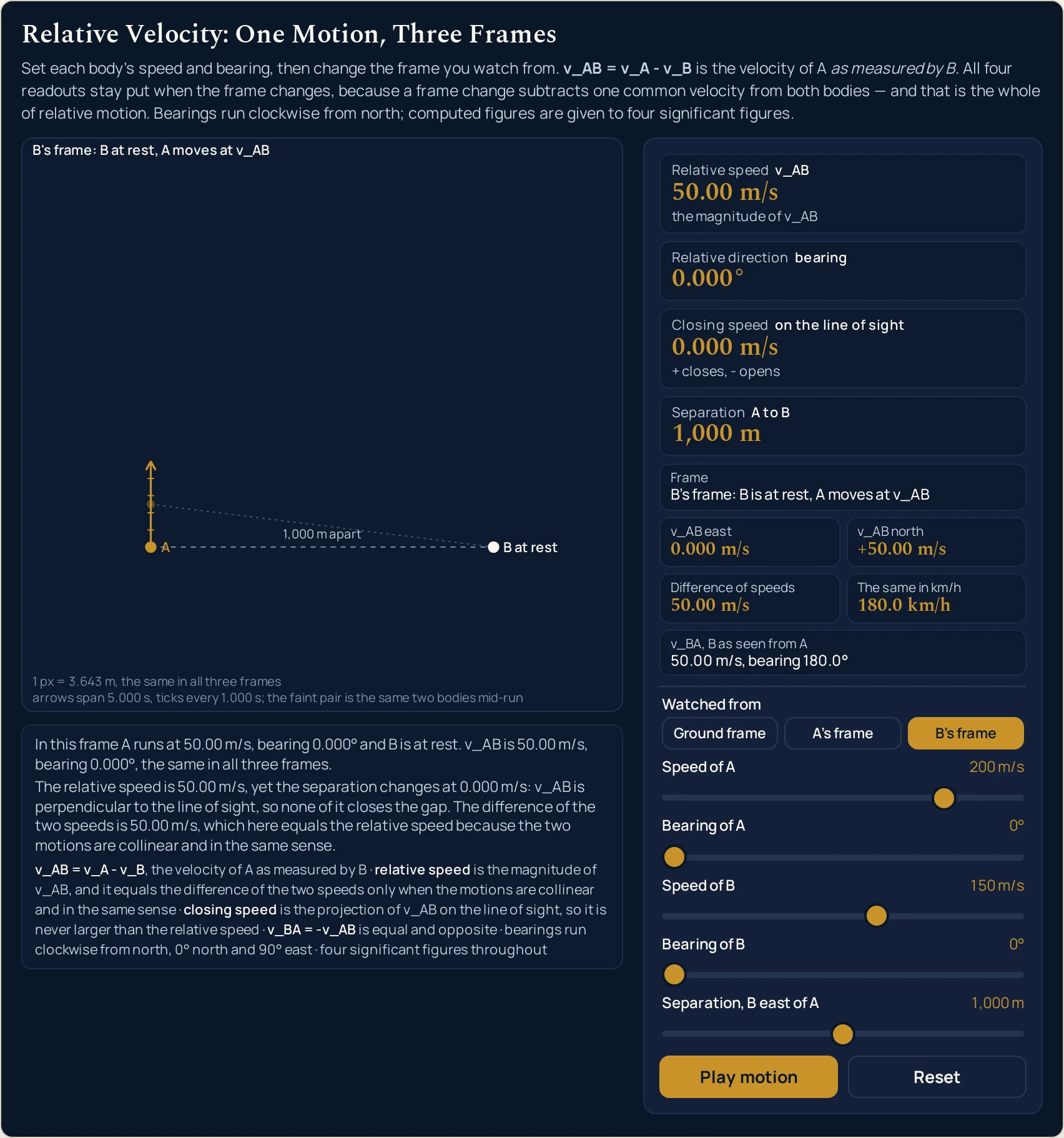
B at rest, and A slides north at 50.00 m/s — yet the dashed line still reads 1,000 m apart, and half a five-second run later the faint pair has drawn apart by under one per cent of that. A relative speed of 50.00 m/s and a closing speed of 0.000 m/s, in one picture.Where the relative velocity readings break down
Every slider position this lab can reach is answered, and the arithmetic is not where the panel can let you down. The model behind it is. Six limits sit under every reading on this page, and two of them are refusals the panel makes on purpose rather than failures.
- A difference of speeds is not a relative speed, and the panel prints both so you cannot forget it
- This is the one misconception the whole lab is arranged around. The two agree only when both motions lie along a single line in the same sense; everywhere else they part company, and they can part company completely. The table above has a difference of 5.560 m/s beside a relative speed of 50.00 m/s, and a difference of 0.000 m/s beside 14.14 m/s. The second sentence cell states which of the two cases the current setting is in rather than leaving you to guess.
- A relative speed is not a closing speed either, and the difference is not small
- The third card is the projection of the relative velocity on the line of sight, so it depends on where the bodies are. On Parallel tracks the relative speed is 50.00 m/s and the gap changes at 0.000 m/s; put the same two velocities in line and the two readings coincide. A projection can never exceed what it is taken from, so the third card is never larger than the first — which is exactly why mistaking one for the other feels safe and is not.
- At zero separation the closing speed is undefined, and the card says so instead of printing a number
- Drag the fifth slider to
0 mand the Closing speed card prints an em dash. There is nothing wrong with the relative velocity at that setting — the first two cards carry on reading 5.560 m/s and 90.00° — but the line of sight between a point and itself has no direction, so there is nothing to project onto. Dividing by that zero would print a confident infinity, and the panel refuses rather than divides. - A zero relative velocity has no direction, so the second card is suppressed rather than computed
- Press Travelling together and the Relative direction card shows a dash. Zero is a perfectly good answer on the first card — 0.000 m/s, the two travel together and neither sees the other move — but a vector of zero length points nowhere. The naive arctangent of zero over zero returns zero, which would print as a confident bearing of due north, and that single wrong readout is the reason the suppression exists.
- Four significant figures is the ceiling, and it is a choice rather than a limit of the data
- Every input here is an exact value you chose on a slider, so there is no measurement uncertainty to propagate and nothing in the physics decides how many digits to print. The lab stops at four, with the trailing zeros kept, which is why a reading is
50.00 m/srather than 50 and a bearing is90.00°rather than 90. Rounding happens once, so re-deriving one printed figure from another will not always reproduce the fourth digit. - At speeds approaching that of light the subtraction stops being the right operation
- Nothing on this panel goes near that limit: 500.0 m/s is the fastest relative speed the sliders reach, and there the plain subtraction is not approximately right but right to twelve digits. Push the same rule to two craft closing at eight tenths of the speed of light and it returns 1.6 times that speed, which is not a velocity at all. The crossover for a four-figure answer sits at roughly seven thousandths of the speed of light, and what replaces the rule past it belongs to the special relativity guide.
Where relative velocity is actually used
- Air traffic separation, which is a closing-speed problem and not a relative-speed one
- The Parallel tracks preset is the case that makes the distinction worth money: two aircraft with 50.00 m/s between them whose 1,000 m gap is, at the instant the cards are read, changing at no rate at all. A controller cares about the third card, not the first. Press the fourth preset and you are sitting in B, watching A slide north at 50.00 m/s while the range to it barely moves — a zero closing speed buys you this moment, not the whole run.
- Collision-avoidance radar, which reads the projection directly
- A radar return gives the rate at which a range is changing, which is the Closing speed card and not the Relative speed card. The sign is the whole message:
+ closes, - opens, as the card’s own sub-line puts it. Set the two bodies head-on and the card reads +500.0 m/s at the slider tops; exchange the two bearings and the same pair of speeds reads -500.0 m/s instead. - Overtaking on a road or a railway, where the difference of speeds really is the answer
- Set A to
33.33 m/sand B to25 m/s, both on bearing 90°, 400 m apart, and the panel reads 8.330 m/s on all three of the first card, the closing speed and the difference of speeds. This is the collinear same-sense case, the one most people picture, and it is the reason the misconception survives. The The same in km/h cell reads 29.99 km/h, which is the figure a driver would recognise. - Knowing which way to tilt an umbrella
- Press Rain and cyclist: rain falling due south at 8 m/s, a cyclist heading due east at 6 m/s, and the rain arrives at 10.00 m/s on bearing 216.9° — from in front and to the side, which is why you tilt forward. That same geometry is 36.87° from the downward vertical, which is the figure an umbrella angle is usually quoted as; it is the same triangle measured from a different reference, and it is not the bearing the card prints.
- Collisions, where the relative velocity of approach is the input
- What a collision does depends on the velocity of approach rather than on either body’s speed over the ground, which is why two cars at 27.78 and 22.22 m/s meeting head-on is a 50.00 m/s event and the same pair overtaking is a 5.560 m/s one. The panel gives you the approach velocity and stops there; the guide to elastic and inelastic collisions is where the masses and the energy come in.
- Anything where a wave is involved, because the shift depends on the relative motion
- A source and an observer in relative motion shift the frequency between them, and it is the closing component that does it rather than either speed alone. On Parallel tracks the closing speed is 0.000 m/s, so there would be no first-order shift at all between two bodies moving at 200 and 150 m/s. The Doppler effect guide is where that is worked out properly.
- Boats and currents, which this panel deliberately cannot set up
- A river crossing is a relative-velocity problem with a width and a bank attached, and neither of those is a control here: there is no boundary on the map and nothing to arrive at. The subtraction is the same operation, and the crossing time, the heading correction and the downstream drift are not on this page at all. The relative velocity guide works that case through with the numbers.
Where to go next
A panel can show you which readings a control is allowed to move, and that is the end of what a panel is for. Relative Velocity Explained is where the subject itself is written out: the convention argued rather than declared, the river crossing and the crosswind worked through, the eight problems and the misconceptions. The calculator that takes these figures typed heads the list of related tools below.
Two neighbouring ideas have pages of their own and are not argued here. The guide to velocity and speed is the distinction the first two cards rest on, and the guide to scalar and vector quantities is where the insistence on components comes from.
Further out, the special relativity guide is where the plain subtraction finally fails and the time dilation guide is one of the things that replaces it, the Doppler effect guide is a closing speed turned into a frequency, and the guide to acceleration is what happens when the velocities stop being constant.
Nearer home, the vector addition lab draws two vectors head to tail where this one subtracts them, the velocity and speed lab separates the magnitude from the direction, and the Doppler effect lab puts relative motion between a source and an observer. Beyond that there is the simulation library to work through, an index of calculators for when typing beats dragging, and the blog for everything written out at length.
Frequently asked questions
Why do the four cards not move when I change the frame?
Because a frame change subtracts one and the same velocity from both bodies, so the difference between them is untouched. That difference is what all four cards report. Press the three frame buttons on any setting and the relative speed, the bearing, the closing speed and the separation stay byte for byte identical; only the Frame cell, the sentence under the canvas and the arrows change. That invariance is the thing this lab exists to show.
The Difference of speeds cell sometimes matches the relative speed and sometimes does not. Why?
Because a relative speed is a vector subtraction and a difference of speeds is not. They agree only when the motions lie along one line in the same sense, the case most people picture. Put both bodies on bearing 90 degrees at 27.78 and 22.22 m/s and the cell reads 5.560 m/s beside a relative speed of 5.560 m/s. Turn B round to 270 degrees and the cell still reads 5.560 m/s while the card now reads 50.00 m/s.
What is the Closing speed card for, if the relative speed is already there?
It reports how fast the gap between the two bodies is actually changing, which is the projection of the relative velocity on the line of sight. Those are different quantities and the Parallel tracks preset separates them: a relative speed of 50.00 m/s with a closing speed of 0.000 m/s, because none of the relative velocity points along the line joining the two. The card is signed, so a plus closes the gap and a minus opens it.
Why does the Relative direction card show a dash?
Because the relative speed has come out exactly zero, and a vector of zero length has no direction to report. Give both bodies the same speed and bearing and you are in that state. A naive arctangent of zero over zero returns zero, which would print a confident bearing of due north, so the card refuses instead. Zero relative velocity is a valid answer here rather than an error, and the sentence under the canvas says so.
Why does the Closing speed card show a dash when I drag the separation slider to zero?
Because the two bodies are then at the same point, and a line of sight between one point and itself has no direction. There is nothing to project the relative velocity onto, so the rate the separation changes is undefined rather than zero, and the card prints a dash. Move the separation slider off zero and a figure comes back. The Relative speed card keeps answering throughout, because it never needed the positions.
What exactly do the bearing sliders measure from?
North, going clockwise, which is the navigator convention: 0 degrees is north, 90 east, 180 south and 270 west. Both sliders say so in their accessible labels and the fixed line under the canvas repeats it. It matters because the east component of a velocity then takes the sine of the bearing and the north component takes the cosine, which is the other way round from the mathematical convention of measuring anticlockwise from the x-axis.
Does pausing the motion change any of the readings?
No. Pause motion stops the single animation frame and freezes the faint mid-run pair exactly where it had got to, and every readout on the panel is unchanged, because every one of them is worked out from the five slider values and the chosen frame alone. The button then reads Play motion. Pausing is the right state for reading the two sentence cells, since nothing in the drawing is moving while you look at it.
Why is the A to B gap the same number of pixels in all three frames?
Because the drawing uses one metres-per-pixel scale for all three and prints it in the caption, so the only thing the frame buttons change is the arrows. In the ground frame both bodies carry one; in the frame of A, A has no arrow at all and is labelled at rest; in the frame of B it is B that stands still. The separation is a distance between two bodies, so no choice of frame can alter it.
What is the faint second pair of dots?
It is the same two bodies at one instant partway through the run the arrows cover, joined by its own faint line, so the gap can be watched rather than only read off a card. On Parallel tracks the closing speed is 0.000 m/s, so the two lines are very nearly equal: halfway through the five-second run the faint gap has reached 1,007.8 m against the 1,000 m the card still reads. Nothing about it is a readout.
Why does the reciprocal cell print a bearing 180 degrees round from the card?
Because v_BA is equal and opposite to v_AB: same size, reversed direction. At the opening setting the card reads 5.560 m/s on bearing 90.00 degrees and the cell reads 5.560 m/s, bearing 270.0 degrees. Both are printed at once on purpose, because textbooks genuinely disagree about which subscript comes first and seeing both readings together settles which one you are looking at.
References & formula source
- Every figure on this panel comes out of five slider values, one frame button and a vector subtraction, and nothing is fitted or measured. The lab prints the relations on itself, in the fixed line under the canvas: v_AB is v_A less v_B taken one component at a time, the relative speed is the magnitude of that difference, the relative direction is its compass bearing, the closing speed is its projection on the line of sight, and v_BA is equal and opposite to v_AB.
- The reading of the subscripts is a convention and the lab states it rather than assuming it. Here v_AB means the velocity of A as measured by B, which is the order the formula band, both sentence cells and the fixed line all use. Textbooks genuinely disagree about which letter comes first, so the reciprocal view is printed beside every answer: same magnitude, bearing 180 degrees round. A page that silently used the other order would differ from this one by a sign on every component.
- Bearings are measured clockwise from north throughout, which is the navigator convention rather than the mathematical one. The east component of a velocity therefore takes the sine of its bearing and the north component takes the cosine, which is the opposite pairing from angles measured anticlockwise from the x-axis. Both conventions are correct and they are not interchangeable, so a bearing read off this panel cannot be dropped into a formula written for the other one without being converted first.
- Four significant figures with the trailing zeros kept is the ceiling on every computed reading, and it is a house choice rather than a limit of the data. Every input here is an exact value chosen on a slider, so there is no measurement uncertainty to propagate and the printed precision is whatever the ceiling allows. Rounding happens once, at four figures, which is why re-deriving one printed reading from another will not always reproduce the fourth digit.
- The relative speed and the closing speed are genuinely different quantities and the panel keeps them apart on purpose. The first is the magnitude of the relative velocity; the second is that velocity projected on the line joining the two bodies, so it depends on where they are as well as on how they are moving. The Parallel tracks setting is the cleanest demonstration: 50.00 m/s of relative speed with the gap changing at 0.000 m/s. A projection can never exceed the vector it is taken from, which is why the third card is never larger than the first.
- Two readings are refused rather than computed, and a refusal is printed as an em dash. The relative direction is suppressed when the relative speed is exactly zero, because an arctangent of zero over zero would otherwise publish a confident bearing of due north for a vector that has no direction at all. The closing speed is suppressed when the separation is zero, because a line of sight from a point to itself has no direction to project onto. Both are stated in words in the second sentence cell as well.
- The three frames share one metres-per-pixel scale, printed in the caption band, and that is a deliberate refusal to rescale. It is what makes the A to B gap the same number of pixels in each frame and lets the arrows carry the whole difference between them. Because the scale is fitted to the pane as well as to the settings, the figure it prints changes with the width of the column the lab is rendered in, so no scale value is quoted anywhere in the prose on this page.
- The animation is decorative in the strict sense that nothing it touches reaches a readout. Every one of the panel readings is a pure function of the five slider values and the chosen frame, which was asserted directly rather than assumed: all twenty rendered strings were compared before and after a run of the animation, at every width tested, and none moved. That is also what allows the readouts to be compared between two independent implementations at all.
- Two engines were compared readout by readout rather than assumed to agree: the browser check run for this lab put five slider positions side by side in Chrome and in Firefox at four widths and compared every readout string, with 19 assertions passed and 0 failed. There is a hole in that, and it is Safari. The WebKit build on this machine will not start without system access it has not been given, so Safari was never exercised here and nothing on this page is evidence about it.
- Every reading quoted on this page is a string this simulation printed for the slider positions named beside it, read back out of the running lab in a browser rather than worked out by hand. Two figures in the prose are not readings at all, and each is named as such where it appears: the 100 km/h the 0.01 m/s speed grid cannot land on exactly, and the 1,007.8 m the faint mid-run line reaches on Parallel tracks while the Separation card holds at 1,000 m. Where a figure here and the lab part company, believe the lab, and verify anything you rely on before using it.
- Further reading: Relative velocity — Wikipedia