balanced means the two forces are equal; unbalanced means one is left overnet force = (force to the right) - (force to the left) · the lab calls them balanced when the two values are equal · zero net force leaves the velocity alone
The balanced and unbalanced forces simulator is a free interactive lab that makes one call and then shows you what it buys. Two opposing forces act on a single block along one horizontal line: set them, set the mass, set a starting velocity, and the panel answers from the two force values alone. On arrival the four cards read balanced, 0 N, at rest and stays at rest.
The two settings worth pressing first are the ones where that answer and the picture of the block disagree. Coasting, forces even gives balanced over a block doing 5.00 m/s right, with the trap row reading balanced, and still moving. Pushed back while rolling, dragged on to 4.0 s, gives unbalanced and at rest together, over unbalanced, but momentarily at rest.
Balanced and Unbalanced Forces Simulator
Two forces act on one block along a single line. The lab calls them balanced when the two values are equal, and unbalanced when one force is left over. Set the two forces, the mass and a starting velocity, then drag the time slider or press Run: the forces decide what the velocity does next, and the motion on its own never decides the call.
acceleration0.00 m/s2
position0.00 m
the trap on showneither trap on show
reaches zero velocitynever moves
The three force arrows share one scale; the velocity arrow is a different quantity in different units and has its own, different scale. Each row is labelled with its own unit, and the figure beside an arrow is the reading — never its length.
Nothing here is measured. The two forces are given and everything else is worked out from them, so a steady velocity under equal forces is built into the model, not found by it. The sliders are for the other job: build a state that looks wrong, then watch what it actually does.
The forces
balanced
left 60 N, right 60 N
Net force
0 N
the two cancel exactly
Velocity now
at rest
at t = 0.0 s
What happens next
stays at rest
zero net force leaves the velocity alone
60 N
60 N
20 kg
0.0 m/s
0.0 s
Model: no friction, horizontal surface, both forces through the centre line, so no turning effect. These are the lab's assumptions, not measurements of any object.
Load a Real Tug of War
Each button writes the five sliders and nothing else; the simulation does every calculation itself, exactly as it would if you had dragged them. All five put the clock back to 0.0 s, so every comparison below starts from the same instant.
Press the first and then the second if you only press two. Both blocks read at rest at t = 0.0 s and nothing about their motion separates them; the arrows do, and two seconds later so does everything else.
Pick one of the five settings above, or drag the five sliders yourself.
What Is the Balanced and Unbalanced Forces Simulator?
The balanced and unbalanced forces simulator is a free interactive physics lab that runs in your browser, with nothing to install and no sign-up. Two opposing forces act on one block along a single horizontal line, and the panel answers one question about them: are the two values equal, or is one of them left over?
Balanced is the answer when the two forces are equal, and the lab tests that as an exact match rather than as a near miss. Unbalanced is the answer when they are not, and the panel then prints how much force survived the cancellation and which way it points. Nothing else about the block changes either answer.
Four reading cards carry the panel. The forces prints balanced or unbalanced, Net force prints the magnitude and the direction word, Velocity now prints the speed and direction at the time on the clock, and What happens next prints a short phrase. On the opening setting they read balanced, 0 N, at rest and stays at rest.
A sub-line under each card shows its working. Under the first it reads left 60 N, right 60 N; under the second, the two cancel exactly; under the third, at t = 0.0 s, which is the instant the velocity was read at; and under the fourth, the rule in words: zero net force leaves the velocity alone.
That fourth sub-line is the one worth reading twice, because it does not say the block is standing still. A block already moving with equal forces on it keeps the velocity it had, and the lab has a setting for exactly that: 50 N each side over a block doing 5.00 m/s right still reads balanced ten seconds later, with What happens next at keeps the same velocity.
Five sliders drive it. Two set the opposing forces, each from 0 to 100 N in steps of five; one sets the mass of the block from 1 to 50 kg; one sets a signed starting velocity from -10 to +10 m/s in half-metre steps; and the last is the clock, 0 to 10 s in tenths. The five-newton force step is what lets the match be exact.
Two buttons sit under them. Run animates the clock to ten seconds and flips its own label to Pause, and it moves nothing but the clock: the two forces, the mass and the starting velocity are left exactly where they were. Reset puts all five sliders back to 60 N, 60 N, 20 kg, 0.0 m/s and 0.0 s and replays the opening settle.
Under the drawing a compact grid of four rows gives the rest. They are the acceleration, the position, the trap on show and the time at which the run reaches zero velocity, reading 0.00 m/s2, 0.00 m, neither trap on show and never moves when the lab opens.
The third of those four rows is this lab’s punchline. It has exactly three values: balanced, and still moving when the two forces are equal and the block is not standing still, unbalanced, but momentarily at rest when one force is left over and the speed rounds to zero, and neither trap on show the rest of the time.
Both of those first two states are reachable in one click, and the second is reachable two different ways. A block that has never moved can carry a left-over force, and a block brought to a halt by one carries it through the halt and out the other side: pushed back while rolling, the panel reads at rest and unbalanced together at 4.0 s, then 4.00 m/s left at 6.0 s.
The fourth grid row is the panel’s most mis-readable string, so it is worth knowing what it names. It is the instant in the whole run at which the velocity passes through zero, worked out from the starting velocity, which is why it still reads at t = 4.00 s, x = 16.00 m once the clock has gone past four seconds. It is not an answer to “when would it stop from here”.
The drawing beside the panel has three labelled bands: the word BALANCED or UNBALANCED across the top with the trap line under it, the block itself in the middle with its force arrows, its net arrow and its velocity arrow, and a position axis along the bottom. The axis range is worked out from the whole ten-second window before anything is drawn, so it cannot jump while the clock is running.
The three force arrows share one scale and the velocity arrow has its own, different one, and each row carries its own unit label for that reason. A force of zero draws no arrow at all, and the net arrow disappears whenever the two forces are equal. There is no minimum width anywhere in the drawing, so the figure printed beside an arrow is the reading and its length never is.
Four things are the lab’s stated assumptions rather than measurements of any object, and the panel prints them in a fixed line: there is no friction and no drag of any kind, the surface is horizontal so that gravity and the normal force are a balanced pair that is never drawn, both forces act through the centre line so there is no turning effect, and the block is rigid with a constant mass. On a real floor a coasting block slows down and stops.
Nothing in the panel is measured. The two forces are given and everything else is worked out from them, so a steady velocity under equal forces is built into the model rather than discovered by it. What the sliders are for is the other job: building a state that looks wrong and then watching what it actually does.
Five preset buttons on the landing page write the five sliders for you and recompute nothing. They run from a dead-even rope pull through a one-sided one, a block coasting under equal forces, a block pushed back while it rolls, and a block rolling and being pushed harder still. Every one of them puts the clock back to 0.0 s, so each comparison starts from the same instant.
| Control | Range | Step, default and what it moves |
|---|---|---|
| Force pushing left | 0 to 100 N | step 5; opens at 60 N, and the label reads "60 N". It is one of the two values the call is made from: the panel answers "balanced" only when this and the force pushing right match exactly. Dropping it alone to 40 N against 60 N gives a net force of "20 N right" over the sub-line "20 N is left over, to the right" |
| Force pushing right | 0 to 100 N | step 5; opens at 60 N. The five-newton step is a design decision with a consequence: both forces land on the same grid, so the match the call is made on is an exact comparison of two numbers and not a tolerance. Setting both to 0 N and both to 100 N print the same four card strings, because equal is equal |
| Mass of the block | 1 to 50 kg | step 1; opens at 20 kg. It never reaches zero, because it is the only denominator in the model, so the acceleration row can never go to infinity. It changes how fast the velocity moves and it never changes the call, which is read off the two forces alone |
| Starting velocity | -10 to +10 m/s | step 0.5; opens at 0. It is signed, and negative is leftward: the slider keeps "-10" while the label prints "10.0 m/s left". This is the slider that makes the two interesting states reachable, because it lets a block already be moving when equal forces are applied to it |
| Time since the start | 0 to 10 s | step 0.1; opens at 0. It is the state the whole panel is read at, which is why every figure is exactly reproducible: set the clock and read the cards. The velocity sub-line names the instant it used, reading "at t = 4.0 s" when the clock is at four seconds |
| Run, Pause and Reset | two buttons | Run animates the clock to ten seconds and flips its own label to Pause; it advances nothing else, so the two forces, the mass and the starting velocity are untouched by it, and it stops of its own accord at 10.0 s. Reset restores 60 N, 60 N, 20 kg, 0.0 m/s and 0.0 s and replays the opening settle rather than cutting straight to the answer |
How to Use the Simulator
- Read the four cards before you touch anything. They sit at the top of the panel and are already answering for a dead-even rope pull: The forces
balanced, Net force0 N, Velocity nowat rest, and What happens nextstays at rest. - Read the sub-line under each one, because that is where the card shows its working. They read
left 60 N, right 60 N,the two cancel exactly,at t = 0.0 sandzero net force leaves the velocity alone. The last of those is the rule the whole lab turns on, and it does not mention standing still. - Pull Force pushing left down one step at a time and watch where the call flips. At
55 Nagainst60 Nit has already gone tounbalanced, with the second card reading5 N right; there is no band of near-enough values, because the two forces are compared exactly. At40 Nthat card reads20 N rightover20 N is left over, to the right. - Now look at the four-row grid under the drawing, and read the third row. With the block still untouched at
at restit has gone tounbalanced, but momentarily at rest. That row is the one this lab exists for, and it has only three possible values. - Press Run and watch what it does and does not move. The button flips its own label to Pause, animates the clock to
10.0 sand stops there by itself. The two forces, the mass and the starting velocity are left exactly where you put them: the clock is the only thing a run advances. - Press Coasting, forces even and leave the clock alone. The call comes back
balancedover a block already doing5.00 m/s right, the trap row readsbalanced, and still moving, and What happens next readskeeps the same velocity. Run it to10.0 sand the velocity card has not changed a character. - Press Pushed back while rolling and drag Time since the start through 4.0 s. At
4.0 sthe velocity card readsat restwhile the call still readsunbalanced, with the position at16.00 m. Carry on to6.0 sfor4.00 m/s leftat12.00 m, and to8.0 sfor8.00 m/s leftback at0.00 m. - Check the last grid row on that preset before you trust it. It reads
at t = 4.00 s, x = 16.00 mat every one of those instants, including8.0 s. It names the moment this run passes through zero velocity, worked out from the starting velocity, rather than a halt still ahead of the block. - Press Reset when you have finished. It puts the five sliders back to
60 N,60 N,20 kg,0.0 m/sand0.0 s, and replays the opening settle, so the scene grows back rather than cutting straight to the answer.
Dragging is the right way to find out which readings move together and a poor way to hit an exact figure, because the force sliders step five newtons at a time and the clock a tenth of a second. The five preset buttons above exist for that reason: they write the sliders for you and leave every number to the simulation. The written guide to balanced and unbalanced forces is where both terms are defined properly and the problems are worked through with every step shown.
One thing this panel will not decide for you is which forces belong on the block in the first place. That judgement is upstream of every reading on the screen, and it is where most wrong answers are actually made: leave a force off and the two values still compare perfectly while telling you nothing true. The force diagram lab is the place to settle it, and then this panel will tell you what the pair you ended up with means.
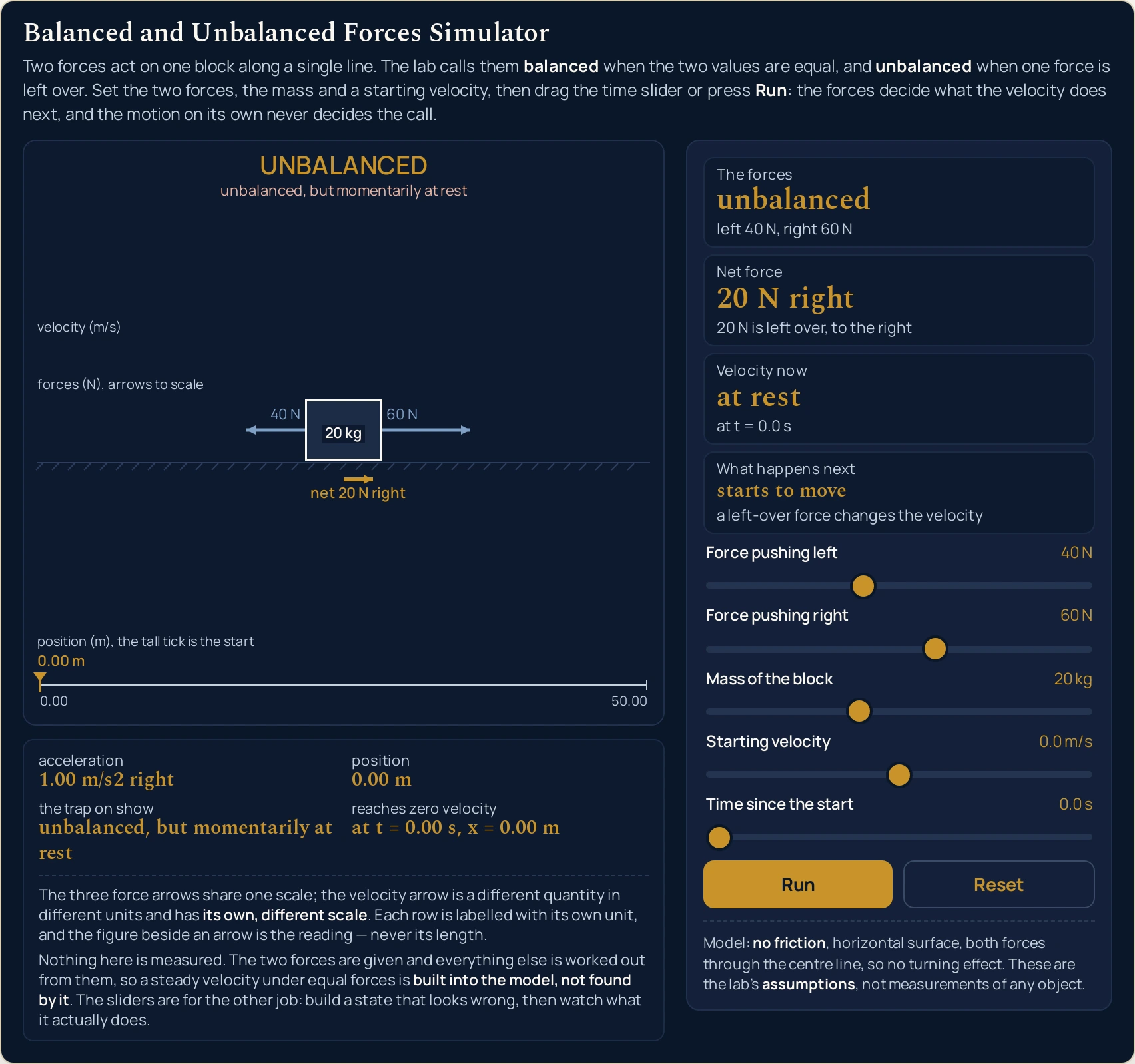
unbalanced anyway. Velocity now reads at rest while Net force reads 20 N right, and the top band names the state outright. The band text here is what the drawing paints at this page’s own width; it shortens on a narrow column, band by band.Worked Example: Two Blocks Sitting Perfectly Still
Nothing in the three tables below was worked out here. Each row is a setting the lab was put into through its own sliders and then read back from, cell by cell, so every string in them is the panel’s own. The first table is the pair this whole lab was built around.
One: the same stillness, the opposite call
Press Tug of war, dead even and then Tug of war, one side wins, and read the first two rows before you touch the clock. Both blocks are motionless, both have gone nowhere, and the panel gives them opposite answers.
| What was loaded, and when | The forces | Net force | Velocity now | Position | The trap on show |
|---|---|---|---|---|---|
Tug of war, dead even at t = 0.0 s |
balanced | 0 N | at rest | 0.00 m | neither trap on show |
Tug of war, one side wins at t = 0.0 s |
unbalanced | 20 N right | at rest | 0.00 m | unbalanced, but momentarily at rest |
Tug of war, dead even at t = 2.0 s |
balanced | 0 N | at rest | 0.00 m | neither trap on show |
Tug of war, one side wins at t = 2.0 s |
unbalanced | 20 N right | 2.00 m/s right | 2.00 m | neither trap on show |
Read the first two rows across, then stop. Columns four and five are identical in both: at rest and 0.00 m. Column two is not. Whatever the panel used to tell these two settings apart, it was not the motion, because at this instant there is no difference in the motion to use.
Now read rows three and four, which are the same two settings two seconds later. The dead-even rope pull has not moved a character: still at rest, still 0.00 m. The one-sided pull is doing 2.00 m/s right and has covered 2.00 m. The difference the arrows showed at the start has become a difference you could see.
The last column is where the two rows at the start are worth keeping. One reads neither trap on show and the other unbalanced, but momentarily at rest, from identical readings in every motion column. Signed velocity is the quantity all of this turns on, and the guide to velocity against speed is where the distinction between it and a bare speed is set out.
Two: the five presets, and what each one is for
These are the buttons above with the readings they produce at t = 0.0 s. The fifth column is the What happens next card and the last two are the third and fourth rows of the grid under the drawing.
| Preset | The forces | Net force | Velocity now | What happens next | The trap on show | Reaches zero velocity |
|---|---|---|---|---|---|---|
| Tug of war, dead even | balanced | 0 N | at rest | stays at rest | neither trap on show | never moves |
| Tug of war, one side wins | unbalanced | 20 N right | at rest | starts to move | unbalanced, but momentarily at rest | at t = 0.00 s, x = 0.00 m |
| Coasting, forces even | balanced | 0 N | 5.00 m/s right | keeps the same velocity | balanced, and still moving | never |
| Pushed back while rolling | unbalanced | 30 N left | 8.00 m/s right | slows down | neither trap on show | at t = 4.00 s, x = 16.00 m |
| Rolling and pushed harder | unbalanced | 40 N right | 3.00 m/s right | speeds up | neither trap on show | never (already moving away) |
The second and third columns never disagree, and that is worth checking yourself. Wherever column two says balanced, column three says 0 N; wherever it says unbalanced, column three has a magnitude and a direction. Both readings come from the same comparison of the two slider values, so the panel cannot print one without the other.
The last column is the one to read carefully, because three of its five entries are refusals. never moves belongs to a block with no left-over force and no starting velocity; never to one that is moving and has nothing to change it; never (already moving away) to one being pushed the way it is already going. Only the two settings with a real crossing give a time.
Three: the same clock, run on two of them
Press Coasting, forces even and then Pushed back while rolling, and read them at the same five instants. Both start the run moving; one of them is still doing exactly what it started with ten seconds later.
| Clock | Coasting, velocity | Coasting, position | Pushed back, velocity | Pushed back, position | Pushed back, the trap on show |
|---|---|---|---|---|---|
0.0 s |
5.00 m/s right | 0.00 m | 8.00 m/s right | 0.00 m | neither trap on show |
4.0 s |
5.00 m/s right | 20.00 m | at rest | 16.00 m | unbalanced, but momentarily at rest |
6.0 s |
5.00 m/s right | 30.00 m | 4.00 m/s left | 12.00 m | neither trap on show |
8.0 s |
5.00 m/s right | 40.00 m | 8.00 m/s left | 0.00 m | neither trap on show |
10.0 s |
5.00 m/s right | 50.00 m | 12.00 m/s left | -20.00 m | neither trap on show |
Column two is a single string repeated five times. 5.00 m/s right at the start and 5.00 m/s right at 10.0 s, with the position climbing steadily to 50.00 m underneath it. That is the lab’s stated frictionless surface doing what it was told to do, not a claim about any floor you have met.
Column four changes sign without the panel ever printing one. It goes 8.00 m/s right, at rest, 4.00 m/s left, 8.00 m/s left, 12.00 m/s left, and the only minus sign in the whole table is in column five, where the position reaches -20.00 m. The two forces that slowed the block are the two that then sped it up the other way.
Column six holds the trap for exactly one row. It is the same string the one-sided tug of war printed at the start, arrived at from the opposite direction: that block had never moved, this one has been brought to a halt. The guide to acceleration in physics is where a velocity changing sign while the acceleration holds steady is set out at length.
Formula and Symbol Reference: Every Slider and Every Readout
The line at the head of this page is the whole of the test: compare the two forces, and the answer is one word. The net force is the subtraction behind it, and the acceleration is that net force shared out over the mass.
What the lab does with the answer is the second half, and it is the half that people get wrong. A net force of zero leaves the velocity exactly as it was, which is a statement about change and not about standing still. How large the acceleration becomes once there is a left-over force is a separate question with its own tool: the force, mass and acceleration calculator works that figure out from typed values.
| Symbol or readout | Meaning | SI unit | In this lab |
|---|---|---|---|
| fL | The force pushing the block to the left. One of the two values the call is made from, and the lab compares it with its partner exactly rather than within a tolerance | newton (N) | 0 to 100 N, in steps of 5, opening at 60 N. At 0 N against a 60 N partner the net force reads 60 N right; at 100 N against the same partner it reads 40 N left. |
| fR | The force pushing the block to the right. It has the same range, the same step and the same standing as its partner: neither force is the one that acts and the other the one that resists | newton (N) | 0 to 100 N, in steps of 5, opening at 60 N. Taking it alone to 0 N gives 60 N left, and to 100 N gives 40 N right. |
| m | Mass of the block. It sets how quickly a left-over force moves the velocity, and it has no say at all in whether the forces match | kilogram (kg) | 1 to 50 kg, in steps of 1, opening at 20 kg. The floor is not cosmetic: it is the only denominator in the model. At 1 kg with a 100 N right net force the acceleration row reads 100.00 m/s2 right, the largest figure these sliders reach. |
| v0 | Starting velocity — the velocity the block already has when the clock reads zero. It is signed, and it is what makes the two awkward states reachable at all | metre per second | -10 to +10 m/s, in steps of 0.5, opening at 0. The slider value stays signed while the label spells the direction out: 10.0 m/s left at one end and 10.0 m/s right at the other, with the word dropped entirely at 0.0 m/s. |
| t | Time since the start. Every figure on the panel is read at this instant, which is why any state on this page can be reproduced exactly: set the five sliders, set the clock, read the cards | second (s) | 0 to 10 s, in steps of 0.1, opening at 0. The velocity card’s sub-line names the instant it used — at t = 0.0 s on arrival and at t = 10.0 s at the far end. |
| the call | Whether the two forces match. This is the reading the whole lab exists for, and it is made from the two slider values and nothing else — not from the velocity, not from the position, not from the clock | not a physical quantity | the first card, printing balanced or unbalanced over the two values side by side (left 60 N, right 60 N). 0 N against 0 N and 100 N against 100 N both print balanced. |
| net force | What survives the cancellation, as a magnitude and a direction word. Zero exactly when the call is balanced, because the lab reads both from the same comparison | newton (N) | the second card, with the reason underneath: the two cancel exactly when the forces match, and 30 N is left over, to the left when they do not. It never prints a minus sign. |
| velocity now | The velocity at the instant on the clock. The lab calls the block at rest when its speed rounds to 0.00 m/s, and that one rule is shared by the card, the trap row and the drawing alike |
metre per second | the third card, to two decimal places with a direction word: 5.00 m/s right, 4.00 m/s left, or the words at rest. There are settings where the arithmetic leaves a residue far below that threshold, and every one of them prints at rest too. |
| what happens next | A short phrase, and under it the rule it came from. This is where the lab states what a matching pair of forces actually buys you | not a physical quantity | the fourth card: stays at rest, keeps the same velocity, starts to move, slows down or speeds up, over zero net force leaves the velocity alone or a left-over force changes the velocity. |
| acceleration | How fast the velocity is changing, printed in the panel’s own plain form. The size of it is deliberately secondary here: this lab is about whether there is one at all | metre per second squared | the first grid row under the drawing, as 0.00 m/s2 when the forces match and otherwise a magnitude plus a direction word, such as 2.00 m/s2 left. Its span runs to 100.00 m/s2 right. |
| position | Where the block is, measured from where it started. It is the only reading in the lab that carries a sign instead of a direction word | metre (m) | the second grid row, to two decimal places: 16.00 m at the braking preset’s halt and -20.00 m at the same preset’s 10.0 s. The position axis along the bottom of the drawing marks the same figure. |
| the trap on show | Which of the two awkward states, if either, is currently on screen. It is computed from the call and the at-rest test and from nothing else | not a physical quantity | the third grid row, and it has exactly three values: balanced, and still moving, unbalanced, but momentarily at rest, and neither trap on show. |
| reaches zero velocity | The instant in this run at which the velocity passes through zero, and where the block is then. It is worked out from the starting velocity, so it does not change as the clock advances past it | second (s) and metre (m) | the fourth grid row, as at t = 4.00 s, x = 16.00 m, or one of three refusals: never moves, never, and never (already moving away). |
If you read one row twice, make it the last. The row that says when the run reaches zero velocity is the only reading on the panel that describes an instant other than the one the clock is on, and it keeps its answer as the clock moves past it.
Reading the Diagram: Arrows, Bands and Units
The drawing is laid out as three bands and the bands are reserved before anything is placed, so no part of it is ever painted across another. The top band carries the call, the middle band carries the block and its arrows, and the bottom band carries a position axis.
| Part of the drawing | What it paints | What it does when there is nothing to paint |
|---|---|---|
| the call band | The top band, carrying one word in capitals — the same call the first card prints — and, under it, the trap line when there is a trap to name. Nothing else is painted in this band | the trap line is simply absent when neither trap is on show |
| the force row | Through the block: one arrow out of the left face and one out of the right, each labelled with its own newtons, both on one shared scale | a force of 0 N draws no arrow at all, which is what the braking preset’s right-hand side looks like |
| the net arrow | Below the block, on the same scale as the two it came from, labelled with the magnitude and the direction — and never longer than the larger of the two | absent entirely whenever the two forces match, because there is nothing left over to draw |
| the velocity row | Above the block, one arrow on its own separate scale in its own separate units, labelled with the reading such as 5.00 m/s right |
absent whenever the block is at rest, which is the same test the velocity card uses |
| the position axis | The bottom band: a line in metres with its range printed at the two ends, a tall tick at the start and a mark where the block is now | the range is fixed from the whole run before anything is drawn, so it cannot jump mid-run |
| the mass chip | The mass written inside the block itself, as 20 kg, so the one quantity that is neither a force nor a motion is still on the picture |
it shortens to the bare number and then disappears as the block gets narrower |
The three force arrows share one scale, and that is the only thing their lengths are good for. On the dead-even pull the two are the same length; on the one-sided pull the 60 N arrow is exactly half as long again as the 40 N one, and the net arrow is the difference. At the page’s full width the shared factor is 110 pixels per 100 newtons, and on a narrower canvas all three shrink together, so the proportions hold and the pixel figure does not.
The velocity arrow sits in its own row with its own label and its own, different scale. It is a different quantity in different units, so its length is a statement about velocities only, and the row label says velocity for exactly that reason. Read the figure printed beside each arrow and treat the lengths as a comparison within a row, never across two.
There is no minimum width in this picture, and no caption claims one. A 5 N force, the smallest the sliders can ask for, comes out at five and a half pixels at the full width and is drawn at exactly that; nothing is propped up to stay visible. A force of 0 N is drawn as no arrow at all, which is what the right-hand side of the braking preset looks like, and the velocity arrow disappears on exactly the test the velocity card uses.
The three predicates behind all of this are short enough to state outright. The forces are called balanced when the two values are equal; the block is called at rest when its speed rounds to 0.00 m/s; and the trap row is computed from those two answers and nothing else. The forces you feed in are a separate question, and the guide to the types of forces covers what you might be adding up before you get here.
The Physics: Why the Motion Cannot Tell You the Verdict
Two blocks sitting perfectly still can be in opposite states, and two blocks moving at speed can be in opposite states. That is the whole claim, and both halves of it are a button press away: the first two presets are the stillness pair and the third and fourth are the moving pair.
The moving pair is the one that takes longer to believe. At 4.0 s the coasting block is doing the 5.00 m/s right it started with and the braking block has stopped dead at 16.00 m, and the thing that separates them was visible from the first frame: one pair of arrows matched and the other did not. Nothing about the two blocks at t = 0.0 s would have told you.
Be blunt about what the simulator is doing here, because a panel that keeps agreeing with itself can look like a panel that has found something out. It has not. The simulator does not measure anything: it is told the two forces and works out the rest, so matching forces leave the velocity alone is built into its arithmetic rather than discovered by it, and the honesty strip under the drawing says so in its own words.
What the sliders are genuinely for is the other direction. They let you build the two states that look wrong — still but unbalanced, moving but balanced — and then watch what each one actually does next, which is a thing you cannot do by staring at a photograph of a block. That is also why the clock is a slider rather than only a Run button: every frame is a state you can set and read.
One consequence is worth saying plainly. A left-over force does not need the block to be stationary to start with, and it does not stop acting when the block happens to be passing through zero speed: on the braking preset the net force reads 30 N left at 0.0 s, at 4.0 s and at 10.0 s without changing a character, while the velocity goes from right, through nothing, to left.
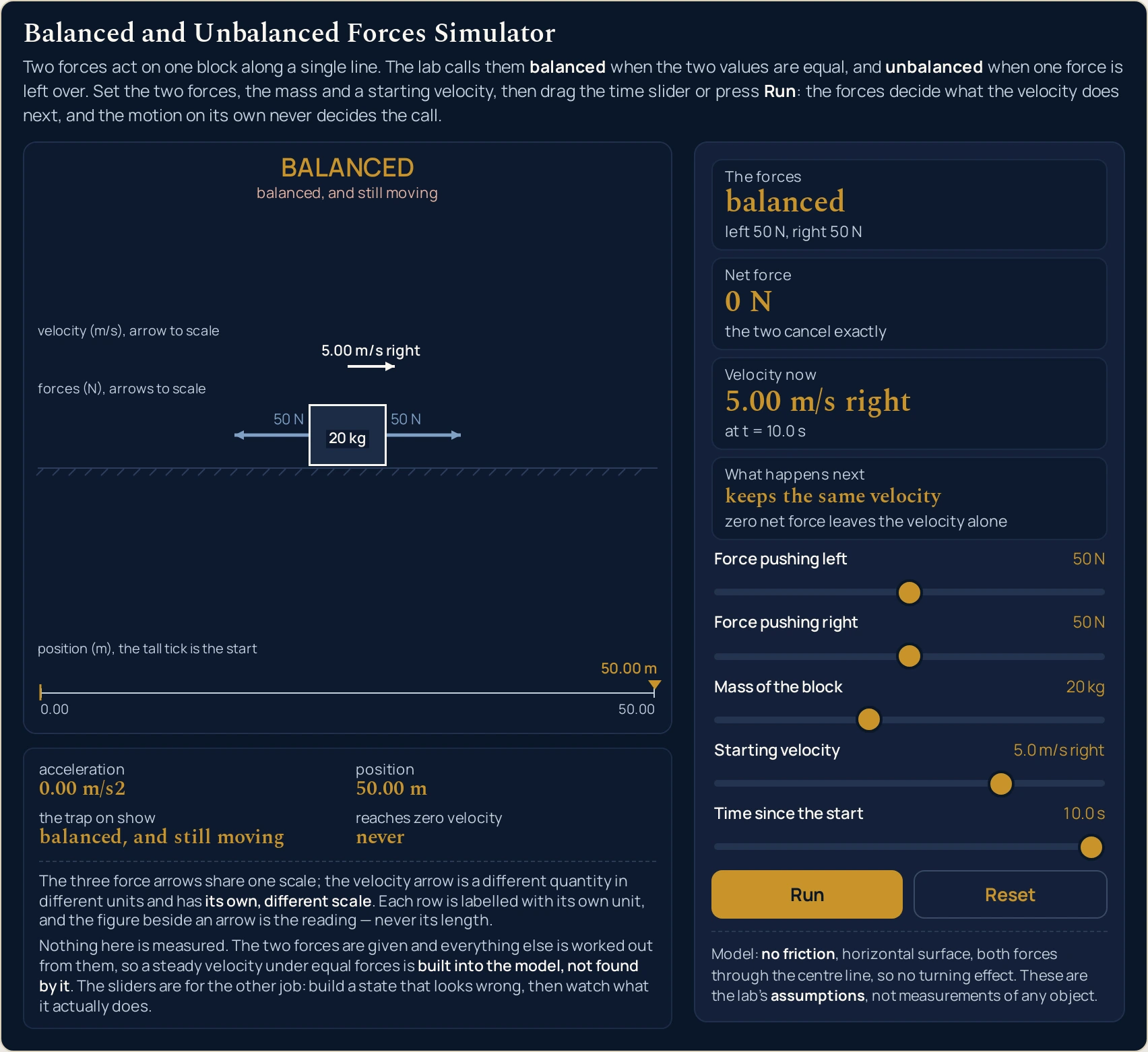
5.00 m/s right it read at the start, the position has climbed to 50.00 m, and the last grid row reads never. The band text is what the drawing paints at this page’s width, and it shortens band by band on a narrower one.Where It Breaks Down
Every slider position this lab can reach is answered, and the arithmetic is not where it can let you down. What it cannot do is model a real surface, and what it chooses not to do is treat its own idealisations as facts. Six limits sit under the readings on this page.
- There is no friction anywhere in the model, and that is the big one
- The panel says so in its fixed line, and it is the single most important thing to carry away from the coasting preset: on a real floor that block would slow and stop. Worse for the lab, a real crate pushed along at a steady speed is balanced — the friction opposing the push is one of the forces that match — and this lab does not draw that force at all, so a two-arrow picture of that crate would be wrong. The friction calculator is where the missing force gets a size, and it takes the kind of figures this panel prints.
- The call is an exact equality here and a threshold in the world
- Two slider values either match or they do not, and five newtons apart is as unbalanced as a hundred. A real surface answers a softer question, with a range of pushes below which nothing happens at all, and nothing in this lab reproduces that range because nothing in this lab resists. If you are asking whether a push is enough to get something going, this panel is answering a different question from the one you asked.
- The two forces never change during a run
- That is what makes the velocity and the position exact here rather than stepped: with a constant net force the expressions are closed form and there is no integration error to accumulate. Real pushes vary, ropes stretch, and a hand tires, so the straight-line velocity on this panel is the cleanest possible version of the story. The clock slider is honest about this — every instant is computed, not reached by running.
- Nothing here can turn, and the lab assumes it away rather than hiding it
- Both forces act through the centre line, which is why the drawing is one axis and the answer is one word. A real pair of forces offset from each other can match for the purpose of moving the object along and still set it spinning, and this panel would call that pair balanced and be only half right. The formal word for the full condition, covering that case as well as this one, is set out in the guide to equilibrium in physics.
- The block is a rectangle on a line
- It has a mass and it has a width on screen and nothing else: no shape, no contact area, no deformation, no place where one force is applied rather than another. The
20 kgwritten inside it is a label, not a size, and the surface under it is a line rather than a material. Anything you want to conclude about a real object’s stiffness, grip or balance has to come from somewhere other than this picture. - The drawing is a drawing, and only one of its promises is geometric
- The three force arrows are in proportion to one another, on a factor that shrinks with the canvas so that they stay inside a narrow column. That is the one thing a length tells you. The velocity arrow’s scale is a different number at every width, the position axis is rescaled per setting, and the mass chip is text. Read the figures; the picture is for seeing which way things point and which of two forces is bigger.
Where the Verdict Is Actually Used
- A crane load that is already on its way up
- A load of 500 kilograms weighs about 4,900 newtons — 500 kg at roughly 9.8 N per kilogram — and while a hoist raises it at a steady speed the rope is carrying exactly that: 4,900 N up against 4,900 N down. Two forces of nearly five kilonewtons each, an object plainly in motion, and the call on it is
balanced. Neither the height it has reached nor the speed it is doing enters the comparison, which is the one structural thing this panel is built to make obvious. - A car at its top speed, where the call is what fixes the number
- Top speed is not a property an engine has on its own: it is the speed at which the driving force has stopped being larger than everything resisting the car, so nothing is left over to change the speed. At 30 metres per second — 108 kilometres per hour — the call on such a car is
balancedwhile it travels as fast as it can go. How big each side is depends on the shape of the car and the air it pushes aside, and this page will not hand you a figure for it. Lift off the accelerator and the call flips, with the left-over force now pointing backwards. - Knowing what an object is doing at the instant it stops
- Load Pushed back while rolling and sit on
4.0 s. The velocity card readsat rest, the net force still reads30 N left, and the acceleration row still reads2.00 m/s2 left. That is the state behind anything that stops and then comes back — a ball at the top of a ramp, a trolley released on a slope — and two seconds further on the panel is reading4.00 m/s left. - Recognising forces that come into balance while something is moving fast
- The coasting preset is a laboratory version of a very common real case: something is moving quickly, the forces on it have become equal, and the velocity simply stops changing. The guide to terminal velocity is where that happens for real, with a falling object whose drag grows until it matches the weight and the speed levels off. This panel shows the end state of that story without the mechanism that gets there.
- Trusting a set of scales, which only report a weight while the call is balanced
- A weighing machine does not measure a weight at all: it measures how hard its pan has to push up, and that force equals the weight only while the two of them match. Stand still on bathroom scales and 70 kilograms reads as about 690 newtons, taking roughly 9.8 N for every kilogram. Step on quickly, or weigh something on a ship in a swell, and the figure wanders, because for those seconds the pan is doing more than holding the load up. The pair being compared there is the weight-and-support pair this lab assumes away and never draws.
- Separating the call from the size of what follows
- Once the answer is
unbalanced, how fast the velocity moves is a second question, and the mass slider is where you see the two come apart: the call does not shift by a character as it travels from1 kgto50 kg, while the acceleration row does. The force and acceleration lab takes that second question as its whole subject, with the size of the effect in the foreground instead.
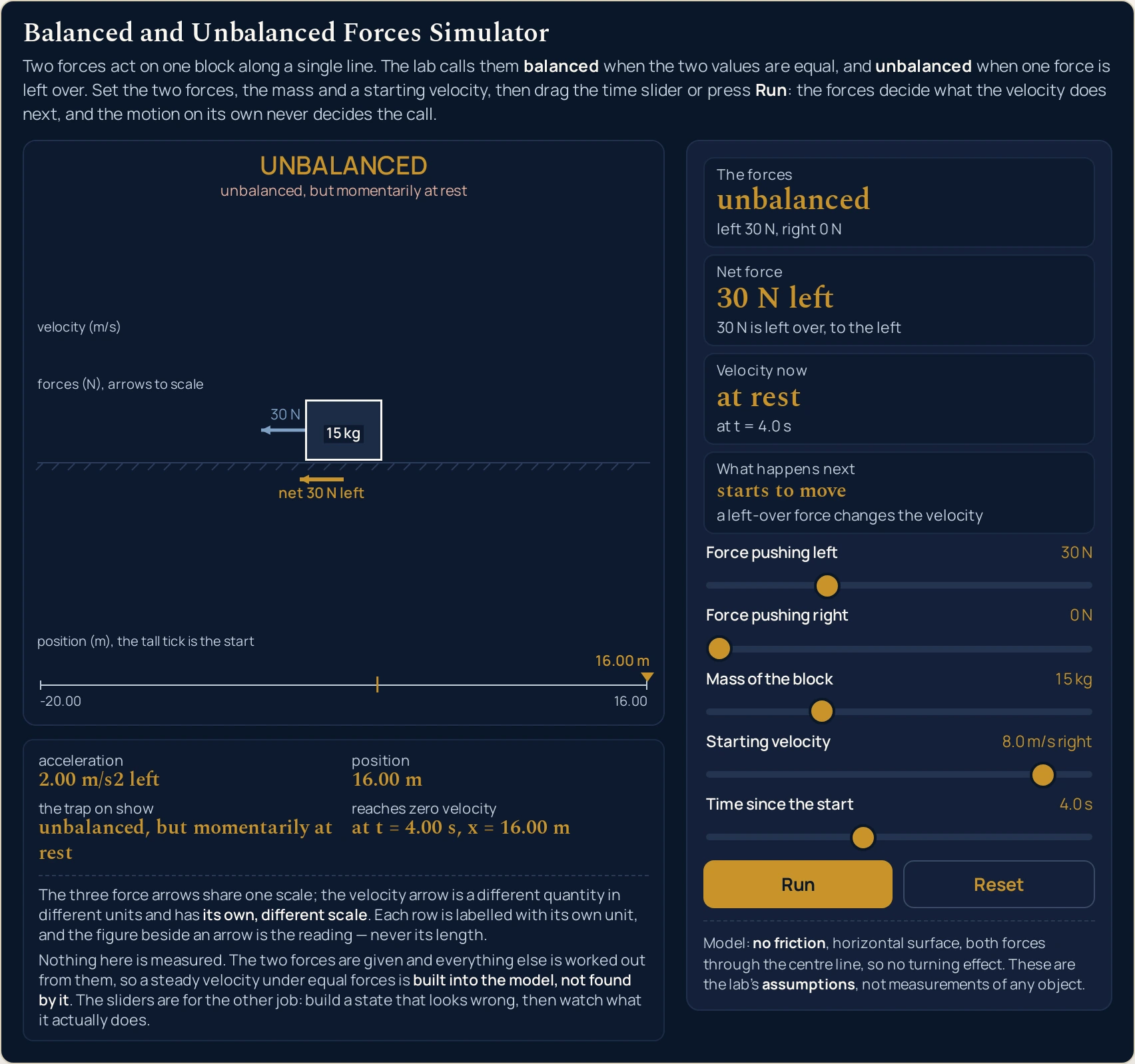
8.00 m/s right four seconds ago. Net force reads 30 N left through the halt and out the other side, and the last grid row names this instant, at t = 4.00 s, x = 16.00 m, rather than one still to come. The right-hand face carries no arrow because that force is 0 N.Where to Go Next
A panel can show you a state and let you run the clock on it, and that is the end of what a panel is for. Balanced and unbalanced forces is where the subject itself is written out: both terms defined separately, the procedure for deciding between them, and worked problems with every step shown.
Three guides sit around this one. The guide to the types of forces covers what you are adding up before any of this starts, the guide to drawing the forces on an object covers getting them onto the page correctly, and the overview of the laws of motion is where this one consequence sits among the rest.
Three more are about what happens after the answer is unbalanced. The guide to how much acceleration a net force produces is the one place the size of it is worked out, the guide to acceleration in physics is where a changing velocity gets its own treatment, and the guide to velocity against speed covers the signed quantity this lab reads. The guide to terminal velocity is the real case that lands in the coasting preset’s end state.
On the tool side there are the friction calculator, the force, mass and acceleration calculator and the acceleration calculator, with the force diagram lab and the force and acceleration lab for the drawn versions. Beyond them there is the simulation library, an index of calculators, and the blog for everything written out at length.
Frequently asked questions
Why does the trap row say "unbalanced, but momentarily at rest" when nothing is moving?
Because the two readings it joins are decided separately. The lab makes the call from the two force values alone, and it calls the block at rest when its speed rounds to 0.00 m/s, so the two can disagree. Load "Tug of war, one side wins" and both are true at once: 20 N survives the cancellation while the block has not started moving yet.
The grid still says it reaches zero velocity at 4.00 s after the block has turned round. Is that a bug?
No, and the row names a different instant from the one you are probably expecting. It is the moment in the whole run at which the velocity passes through zero, worked out from the starting velocity, not a halt still to come. On "Pushed back while rolling" it reads "at t = 4.00 s, x = 16.00 m" and keeps reading it at 6.0 s and at 8.0 s, after that halt has been and gone.
Why does each row of the drawing carry its own unit label?
Because the rows measure different quantities and are drawn on deliberately different scales. The force row is labelled in newtons and the velocity row in metres per second, and the number printed beside an arrow is the reading rather than anything you should take off its length. Reading across the two rows is the one thing the picture is not built to support.
Why does nothing happen when I press Run on the opening setting?
Because the opening setting is 60 N against 60 N, which the panel calls balanced, over a block whose starting velocity is 0.0 m/s. The clock advances to 10.0 s and the position row stays at 0.00 m the whole way. The row that says so in advance is the last one, which reads "never moves" rather than giving a time.
Does a small force still show a short arrow, or does the drawing hide it?
A force of 0 N draws no arrow at all, and every other force on the slider grid draws one at its own length. There is no minimum width anywhere in this picture and no caption claims one, so nothing is being propped up to stay visible. The net arrow disappears too whenever the two forces match, because there is nothing left over to draw.
Why do two 100 N forces read the same as no forces at all?
Because the call is made on whether the two values match, and 100 against 100 matches exactly as 0 against 0 does. Both settings print "balanced", "0 N", "at rest" and "stays at rest", with the same sub-line "the two cancel exactly". The force arrows are the only part of the screen that tells the two settings apart.
Why will the mass slider not go below 1 kg?
Because the mass is the only denominator in this model, and a floor of 1 kg is what keeps the acceleration row finite at every reachable setting. The largest figure the sliders can produce is 100.00 m/s2 right, from a 100 N net force on that 1 kg block. The mass changes how quickly the velocity moves and it never changes the call.
Why is the position the only reading with a minus sign in it?
Because position is the one quantity here that needs a sign rather than a direction word. Every other reading prints a magnitude and a word: the velocity prints "12.00 m/s left" and the net force "30 N left". The position row instead prints "-20.00 m", which is what the braking preset reads once the clock reaches 10.0 s.
References & formula source
- The model this lab draws is the simplest case of a net force, and the definition is quoted from the source rather than asserted here. Source: Wikipedia, "Net force" - "In mechanics, the net force is the sum of all the forces acting on an object. For example, if two forces are acting upon an object in opposite directions, and one force is greater than the other, the forces can be replaced with a single force that is the difference of the greater and smaller force. That force is the net force." Two opposing forces replaced by their difference is exactly what this panel does, and the difference is what the second card prints.
- Four things are this lab's STATED ASSUMPTIONS and not measurements of any object, and the panel prints all four in a fixed line: there is no friction and no drag of any kind; the surface is horizontal, so weight and the support from the surface are a balanced pair that is neither drawn nor counted; both forces act through the centre line, so there is no turning effect anywhere; and the block is rigid with a constant mass. "A 20 kg block coasts for ever" would be a false claim about blocks. "With this lab's stated frictionless surface, a 20 kg block with matching forces holds 5.00 m/s indefinitely" is what the simulation computed.
- Nothing in this lab is measured. The two forces are given, the net force is their difference, the acceleration is that difference divided by the mass, and the velocity and position follow from constant-force expressions that are exact rather than stepped. So "matching forces leave the velocity alone" is built into the arithmetic and is not a result that came out right, and the panel says so in its own words under the drawing. What the sliders are for is the opposite job: building a state that looks wrong and watching what it actually does.
- The call is an exact comparison of two numbers, which is a modelling decision with a consequence. The force sliders step five newtons at a time, so both values land on the same grid and the two either match or they do not; there is no tolerance anywhere in the lab. A real surface answers a different question, with a threshold below which nothing happens at all, and this lab has no such threshold because it has no friction.
- The block is at rest, for this lab, when its speed rounds to 0.00 m/s, and that one rule is read by the velocity card, the trap row and the drawing alike rather than being re-implemented three times. It matters because the closed-form velocity can leave a residue of order a millionth of a millionth of a millimetre per second where the arithmetic ought to cancel exactly; the cluster's simulation report counts 13,546 reachable settings of that kind on the declared slider grid, and the panel prints "at rest" at every one of them.
- Every figure quoted on this page is a string the simulation printed, read back out of the running lab in a browser at the slider position named beside it. The cluster's simulation report is where those strings are recorded: it walks the rendered panel state by state - the five presets, the named instants of two of them, both range ends of every slider and the three states that carry the cluster's point - and every cell of the three worked tables on this page is that report's own string. The cluster's independent reference, written separately from the simulation, runs 2,221,686 checks against the same arithmetic with none failing.
- The drawing promises two things and refuses a third. The three force arrows share one scale, so their lengths are in exact proportion to one another at every width; the velocity arrow has its own, different scale; and because those two numbers are different quantities in different units, no length in one row means anything in the other. Each row is labelled with its own unit for that reason. The shared force factor is 110 pixels per 100 newtons at the full width and shrinks on a narrow canvas, so a figure in pixels is a figure about one screen and never about the physics.
- There is no minimum arrow width in this drawing and no caption claims one. The smallest force the slider grid can ask for is five newtons, which comes out above any legibility floor at the full width, so nothing ever needs propping up; a force of zero is drawn as no arrow rather than as a short one, and the net arrow vanishes whenever the two forces match. The figure printed beside an arrow is always the reading and the length is never the reading.
- The row that says when the run reaches zero velocity is the panel's most mis-readable string, so read it as what it is: the instant in the whole run at which the velocity passes through zero, computed from the starting velocity, together with the position at that instant. It is not an answer to "when would it stop from here". On the braking preset it reads "at t = 4.00 s, x = 16.00 m" and goes on reading it at 6.0 s and at 8.0 s, long after the block has been through that halt and come back the other way.
- Two browser engines were compared reading by reading rather than assumed to agree: the same slider positions were driven in Chrome and in Firefox at four widths and every readout compared per width, 154 values in all, every one identical, with the desktop height agreeing to the pixel. There is a hole in that and it is Safari. The WebKit build on the machine this was tested on will not start without system access it has not been given, so Safari was never exercised and nothing on this page is evidence about it.
- No setting on this panel is a measurement of a real object. The rope pull, the coast and the push-back are three shapes of the same one-axis problem, chosen because between them they reach all four combinations of the call and the motion. Where this page does name a real object — a crane load, a car at its top speed, a set of scales — the figure beside it is worked from a stated round mass at 9.8 newtons per kilogram, not measured from any particular one. Treat any figure you intend to act on as unverified until it has been checked against the object in front of you.
- Further reading: Net force — Wikipedia