The combined gas law says that for a fixed amount of one gas the quantity PV/T is the same before a change as after it, so P1V1/T1 = P2V2/T2. It is the one gas law that lets the pressure and the temperature move at the same time. This free combined gas law calculator solves it six ways — for either pressure, either volume or either temperature — and converts Celsius and Fahrenheit to kelvin before it divides.
Load a real change of state
Each button puts the Solve for menu on the unknown that case is asking about, resets every unit menu to kilopascals, litres and kelvin, and fills the five remaining boxes. Whatever the widget then works out is read back into the line underneath, so nothing there is stored text.
Pick a case above, or type your own numbers.
What Is the Combined Gas Law Calculator?
The combined gas law calculator is a free online tool for the one equation that ties two states of the same fixed sample of gas together: P1V1/T1 = P2V2/T2. Enter any five of the six quantities and it returns the sixth — either pressure, either volume or either temperature — converting Celsius and Fahrenheit to kelvin before it divides, which is the step readers skip. It is the gas law for the case the single-law tools forbid, where pressure and temperature both move at once, and beside the answer it prints PV/T before and after, the volume factor and the two ratios.
| Symbol | Quantity | Default unit | Also accepts | Example value |
|---|---|---|---|---|
| P1 | Absolute pressure before | kPa | Pa, atm, bar, psi | 100 |
| V1 | Volume before | L | mL, m³ | 2 |
| T1 | Absolute temperature before | K | °C, °F | 300 |
| P2 | Absolute pressure after | kPa | Pa, atm, bar, psi | 200 |
| V2 | Volume after | L | mL, m³ | 1.5 |
| T2 | Absolute temperature after | K | °C, °F | 450 |
How to use the combined gas law calculator
- Choose the unknown. The Solve for menu opens on Volume after. The other five choices are Pressure after, Temperature after, Volume before, Pressure before and Temperature before, and whichever you pick vanishes from the boxes below.
- Describe the state before. Type the pressure, the volume and the temperature the gas had at the start. Each box has its own unit menu: kPa, Pa, atm, bar or psi for a pressure, L, mL or m3 for a volume, and K, °C or °F for a temperature.
- Make both pressures absolute. A tyre gauge, a dial gauge and a manifold gauge all read the excess over the surrounding air, so add the atmospheric pressure before you type. At sea level that is 101.325 kPa, a figure fixed by definition rather than measured, and a tyre reading 220 kPa on the gauge is 321.325 kPa absolute.
- Type the temperature you actually have. Set the menu to °C or °F and enter the reading as it stands; the engine converts to kelvin before it divides. That conversion is the whole reason this page is safer than doing the arithmetic by hand, because it is precisely the step people leave out.
- Describe the state after. Fill in whichever two of the pressure, volume and temperature after the change you know. The third is whatever the Solve for menu is set to, and its box is hidden while it is the unknown.
- Read the answer and the extras. The headline is the quantity you asked for, with its unit printed beside it, and it carries up to six significant figures with trailing zeros trimmed. The chips underneath carry PV/T before and PV/T after, the volume factor, the pressure and temperature ratios, and both temperatures restated in Celsius.
- Read the two PV/T chips for what they are. They agree because the answer was computed to make them agree, so they show you the law rather than test it. Very occasionally the last printed digit differs, which is the rounding and not the physics, and the check that can actually fail is the two-route method further down.
- Open Show working. The steps restate the rearrangement, list your figures in kilopascals, litres and kelvin whatever the menus say, and end on the answer. Watching a Celsius entry come back as a kelvin number in that second line is the fastest way to see what the conversion did.
Most of the time you should not be on this page at all, and that is not a criticism of it. If the temperature genuinely does not move, the Boyle's law calculator asks for four numbers instead of six and gives you two fewer chances to mistype. If the pressure is the thing being held, the Charles's law calculator is the right tool, and if the gas is sealed in something rigid it is the Gay-Lussac's law calculator.
This page earns its place only when two of the three move together, which is exactly what those three forbid. A balloon that rises into colder, thinner air is the standard case, and so is any gas moved between a warm store and a cold one at a different pressure. For the background on where the relation comes from, the guide to the ideal gas law derives it from PV = nRT with the amount held fixed.
Two mistakes account for almost every wrong answer on this equation, and both are about what you typed rather than how you typed it. The first is Celsius straight into a ratio: a change from 25 °C to 150 °C looks like a factor of six but is really a factor of 1.4192520543, and for a 2 L sample at constant pressure that turns 2.838504 L into 12 L, wrong by 322.76 per cent. Set the menu to °C and the tool cannot make that mistake for you.
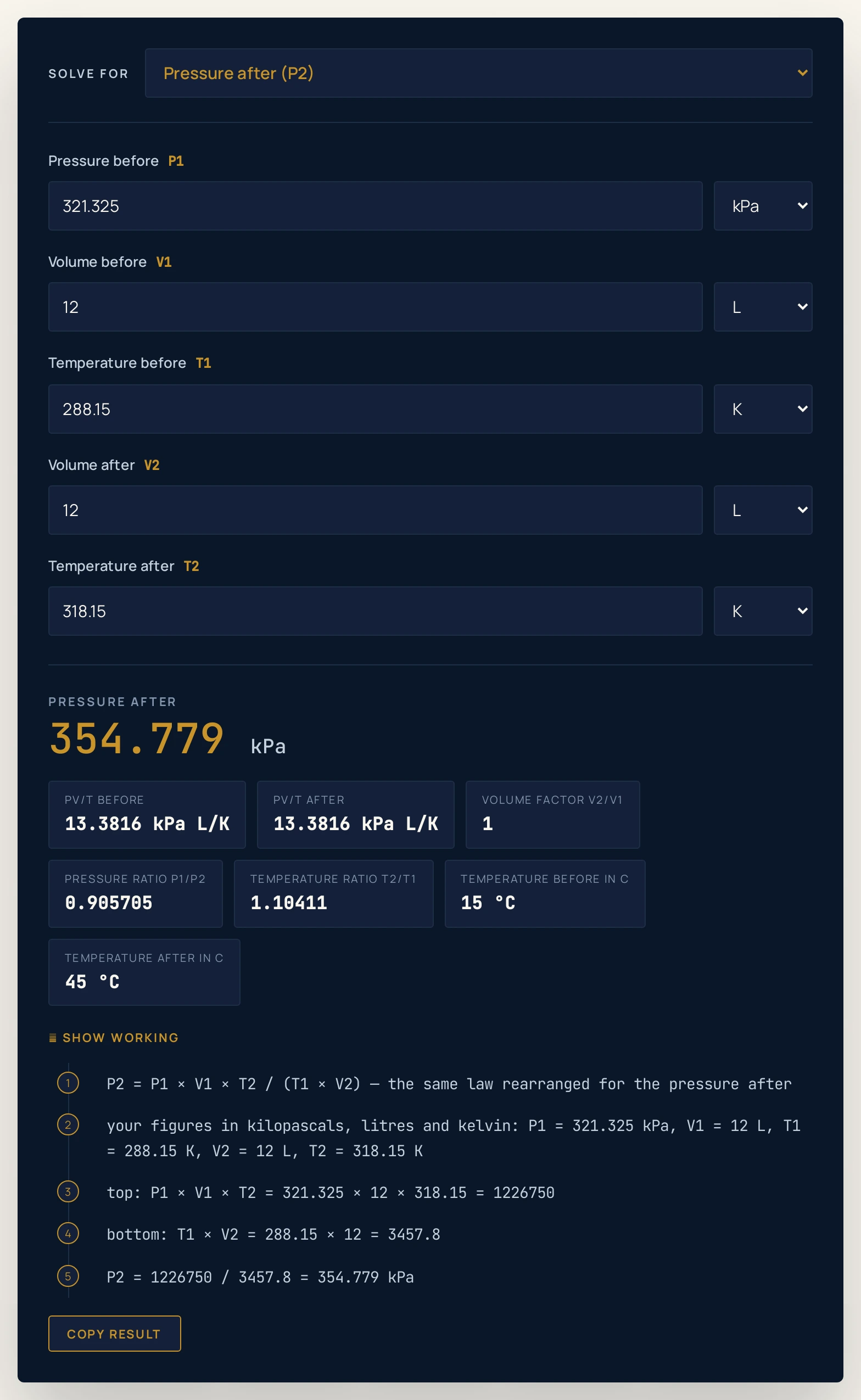
The second is gauge pressure. A tyre at gauge 220 kPa and 15 °C warming to gauge 250 kPa at 45 °C works out at 12.117974 L from 12.0 L using absolute pressures, and 11.659427 L using the gauge numbers — an error of 3.78 per cent in the wrong direction. Neither mistake announces itself, because both produce a perfectly plausible number.
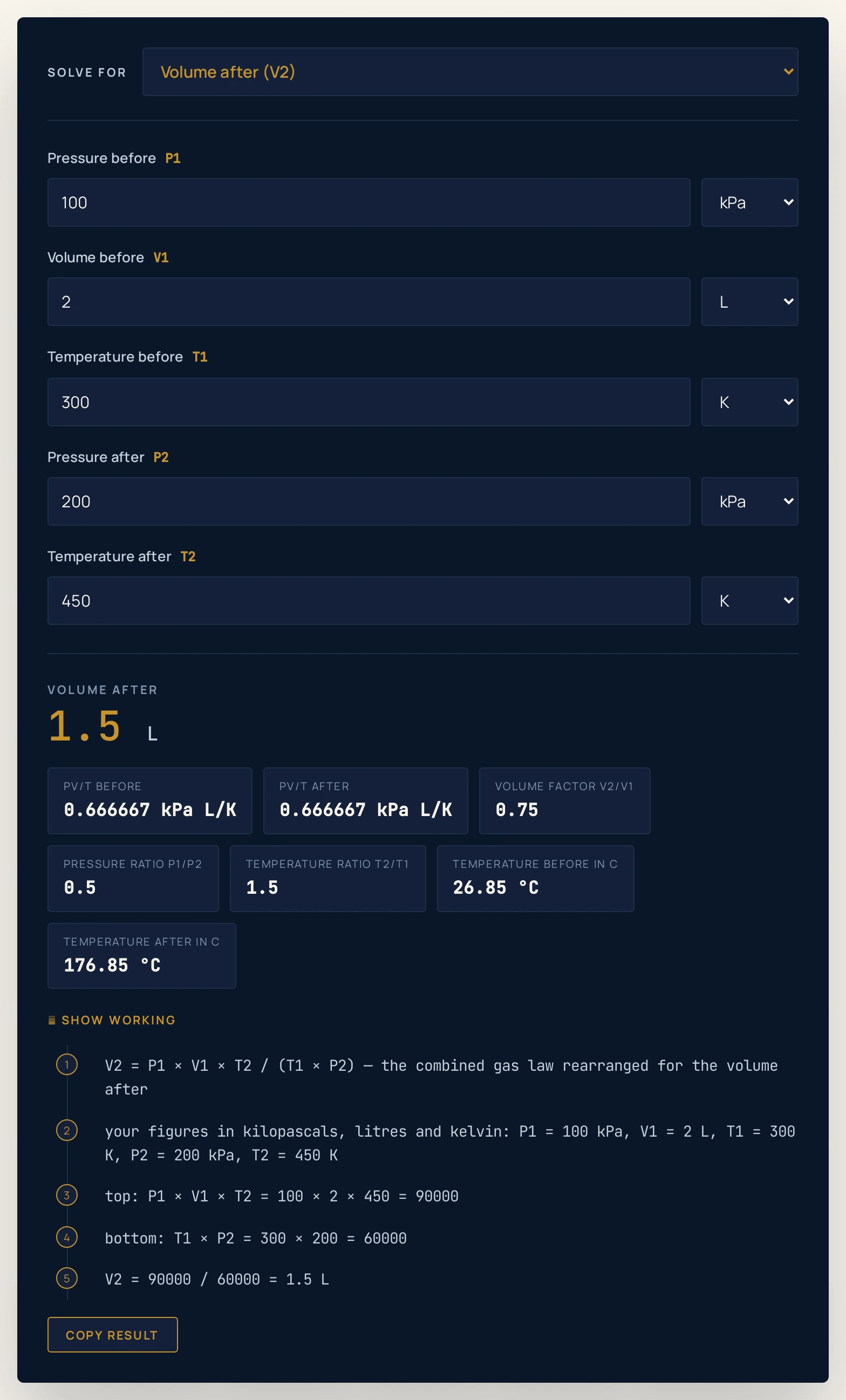
0.666667 kPa L/K, which is the law being displayed and not a check — the 1.5 L was worked out from the requirement that the two agree.Worked example: change one thing at a time
The table starts at the defaults and moves one thing at a time: which quantity is the unknown, then which of the three is held, then the scale of the numbers, then the unit they are typed in. Every Result and PV/T cell was read out of the running widget rather than worked out by hand, so where a cell and the tool ever part company, believe the tool. The state columns are simply what you type, with a question mark where the box is hidden.
| Step | Solving for | Before | After | Result | PV/T before and after |
|---|---|---|---|---|---|
| The page as it opens | Volume after | 100 kPa, 2 L, 300 K | 200 kPa, ?, 450 K | 1.5 L | 0.666667 |
| Feed that answer back | Pressure before | ?, 2 L, 300 K | 200 kPa, 1.5 L, 450 K | 100 kPa | 0.666667 |
| and again, for the volume | Volume before | 100 kPa, ?, 300 K | 250 kPa, 1 L, 375 K | 2 L | 0.666667 |
| and again, for the temperature | Temperature before | 100 kPa, 2 L, ? | 200 kPa, 1.5 L, 450 K | 300 K | 0.666667 |
| Hold the temperature | Volume after | 100 kPa, 2 L, 300 K | 200 kPa, ?, 300 K | 1 L | 0.666667 |
| Hold the pressure | Volume after | 100 kPa, 2 L, 300 K | 100 kPa, ?, 450 K | 3 L | 0.666667 |
| Both in the same ratio | Volume after | 100 kPa, 2 L, 300 K | 150 kPa, ?, 450 K | 2 L | 0.666667 |
| How hot did it get | Temperature after | 100 kPa, 2 L, 300 K | 250 kPa, 1 L, ? | 375 K | 0.666667 |
| Weather balloon climbing | Volume after | 101.325 kPa, 5 L, 293.15 K | 26.5 kPa, ?, 223.15 K | 14.5528 L | 1.72821 |
| Tyre warming at fixed volume | Pressure after | 321.325 kPa, 12 L, 288.15 K | ?, 12 L, 318.15 K | 354.779 kPa | 13.3816 |
| Scuba cylinder at the surface | Volume after | 20000 kPa, 12 L, 293.15 K | 101.325 kPa, ?, 283.15 K | 2287.82 L | 818.694 |
| Typed in Celsius | Volume after | 150 kPa, 4 L, 27 °C | 300 kPa, ?, 127 °C | 2.66633 L | 1.999 |
| Absolute zero after | Volume after | 100 kPa, 2 L, 300 K | 100 kPa, ?, 0 K | no answer | — |
| A hair above absolute zero | Volume after | 100 kPa, 2 L, 300 K | 100 kPa, ?, 0.05 K | 0.000333333 L | 0.666667 |
The last column carries a single figure because the two PV/T chips are identical in every row. That is not a finding: the answer in each row was computed from the requirement that they be identical, so the column displays the law rather than confirming it.
Rows 1 to 4 are the demonstration this page exists for. One state pair is read four different ways — for the volume after, then for the pressure, the volume and the temperature before — and every answer comes back on the nose. Six quantities, one relation, and no arrangement is more fundamental than another.
Rows 5 to 7 show the three single-variable laws sitting inside this one. Hold the temperature and the volume halves as the pressure doubles, which is Boyle's law; hold the pressure and it goes up by half, which is Charles's law. Row 7 is the case worth being careful about, because the volume comes back to where it started without anything holding it there.
That row is not volume held. The pressure happened to rise in the same proportion as the temperature, so the two effects cancelled and the volume landed back on its starting figure by coincidence. Pressures and temperatures in the same ratio is Gay-Lussac's law, and the Gay-Lussac's law calculator is the page to use when a gas really is sealed in something rigid.
Rows 9 to 11 take the same equation somewhere the arithmetic stops being tidy. A balloon rising into thin, cold air ends up at 14.5528 L from 5 L, and a 12 L scuba cylinder emptied at the surface gives 2287.82 L. The volume factor chip reports that last one as 190.651, which is why a cylinder that size is worth carrying at all.
Row 12 is the Celsius row. The temperatures were typed as 27 °C and 127 °C with the menus on °C, and the working panel shows them back as 300.15 K and 400.15 K. Putting 127 over 27 into the ratio by hand instead would give 9.4074 L rather than 2.66633 L, wrong by 252.8 per cent.
Rows 13 and 14 are the guard and the knife edge either side of it. A temperature after of exactly 0 K is refused, which matters because an unguarded tool would return a volume of zero and look like it had worked. Move to 0.05 K, a state no laboratory can reach but the equation is happy with, and the answer comes straight back.
The check the two PV/T chips cannot give you
Because the answer is computed from PV/T before equals PV/T after, seeing those two chips agree tells you nothing you did not already assume. The honest test is to make the change in two stages and see whether the stages arrive where the single step did. Run it in both orders and the intermediate volumes are different, which is what makes the agreement at the end worth something.
Take 120 kPa, 5 L and 250 K going to 300 kPa and 400 K. In one step the tool returns 3.2 L. Squeeze first at 250 K and it passes through 2 L, then warming that to 400 K at 300 kPa gives 3.2 L.
Warm first at 120 kPa and it passes through 8 L instead, and squeezing that to 300 kPa at 400 K gives 3.2 L. Two different middles, one destination, and every figure above came out of this same widget on a separate pass. The interactive simulator listed under Related calculators at the foot of this page lists both route volumes as two readouts whatever you do, and draws them as two dashed levels across the cylinders once you press Show both routes.
Formula and symbol reference
The calculator uses one relation in six arrangements. In full it is P1V1/T1 = P2V2/T2, and the six closed forms are V2 = P1V1T2/(T1P2), P2 = P1V1T2/(T1V2), T2 = T1P2V2/(P1V1), V1 = P2V2T1/(T2P1), P1 = P2V2T1/(T2V1) and T1 = T2P1V1/(P2V2). No measured constant of nature appears in any of them, which is why the pressure and volume units cancel and only the temperature has to be on an absolute scale.
That cancellation is worth spelling out, because it is what makes the unit menus safe. Type both pressures in psi and both volumes in millilitres and the answer is the same, since each appears once on top and once underneath. The temperature is the exception: it sits alone on each side, so its zero has to be the real one.
| Symbol | Meaning | SI unit | Values used on this page |
|---|---|---|---|
| P1 | The absolute pressure before the change. Absolute, not gauge: add 101.325 kPa to a tyre or dial reading taken at sea level | kilopascal, kPa | Boxes take kPa, Pa, atm, bar or psi: 100 by default, 101.325 for a balloon at sea level, 321.325 for a tyre at 220 kPa gauge, 20000 for a filled scuba cylinder. |
| V1 | The volume the gas occupied before the change. Any unit, because only its ratio to the volume after matters | litre, L | Boxes take L, mL or m3: 2 by default, 5 for a weather balloon at launch, 12 for a scuba cylinder or a tyre. |
| T1 | The absolute temperature before the change. Type Celsius or Fahrenheit if that is what you have and the engine converts it | kelvin, K | Boxes take K, °C or °F: 300 by default, 293.15 for 20 °C, 288.15 for 15 °C, 27 °C typed straight in. |
| P2 | The absolute pressure after the change, in the same sense as the pressure before | kilopascal, kPa | Boxes take kPa, Pa, atm, bar or psi: 200 by default, 26.5 at balloon altitude, 101.325 at the surface, 250 in the row solved for the temperature. |
| V2 | The volume after the change, and the quantity the page opens on as the unknown | litre, L | Boxes take L, mL or m3: 1.5 by default, 1 in the rows solved backwards, 12 where a tyre cannot stretch. |
| T2 | The absolute temperature after the change. The most dangerous box on the page, because a zero here returns a volume of zero rather than an error in a tool that does not guard it | kelvin, K | Boxes take K, °C or °F: 450 by default, 223.15 at balloon altitude, 318.15 for a warm tyre, 0.05 for the row just above absolute zero. |
The physics: why the temperature has to be absolute
Pressure and volume enter this law as a ratio of a before to an after, so their zeros never matter and their units cancel. The temperature does not: it appears once on each side, dividing, so the scale you use has to be one whose zero means no thermal energy left to take away. That scale is the kelvin, and the article on absolute zero is the background on why it stops where it does.
The size of the mistake is not small and it does not shrink. A sample warmed from 25 °C to 50 °C at constant pressure really goes from 2 L to 2.1677 L; the Celsius shortcut says 4 L, wrong by 84.5 per cent. Push the finish to 300 °C and the correct figure is 3.8447 L against a shortcut answer of 24 L, wrong by 524.2 per cent.
The error runs the other way as well, and that is the part people miss. Starting near 0 °C makes the Celsius denominator tiny and the shortcut explodes; starting at exactly 0 °C divides by zero. Even at the far end of a sweep from 1 °C to 400 °C the smallest error the shortcut can make is 0.1016 per cent, so it is always wrong when the temperature changes, not merely usually.
Pressure has its own version of the same trap, which the gauge on a tyre or a cylinder sets for you. A gauge reads the excess over the surrounding air, so its zero is not a vacuum but whatever the weather is doing. The law wants absolute pressure, and 101.325 kPa is the standard atmosphere to add — a defined constant, not a measurement of today's sky.
Where the law comes from is short enough to say in a sentence. Hold the amount of gas n fixed in PV = nRT and the group PV/T becomes nR, a constant for that sample, so it has to be the same before and after. That also tells you exactly what breaks it, which is anything that changes n, and the guide to Avogadro's law covers the case where the amount is the thing that moves.
One thing the equation deliberately does not describe is the journey. It relates an equilibrium state before to an equilibrium state after and says nothing about the pressure or the temperature partway through. That is why the two-route check is interesting rather than trivial: the intermediate states on the two paths really are different, and the law does not care which you took.
The single-state version of the same physics lives on the ideal gas law calculator, which keeps the mole count and the gas constant instead of cancelling them. Use that one when you have a single state and want to know how much gas is in it; use this one when you have two states of the same gas and the amount is not in question.
Where the combined gas law calculator breaks down
The arithmetic is five lines long and hard to get wrong. What fails is the model being pressed onto a situation it does not cover, or an expectation the equation was never making.
- The amount of gas does not stay put
- This law holds
nfixed, so a slow leak, a gas dissolving into a liquid, or a reaction that makes or consumes molecules all break it. A tyre that has lost air overnight is the everyday case, and the figure this page returns for it will be too high. - Symptom: a measured pressure that keeps falling below the predicted one.
- Gauge pressure typed where absolute belongs
- The commonest error on the whole topic, and the quietest. Gauge numbers give a plausible answer that is simply wrong: the worked tyre case comes out at 11.659427 L on gauge readings against 12.117974 L on absolute ones. Add 101.325 kPa at sea level before you type.
- Celsius or Fahrenheit typed into the ratio by hand
- The tool converts for you if you set the menu, but it cannot help with arithmetic you did before you arrived. A 25 °C to 150 °C change is a factor of 1.4192520543 and not of six, and a change starting at 0 °C has no Celsius ratio at all.
- A state that is not a state of a gas
- Zero or negative pressures, zero or negative volumes and temperatures of 0 K or below are all refused, and nothing is printed instead. The temperature after is the one that matters most: an unguarded tool returns a volume of exactly zero for it, which looks like an answer rather than an error.
- Two states that are not equilibrium states
- The law compares a settled before with a settled after. A gas caught mid-compression, a shock front, or a cylinder measured while it is still cooling is none of those, and the equation says nothing about the path between the two ends.
- A real gas near condensation or at high pressure
- The ideal-gas assumption behind this law fails when the molecules are crowded enough for their size and their attraction to each other to matter. Near a boiling point, or at pressures where a gas is close to liquefying, the real answer departs from this one and a real-gas equation is needed instead.
- Treating the two PV/T chips as a check
- They are equal by construction, because the answer was chosen to make them equal, so using them to confirm the result is circular. Now and then the two chips print a different last digit; that is two floating-point paths rounded independently, not a crack in the physics. The two-route method above is the check that can actually fail.
- Rounded figures in, rounded figures out
- Every number printed is rounded and the arithmetic behind it is not, so multiplying the figures on screen together need not reproduce another figure on screen to its last digit. This is a fact about decimals, not a fault in the physics, and re-typing a rounded answer back in will not always return exactly the state it came from.
- A unit menu left on the wrong option
- The shared engine hides a quantity's unit menu while that quantity is the unknown, but it still renders the answer through whatever that menu was last set to. Set the unit first, then choose the unknown, and reload the page if you are ever unsure — a reload puts every menu back to kilopascals, litres and kelvin.
Where the combined gas law is actually used
- Weather balloons and radiosondes
- A balloon launched at sea level rises into air that is both thinner and colder, so the two effects fight: the falling pressure swells it and the falling temperature pulls it back. The Weather balloon climbing preset is that calculation, and the volume factor chip is the number a balloon's envelope has to survive.
- Tyres, and anything sealed in something rigid
- A tyre's volume barely changes, so heat from a motorway run has nowhere to go but the pressure. The Tyre warming up preset takes 15 °C to 45 °C at a fixed 12 L and shows what the gauge will read afterwards, which is why manufacturers specify cold pressures.
- Diving cylinders and compressed-gas storage
- The Scuba cylinder at the surface preset is the reason a 12 L cylinder is worth carrying: at 200 bar it holds a great deal more air than its own volume, and the tool reports how much when it is let out into the open at 283.15 K. The same arithmetic sets the pressure a filling station has to reach.
- Aircraft cabins, packaging and sealed containers
- Anything with trapped air that travels between a warm, dense atmosphere and a cold, thin one is this equation: crisp packets on a mountain road, sealed bottles in an unpressurised hold, instrument housings in a cargo bay. The interesting figure is usually the volume factor rather than the volume itself.
- Laboratory gas syringes and sealed-tube practicals
- The standard school experiment traps air in a syringe or a sealed tube, changes the pressure and the temperature, and asks for the volume. Predicting the reading with this page and then comparing it with the measurement is a direct test, and the gap is usually a leak or a thermometer that has not settled.
- Comparing gas volumes measured on different days
- Two volumes measured at different laboratory pressures and temperatures are not comparable until both are brought to the same conditions, which is a combined-gas-law conversion. That is what phrases such as corrected to standard conditions mean on a data sheet.
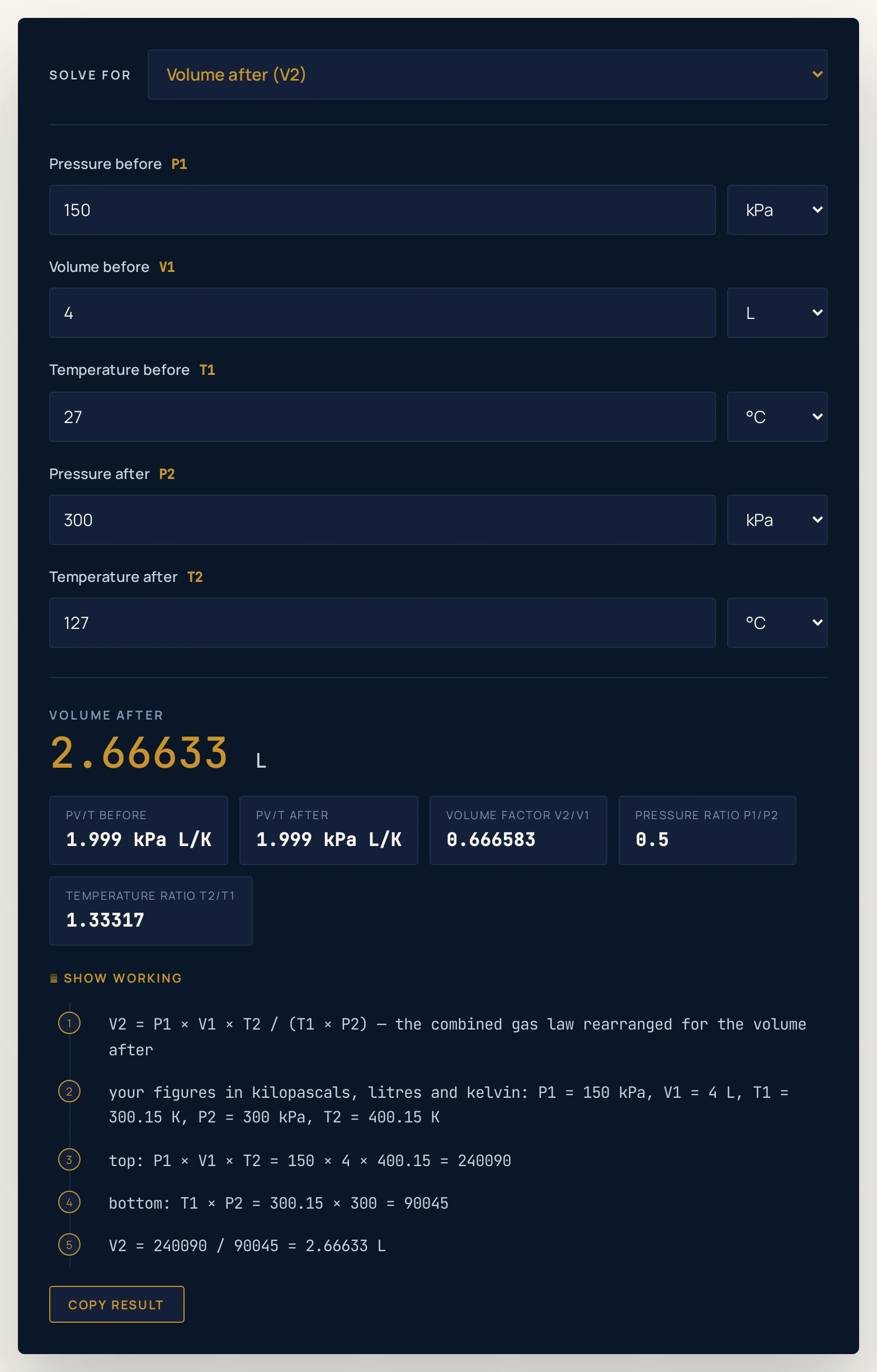
300.15 K and 400.15 K — the conversion that turns an apparent factor of 127 over 27 into the real one of 1.33317. The two Celsius extras drop out here rather than repeating what was typed.Where to go next
For the method in full, with eight worked problems of rising difficulty and the diagrams that go with them, read The Combined Gas Law. Take a single held quantity to the Boyle's law calculator, the Charles's law calculator or the Gay-Lussac's law calculator, a single state to the ideal gas law calculator, a change in the amount of gas to the Avogadro's law calculator, and a mass per unit volume to the gas density calculator. The whole physics lab library is open beside them if you would rather watch the two routes than type them.
Frequently asked questions
What is the combined gas law?
It is the single relation that ties the pressure, volume and temperature of a fixed amount of gas in one state to the same three in another: P1V1/T1 = P2V2/T2. The amount of gas and the gas itself are held; everything else is free to move. It is the ideal gas law with the mole count cancelled out, which is why no gas constant appears in it.
When should I use a single-law calculator instead?
Whenever only one of the three actually changes, because then the single-law page asks you for less and gives you fewer chances to mistype. Hold the temperature and Boyle's law is the right tool; hold the pressure and it is Charles's law; hold the volume and it is Gay-Lussac's law. This page is for the case those three forbid, where pressure and temperature both move.
Why must the temperature be in kelvin?
Because the law divides by the temperature, and a Celsius reading is an offset scale whose zero is not the physical zero. The ratio 150 over 25 is six, but the honest ratio 423.15 over 298.15 is about 1.42, and for a 2 litre sample at constant pressure that is the difference between 12 litres and 2.838504 litres. A 0 Celsius start makes the shortcut divide by zero outright.
Can I type Celsius or Fahrenheit anyway?
Yes, and that is the safest way to use this page. The temperature boxes carry K, Celsius and Fahrenheit menus, and the engine converts whatever you pick to kelvin before it divides. The Show working panel then lists your figures in kelvin, so you can see the conversion that was applied rather than trusting it.
Why did it say the combination has no valid solution?
Something you typed is not a state of a gas, and the tool declines rather than inventing a number. A pressure of zero or less is a perfect vacuum, a volume of zero or less is no gas at all, and a temperature of zero kelvin or below is unreachable. A Celsius entry of -273.15 or colder, or a Fahrenheit entry of -459.67 or colder, is the same refusal seen through a different scale.
What happens at a temperature just above absolute zero?
It answers, because the refusal is at zero and not near zero. Leave the page on its opening state, set the pressure after to 100 kPa and the temperature after to 0.05 K, and the volume after comes back as 0.000333333 L. That is a real arithmetic answer for a state no laboratory can reach, which is a limit of the model rather than of the tool.
Do the two PV/T chips prove the answer is right?
No, and nothing on this page claims they do. The answer was computed from the requirement that they be equal, so their agreeing is the definition restated, not evidence. The genuine check is to run the change in two stages instead, in either order, and see that both stages land where the single step did.
Why do the numbers on screen not always multiply out exactly?
Because every figure printed is rounded and the arithmetic behind it is not. Multiplying two rounded figures together and comparing the product with a third rounded figure can differ in the last digit, which is a fact about decimals rather than about the physics. Your arithmetic is fine; the display is short.
Can I get the answer in atmospheres, or in Celsius?
Yes, but set that menu before you make that quantity the unknown. Each box carries its own unit menu, the menu is hidden while that quantity is being solved for, and the answer is returned in whatever unit the menu was last left on. The unit is always printed beside the number, and reloading the page puts every menu back to kilopascals, litres and kelvin.
Does it work if gas leaks out, or if a reaction happens?
No. The amount of gas is the one thing this law holds fixed, so a leak, a gas dissolving into a liquid or a chemical reaction that makes or consumes molecules all break it. For a change in the amount at a fixed pressure and temperature you want Avogadro's law, and for a single state with the mole count in it you want the ideal gas law.
References & formula source
- Young & Freedman — University Physics with Modern Physics, the chapter on equations of state and the ideal-gas equation.
- Halliday, Resnick & Walker — Fundamentals of Physics, the chapter on the kinetic theory of gases.
- Atkins & de Paula — Atkins' Physical Chemistry, the chapter on the properties of gases.
- Serway & Jewett — Physics for Scientists and Engineers, the gas laws and their worked examples.
- BIPM — The International System of Units (SI brochure): the kelvin and the pascal as SI units, and the standard atmosphere of 101 325 Pa.
- Further reading: Gas laws — Wikipedia